Blog

  • Unlocking the Future: How AI-Powered Digital Marketing is Transforming Small and Medium Businesses

    Unlocking the Future: How AI-Powered Digital Marketing is Transforming Small and Medium Businesses

    Unlocking the Future: How AI-Powered Digital Marketing is Transforming Small and Medium Businesses

    Most small business marketing efforts still rely on guesswork—spending hours on campaigns without clear returns. AI-powered digital marketing is changing that, offering smarter ways to target customers and boost growth. In this post, you’ll learn which AI trends are reshaping digital marketing solutions and how you can use them to sharpen your business growth strategies. For further insights, check this link.

    AI Trends in Digital Marketing

    Artificial intelligence is reshaping the way businesses approach marketing, introducing tools that offer precision and insight. As these tools become more accessible, small businesses stand to gain immensely.

    Key AI-Powered Tools

    Imagine having a digital assistant that knows your customers better than you do. AI tools like chatbots and predictive analytics offer this kind of support. Chatbots provide 24/7 customer service, answering queries without a coffee break. Predictive analytics, on the other hand, helps forecast customer behavior. This means fewer surprises and more strategic planning. According to recent data, 60% of small businesses using these tools report improved customer satisfaction. Want to know more about the impact? Check out this Harvard blog.

    Small Business Marketing Benefits

    The benefits for small businesses are significant. Cost savings, increased efficiency, and enhanced customer engagement are just a few. With AI, marketing campaigns become more targeted, reducing wasted spend on broad strategies. For instance, personalization tools can lead to a 20% increase in sales by tailoring messages to individual preferences. This means better engagement and stronger customer loyalty—a win-win for small businesses.

    Enhancing Campaigns with AI

    Harnessing AI means taking your marketing to the next level, moving from general to specific and reactive to proactive.

    Personalization Strategies

    Picture this: a customer receives an email about a product they were just browsing. It feels almost psychic, but it’s just smart marketing. Personalization is key. By analyzing user data, AI can tailor content, ensuring that each customer feels valued. This approach not only boosts engagement but also builds trust. Most people think personalization is only for big brands, but small businesses can leverage it too. Personalization can increase marketing ROI by up to eight times. Explore more about AI’s potential in SMBs here.

    Automating Routine Tasks

    Let’s face it, repetitive tasks can drain your energy. AI comes to the rescue by automating those mundane jobs. From scheduling social media posts to generating reports, automation frees up your time for creative strategies. Imagine reducing your workload by 20% just by automating emails and social media updates. It’s like having an extra pair of hands working tirelessly. The longer you wait, the more you’re missing out on potential growth.

    Driving Business Growth

    The journey doesn’t end with implementation. It’s about continuous growth and staying ahead of the curve.

    Case Study: Success Story

    Take, for example, a local café that embraced AI-driven marketing. They used customer data to send personalized offers, resulting in a 30% increase in repeat visits. Their story isn’t unique but highlights the power of AI in transforming simple strategies into profitable outcomes. Key insights include:

    • Personalized emails increased customer engagement

    • Automated loyalty programs boosted repeat purchases

    Future-Proof Strategies

    In a world where change is constant, being prepared is crucial. AI offers insights that keep businesses ahead of trends. By monitoring market shifts and customer preferences, you can adapt quickly. This adaptability ensures that your business not only survives but thrives. Check out how technology empowers small businesses here.

    Reach out to Eclipse Digital today! 🚀

    Remember, the key to success in digital marketing is staying informed and adaptable. AI isn’t just a trend; it’s a tool that brings precision and growth opportunities to your doorstep. Embrace it and watch your business soar.

  • Unlocking Success: Best Practices for Creating Accessible Websites that Boost User Experience and SEO

    Unlocking Success: Best Practices for Creating Accessible Websites that Boost User Experience and SEO

    Unlocking Success: Best Practices for Creating Accessible Websites that Boost User Experience and SEO

    Most websites miss a huge opportunity by ignoring accessibility. When your site isn’t easy for everyone to use, you’re not just losing visitors—you’re losing search traffic too. In this post, you’ll learn straightforward best practices for website accessibility that improve user experience and boost SEO, helping your business stand out online with support from Eclipse Digital. Learn more about the connection between SEO and accessibility here.

    Importance of Website Accessibility

    Website accessibility is a game-changer, not just for inclusivity but also for boosting your site’s effectiveness. It can make a world of difference in how users interact with your content and how search engines rank it.

    Boosting User Experience

    A more accessible website means happier visitors. When users can navigate easily, find what they need, and interact without hassle, they are more likely to stay. Imagine a visitor with visual impairments using a screen reader. If your site has clear headings and alternative text for images, they can navigate seamlessly. By making these adjustments, you create a welcoming space for everyone, increasing the likelihood of repeat visits and positive word-of-mouth.

    An example of how accessibility can enhance user experience is through simplified site navigation. Users appreciate when they can easily find your contact page or product listings. This simplification can reduce bounce rates and increase the time spent on your site—key factors in user satisfaction. The benefits of these adjustments are not just felt by users but also by your business’s bottom line.

    Enhancing Search Engine Optimization

    Accessibility is not just a user concern; it’s an SEO opportunity. Search engines favor sites that cater to all users, awarding them with better rankings. When your website is accessible, you’re ticking boxes for both users and search engines. This dual advantage means higher visibility in search results and more organic traffic.

    Think about how search engines work. They read your site much like a screen reader does. So, if your site is optimized for accessibility, it’s likely optimized for search engines too. This includes having descriptive alt text for images, which not only aids users but also helps your site appear in image searches. You can delve deeper into these best practices at Siteimprove.

    Best Practices for Accessible Web Design

    Incorporating accessibility into your web design is both straightforward and rewarding. It enhances the user experience, boosts your SEO, and positions your brand as inclusive and forward-thinking.

    Simplifying Navigation

    Making navigation intuitive is crucial for usability. Visitors should never feel lost on your site. Start by streamlining your menu options. Limit them to the essentials, and use clear, descriptive labels. This not only helps users find what they’re looking for but also improves your site’s search engine ranking.

    Consider using a consistent layout and placing the most important information upfront. For example, your contact information should be easy to find on every page. Using breadcrumb trails can also aid users in understanding their location on your site. A study found that simplifying navigation can increase conversion rates by up to 30%. A user-friendly navigation structure is a win-win for both visitors and search engines.

    Ensuring Text Readability

    Text readability is another cornerstone of accessibility. If users struggle to read your content, they will likely leave your site. Start by choosing a font that is easy to read, like Arial or Verdana, and maintain a font size of at least 16px. Use high-contrast color schemes to ensure text stands out against the background.

    Breaking up text into shorter paragraphs and using bullet points for lists makes your content easier to digest. Remember, a clean and clear page is more inviting. You can find more actionable tips on enhancing readability at UNC’s Web Guide.

    Partnering with Eclipse Digital

    Navigating the path to accessibility can be challenging, but you don’t have to do it alone. Eclipse Digital offers expertise and tailored solutions to make your website shine.

    Tailored Strategies for Your Business

    Every business is unique, which is why Eclipse Digital takes a customized approach. We work with you to understand your goals and challenges, creating strategies that align with your vision. Whether it’s redesigning your site for better accessibility or optimizing it for search engines, our solutions are crafted to meet your specific needs.

    Our agile service model allows us to quickly adapt to changes, ensuring your website remains current and competitive. This flexibility is part of what sets us apart from larger agencies. With Eclipse Digital, you have a partner who is as invested in your success as you are.

    Success Stories and Client Testimonials

    Our track record speaks for itself. From small businesses to larger enterprises, we’ve helped a range of clients improve their online presence. One satisfied client noted, “Working with Eclipse Digital was a game-changer for us. Our website is now accessible and ranks better in search results.”

    Another client shared how their website traffic increased by 50% after implementing our accessibility recommendations. These success stories are a testament to the effectiveness of our methods and the dedication of our team. Learn more about how accessibility impacts SEO and usability from Lyssna.

    🌐✨

    By investing in website accessibility, you’re not just improving user experience and SEO—you’re opening doors to new opportunities and ensuring your business is inclusive and forward-thinking. Eclipse Digital is here to help you every step of the way, turning your website into a tool for growth and success.

  • Why Website Speed is Essential for Google Rankings and User Retention

    Why Website Speed is Essential for Google Rankings and User Retention

    Why Website Speed is Essential for Google Rankings and User Retention

    Your website could be losing visitors before it even fully loads. Slow page load time doesn’t just frustrate users—it drags down your Google rankings and hurts your user retention. In this post, you’ll see why website speed is a crucial part of SEO and how improving it can strengthen your online presence and keep customers coming back. For more insights, check out this article.

    Importance of Website Speed

    Your website’s speed plays a vital role in keeping users engaged and boosting your site’s performance. Let’s explore how this affects your Google rankings and user retention.

    Impact on Google Rankings

    Google uses page speed as a ranking factor, which means a slow website can push you down in search results. A one-second delay can reduce page views by 11%. To improve your Google rankings, focus on speeding things up. The faster your site, the more likely you’ll climb the search engine ladder. Check out this Reddit discussion for more insights.

    Influence on User Retention

    Speed not only affects rankings but also user retention. A slow site frustrates visitors, causing them to leave. If your site loads quickly, users are more likely to stick around and explore. This results in higher retention rates and better user satisfaction. In fact, a 53% chance exists that users will leave if a mobile site takes longer than three seconds to load. Learn more about the connection between speed and retention in this LinkedIn article.

    Enhancing User Experience

    A fast website ensures a smooth browsing experience. Let’s look at how reducing page load time and boosting your online presence can make all the difference.

    Reducing Page Load Time

    Focusing on reducing page load time enhances user satisfaction. Simple tweaks, like optimizing images and using a content delivery network (CDN), can drastically cut down load times. As a result, your visitors will have a smoother experience, leading to increased engagement. Remember, every second counts in keeping users happy and on your site.

    Boosting Online Presence

    A speedy site doesn’t just improve user experience; it boosts your online presence. When your site ranks higher and retains more users, your brand becomes more visible and trustworthy. This increased visibility can lead to more conversions and business growth. Discover more about why speed matters for local search in this article.

    Practical Solutions for Businesses

    Businesses can benefit from practical solutions to enhance website speed. Let’s dive into SEO services and a case study showcasing increased traffic and satisfaction.

    SEO Services for Speed

    Leveraging SEO services can enhance your website speed and improve your rankings. These services often include technical audits, image optimization, and caching solutions to ensure your site is as fast as possible. By focusing on speed, you can improve your search engine performance and user engagement.

    Case Study: Increased Traffic and Satisfaction 🚀

    Consider a business that optimized its website speed, resulting in a 30% increase in traffic and improved user satisfaction. By focusing on faster load times, they saw more visitors and higher conversion rates. This example highlights the powerful impact of prioritizing speed. For more information, check out this article.

    By understanding the importance of website speed, you can take steps to improve your site’s performance, boosting your Google rankings and user retention. Making these changes will enhance your online presence and support your business growth.

  • How Personalized SEO Levels the Playing Field Against Industry Giants

    How Personalized SEO Levels the Playing Field Against Industry Giants

    How Personalized SEO Levels the Playing Field Against Industry Giants

    Small businesses often feel invisible next to industry giants dominating search results. You don’t need a massive budget to compete—you need personalized SEO that targets your unique strengths and audience. This post will show how tailored SEO solutions from Eclipse Digital SEO help you stand out and close the gap with larger brands. For more insights, check out this blog post.

    The Power of Personalized SEO

    Why Small Businesses Need It

    Small businesses often wonder why their efforts don’t yield big results. The answer lies in not just having an online presence, but making it personal. Your unique story deserves to shine, and that’s where personalized SEO comes in. Unlike a one-size-fits-all approach, personalized SEO focuses on what makes your business special. This means honing in on keywords that reflect your values and services, ensuring your audience finds you when it matters most. It’s about standing out in a crowded digital landscape.

    Imagine the impact when your website climbs to the top of search results. More eyes on your business translates to more opportunities. Personalized SEO isn’t just an option; it’s a necessity for small businesses aiming to compete with big brands. This tailored approach ensures every aspect of your digital marketing aligns seamlessly with your goals. When done right, it transforms your online presence into a powerful tool for growth. Ready to see your business thrive?

    Tailored SEO Solutions for Success

    Crafting a successful SEO strategy isn’t about following trends; it’s about setting them. Tailored SEO solutions prioritize your business’s unique needs. Whether it’s targeting local customers or expanding your reach, a personalized plan makes all the difference. By focusing on specific goals, you avoid wasting resources and instead see meaningful results. Consider a local bakery wanting to attract more foot traffic. By optimizing for local search terms like “fresh pastries near me,” they’re more likely to capture potential customers searching nearby.

    Tailored SEO solutions also involve continuous refinement. The digital world is ever-changing, and your strategy should evolve with it. Regular updates and adjustments keep your business relevant and visible. This proactive approach ensures you stay ahead of competitors, regardless of their size or budget. A small investment in personalized SEO pays off in long-term success. So, what’s holding you back from tailoring your strategy today?

    Competing with Large Brands

    Unique SEO Strategies for SMBs

    Standing toe-to-toe with industry giants is no small feat, but small businesses have something powerful on their side: agility. Unique SEO strategies tailored for small-to-medium businesses leverage this advantage. While big brands may have more resources, they lack the flexibility that smaller businesses possess. This flexibility allows for quick adjustments and personalized approaches that resonate with your audience. Consider a neighborhood coffee shop using a blog to highlight community events. This content not only boosts their SEO but also fosters a local connection.

    Incorporating local SEO strategies is another game-changer. By focusing on local search terms and directories, small businesses can capture the attention of nearby customers. This hyper-local focus is something larger brands often overlook. Additionally, engaging with your audience through reviews and social media further enhances your online visibility. It’s about building a community around your brand, something that goes beyond mere transactions. Curious about how these strategies can work for you?

    Eclipse Digital’s Proven Methods

    Eclipse Digital understands that no two businesses are alike. Our proven methods emphasize customization, ensuring each client receives a strategy that works for them. We start by analyzing your current online presence, identifying strengths and areas for improvement. This thorough understanding allows us to create a personalized plan tailored to your goals. Whether it’s boosting your search rankings or increasing web traffic, our methods are designed to deliver results.

    Our success stories speak volumes. From local startups to established enterprises, we’ve helped countless businesses enhance their SEO game. A notable example is a regional retailer who saw a 50% increase in website traffic after implementing our strategies. We focus not only on immediate gains but also on sustainable growth. Our team stays updated on the latest SEO trends, ensuring your strategy remains effective over time. Ready to partner with a team that prioritizes your success?

    Partnering with Eclipse Digital

    Success Stories and Results

    Success often speaks louder than words. At Eclipse Digital, we’ve turned challenges into triumphs for our clients. Take a look at our work with a local restaurant chain. By optimizing their site for mobile users and incorporating local keywords, they saw a 40% rise in bookings. These results are not just numbers; they represent the power of a bespoke approach. Another client, a boutique retailer, experienced a 30% boost in online sales after fine-tuning their product descriptions with strategic keywords.

    Our clients appreciate the transparency and communication we provide throughout the process. We believe in working closely with you to ensure your goals are met and exceeded. Each success story is a testament to the effectiveness of personalized SEO. So, what kind of success are you hoping to achieve?

    Get Started with Effective SEO Today 🚀

    The longer you wait, the more opportunities you miss. Investing in personalized SEO is an investment in your business’s future. Imagine the growth and visibility your business can achieve with a strategy designed just for you. Eclipse Digital is here to make this a reality. Our team of experts is dedicated to helping you succeed.

    Ready to take the first step toward transforming your online presence? Let’s craft a strategy that highlights your strengths and captures your audience’s attention. Your success story begins today. Reach out to us and let’s get started on this journey together.

  • Balancing Website Design Aesthetics with Performance for Better SEO: A Guide for Business Owners

    Balancing Website Design Aesthetics with Performance for Better SEO: A Guide for Business Owners

    Balancing Website Design Aesthetics with Performance for Better SEO: A Guide for Business Owners

    You’ve crafted a stunning website design, but slow load times and clunky performance are driving visitors away. Striking the right balance between eye-catching design and smooth functionality is key to boosting your SEO and online visibility. In this guide, you’ll learn how to create a website that looks great without sacrificing performance—helping your business stand out and rank higher in search results. Learn more here.

    Balancing Design and Performance 🎨⚡

    Finding the sweet spot between design appeal and performance can change how users interact with your site. It’s a crucial aspect that can lead to better SEO results and online growth.

    Prioritizing User Experience

    Your visitors are looking for a seamless journey when they land on your site. If they encounter a slow-loading page or complex navigation, they might leave. Google reports that 53% of mobile users abandon sites that take over three seconds to load. That’s why swift performance is vital.

    To keep users engaged, focus on simplicity. Ensure your website design is intuitive. Use clear menus and concise text. When visitors find what they need quickly, they stay longer. This behavior sends positive signals to search engines, improving your rankings. Remember, a happy visitor often becomes a returning customer.

    Sometimes, we forget that less is more. Cutting down on excessive visuals or plugins can drastically improve load times. These adjustments not only enhance user satisfaction but also boost your website’s performance metrics.

    Design Elements that Boost SEO

    Design elements can either hinder or help your SEO efforts. For example, headers and alt text are gold mines for embedding keywords naturally. These help search engines understand your content better.

    Images are a powerful storytelling tool. But large files can slow your site down. Use compressed images to maintain quality while improving speed. Tools like TinyPNG can help with this. By optimizing visuals, you blend beauty with speed—a winning combo for SEO.

    Consider the mobile experience too. With most users browsing on their phones, responsive design is a non-negotiable. A site that adapts to different screens ensures you don’t lose potential customers. Mobile-friendly sites are also favored in search results, giving you an edge over competitors.

    Enhancing Online Visibility Through SEO 📈

    With a well-balanced design, it’s time to dive into core SEO strategies. These techniques will elevate your business presence and keep you ahead in the digital world.

    Key SEO Strategies for Business Owners

    You might wonder where to start with SEO. Begin with keyword research. It’s like finding the right bait for your fishing trip. Tools like Google Keyword Planner can unveil what your audience is searching for.

    Next, focus on quality content. One study found that longer content, around 1,500 to 2,000 words, tends to rank higher. This doesn’t mean fluffing up your text but providing value-packed insights that answer your visitors’ questions.

    Internal linking is another smart move. It connects pages within your site, helping users discover more content while improving your site’s structure. This strategy can keep people longer on your site, reducing bounce rates.

    Performance Metrics that Matter

    Tracking performance is like having a GPS for your website’s journey. Google Analytics is a free tool that gives you insights into user behavior and site speed. By regularly checking these metrics, you can spot areas for improvement.

    Pay attention to your bounce rate. A high rate might signal that users aren’t finding what they need. Similarly, monitor page speed, as it directly impacts user satisfaction. Aim for a load time under three seconds.

    Also, look at conversion rates. Are visitors taking the actions you want? Whether it’s signing up for a newsletter or purchasing a product, these rates reveal how well your site is converting visitors into customers.

    Partnering with Eclipse Digital for Success 🤝

    Achieving an effective balance between design and performance requires expertise. This is where Eclipse Digital becomes your invaluable ally, offering tailored solutions that fit your specific needs.

    Customized Web Design Solutions

    Eclipse Digital offers custom web design that marries creativity with functionality. Our approach ensures your site is visually appealing and optimized for speed. We understand that each business is unique, so we tailor our services to meet your specific goals.

    Our team works closely with you, crafting a design that reflects your brand while ensuring user-friendly navigation. By focusing on these elements, we enhance both the aesthetic and functionality of your site, making it a powerhouse for attracting and retaining visitors.

    SEO Services to Boost Your Business

    The digital landscape is competitive, but our SEO services give you the edge. We employ strategies that improve your search engine rankings, driving more traffic to your site. Our expertise ensures your content uses the right keywords naturally, boosting your online visibility.

    With Eclipse Digital, your business benefits from a comprehensive suite of digital marketing solutions. We don’t just build websites; we create platforms for growth. Let us guide you to achieve a stronger online presence, ultimately increasing your market reach and business success.

    By focusing on these strategies and solutions, your business can achieve a harmonious balance of design and performance, ultimately leading to improved SEO and greater online visibility.

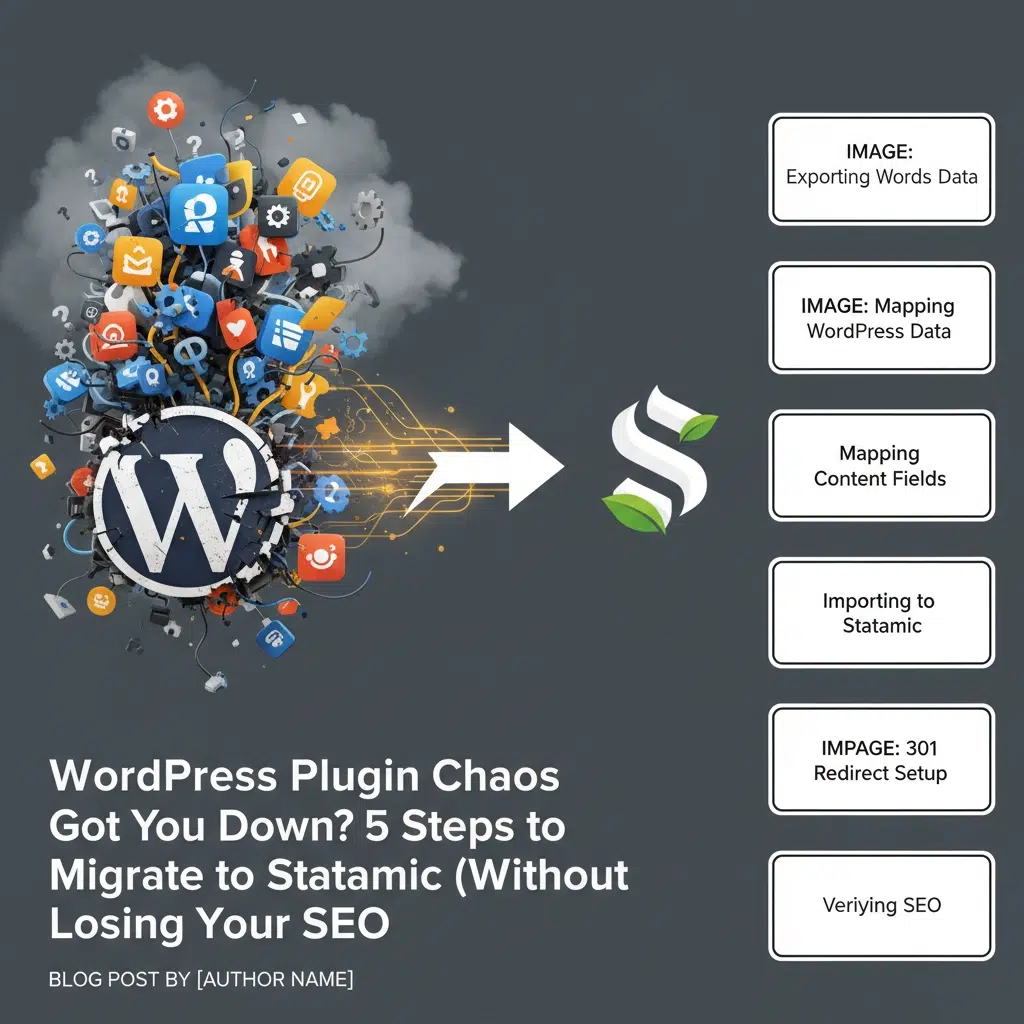
  • WordPress Plugin Chaos Got You Down? 5 Steps to Migrate to Statamic (Without Losing Your SEO)

    WordPress Plugin Chaos Got You Down? 5 Steps to Migrate to Statamic (Without Losing Your SEO)

    Your WordPress site is drowning in plugins. Security plugins conflict with performance plugins. SEO plugins break e-commerce plugins. Cache plugins interfere with form plugins. Sound familiar? You’re not alone, and you don’t have to live with this chaos anymore.

    WordPress plugin dependency has reached a breaking point in 2025. The average WordPress site now runs 25+ plugins, creating a maintenance nightmare that costs businesses thousands in developer hours and lost revenue from site crashes. Meanwhile, Statamic offers a clean, plugin-light alternative that delivers the same functionality without the complexity.

    But here’s the real concern: How do you migrate without destroying years of SEO work?

    The answer lies in a systematic approach that preserves your search rankings while eliminating plugin hell. Here are the exact five steps that Minnesota businesses are using to cut their website maintenance costs by 60% through strategic Statamic migrations.

    Step 1: Audit Your Plugin Ecosystem (The Reality Check)

    Stop adding bandaids to a broken system. Before you can escape WordPress plugin chaos, you need to understand exactly what you’re dealing with.

    Create a comprehensive inventory of every active plugin on your WordPress site. Document what each plugin does, when it was last updated, and whether it conflicts with others. The results will shock you.

    Most WordPress sites we audit at Eclipse Digital contain:

    • 5-8 plugins that duplicate functionality
    • 3-4 abandoned plugins (no updates in 12+ months)
    • 2-3 plugins causing active conflicts
    • 10+ plugins that could be replaced by native Statamic features

    Pay special attention to your SEO-critical plugins: redirect managers, meta tag generators, XML sitemap creators, and structured data plugins. These are your non-negotiables during migration, their functionality must be perfectly replicated in Statamic.

    Pro tip: Screenshot your current plugin dashboard and WordPress admin menus. You’ll reference these later to ensure no functionality gets lost in translation.

    Step 2: Install the WordPress-to-Statamic Bridge

    The migration bridge is your lifeline. Install the WordPress to Statamic Exporter plugin while your WordPress site is still live. This plugin creates a clean data export that Statamic can understand without mangling your content structure.

    Here’s what the exporter handles automatically:

    • Posts and pages with proper formatting
    • Custom post types and taxonomies
    • Featured images and media attachments
    • Author information and publication dates
    • Basic metadata and custom fields

    For sites using Gutenberg blocks (most WordPress sites in 2025), you’ll also need the wp-rest-blocks plugin. This exposes your block data through the REST API, allowing Statamic to recreate your content structure using Bard fields instead of flattening everything into basic HTML.

    Critical warning: Don’t skip the backup step. Export your entire WordPress database and file system before installing any migration plugins. Murphy’s Law applies double to website migrations.

    Step 3: Map WordPress Functionality to Statamic Features

    This is where the magic happens. Statamic eliminates 70% of typical WordPress plugins by building functionality directly into the core system.

    Here’s the translation guide:

    SEO plugins → Native Statamic SEO

    • Yoast/RankMath becomes built-in meta tags and Open Graph support
    • XML sitemaps generate automatically
    • Structured data configures through blueprints

    Form plugins → Native Forms

    • Contact Form 7 becomes Statamic Forms
    • Form validation and spam protection included
    • Email notifications configure without plugins

    E-commerce plugins → Statamic Commerce

    • WooCommerce functionality migrates to native commerce features
    • No third-party plugin dependencies
    • Integrated inventory and payment processing

    Security plugins → Server-level security

    • Most WordPress security plugins become unnecessary
    • Statamic’s flat-file architecture eliminates SQL injection risks
    • Static caching provides natural DDoS protection

    Performance plugins → Native performance

    • Caching plugins become redundant with Statamic’s static generation
    • Image optimization integrates natively
    • CDN integration configures without plugins

    Step 4: Execute the Content Migration (Without Breaking SEO)

    Your SEO rankings are precious cargo. Handle them with surgical precision during the migration process.

    URL structure preservation is non-negotiable. Map every WordPress URL to its Statamic equivalent:

    • Blog posts: /blog/post-name/ → /blog/post-name/
    • Pages: /page-name/ → /page-name/
    • Custom post types: /portfolio/project-name/ → /portfolio/project-name/

    Redirect management requires special attention. WordPress sites often accumulate hundreds of redirects across multiple plugins and .htaccess files. Document every redirect that still receives traffic or has SEO value. Eliminate redirect chains and outdated entries, this migration is your chance to clean house.

    Import your content using Statamic’s CLI tools:

    1. Run the WordPress exporter to generate JSON files
    2. Import content using php please import:wordpress
    3. Verify content structure in Statamic’s control panel
    4. Test all URLs in a staging environment

    Meta data preservation is critical. Ensure every page maintains its:

    • Page titles and meta descriptions
    • Open Graph and Twitter Card tags
    • Structured data markup
    • Canonical URLs
    • Alt tags for images

    Step 5: Launch and Monitor (The SEO Safety Net)

    Going live is just the beginning. Your post-migration monitoring determines whether you keep your search rankings or watch them disappear.

    Pre-launch checklist:

    • All URLs resolve correctly (no 404 errors)
    • Redirects function properly (use tools like Screaming Frog)
    • XML sitemap generates automatically
    • Page speed improves (it should: Statamic is faster)
    • Contact forms submit successfully
    • Analytics and tracking codes transfer correctly

    Post-launch monitoring (first 30 days):

    • Monitor Google Search Console for crawl errors daily
    • Track organic traffic and ranking changes weekly
    • Test site functionality across devices and browsers
    • Update DNS settings for optimal performance

    Pro tip: Submit your updated sitemap to Google Search Console immediately after launch. This signals search engines to re-crawl your site with the new structure.

    The Hidden Benefits You’ll Discover

    Beyond eliminating plugin chaos, Statamic migrations deliver unexpected advantages:

    Development velocity increases 300%. No more compatibility testing between 25 different plugins. Changes deploy faster without plugin conflicts.

    Security incidents drop to near-zero. Flat-file architecture eliminates the database vulnerabilities that plague WordPress sites.

    Hosting costs decrease significantly. Static site generation reduces server resource requirements. Many clients save $200+ monthly on hosting.

    Update anxiety disappears. No more plugin update notifications causing panic about site crashes.

    image_4

    Common Migration Pitfalls (And How to Avoid Them)

    Don’t let these mistakes destroy your SEO:

    Pitfall #1: Changing URL structure during migration
    Solution: Maintain identical URL patterns, even if Statamic’s defaults differ

    Pitfall #2: Forgetting about WordPress widgets and sidebars
    Solution: Recreate sidebar content using Statamic’s partial templates

    Pitfall #3: Overlooking WordPress shortcodes in content
    Solution: Use find-and-replace to convert shortcodes to proper HTML/Markdown

    Pitfall #4: Ignoring WordPress comments and user accounts
    Solution: Export comments separately or implement alternative engagement methods

    Is Statamic Migration Right for Your Business?

    Three scenarios where Statamic migration makes perfect sense:

    1. Plugin fatigue is killing productivity. If you spend more time managing plugins than creating content, migration pays for itself immediately.
    2. Security incidents are increasing. WordPress vulnerabilities typically stem from plugin security holes. Statamic eliminates most attack vectors.
    3. Site performance directly impacts revenue. E-commerce and service businesses benefit enormously from Statamic’s speed advantages.

    Migration isn’t right if: Your WordPress site relies heavily on specific plugins with no Statamic equivalent, or your content team is deeply invested in WordPress workflows.

    Your Plugin-Free Future Starts Now

    WordPress plugin chaos doesn’t have to be your reality. Statamic offers a cleaner, faster, more secure alternative that preserves your SEO investments while eliminating maintenance headaches.

    The businesses making this transition now are positioning themselves for the next decade of web performance standards. Page speed, security, and maintainability aren’t optional anymore: they’re competitive advantages.

    Ready to escape WordPress plugin hell without sacrificing your search rankings? Eclipse Digital specializes in SEO-safe WordPress to Statamic migrations for Minnesota businesses. Our systematic approach has helped dozens of companies reduce maintenance costs while improving site performance.

    Contact Eclipse Digital today for a free migration assessment. Let’s discuss how Statamic can solve your WordPress plugin chaos while protecting the SEO value you’ve worked years to build.


  • Boost Your Elementor Editing Speed: Increasing WordPress Memory Limit Made Easy

    Boost Your Elementor Editing Speed: Increasing WordPress Memory Limit Made Easy

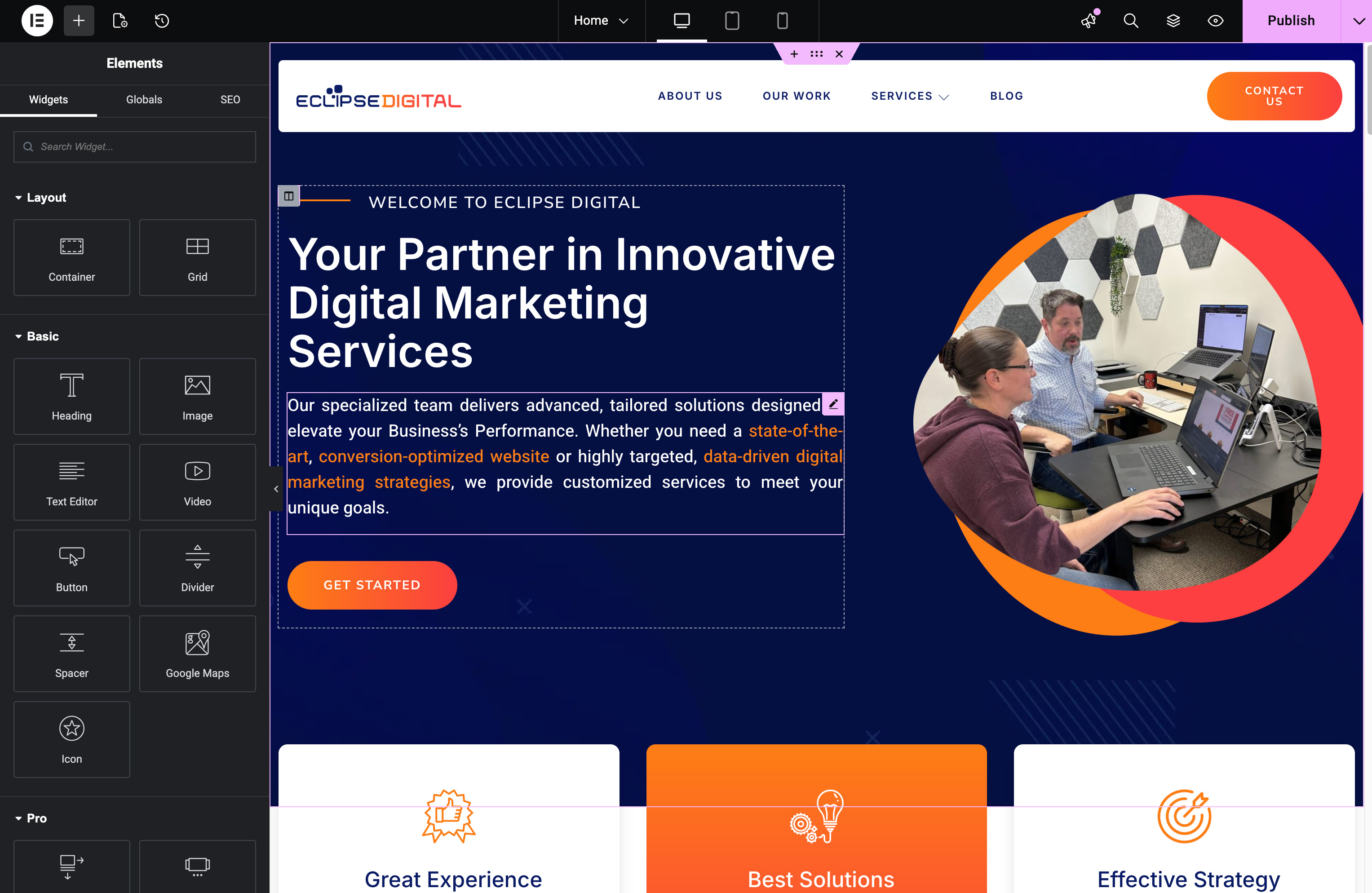
    Elementor dragging its feet while you try to design your site? Slow editor speed often ties back to one hidden culprit: your WordPress memory limit. When memory runs low, every click feels like a wait. In this post, you’ll learn how to increase memory limit settings to boost Elementor speed and improve your WordPress performance—so editing feels smooth and your website optimization efforts pay off. Check out this guide on how to increase WordPress memory limit.

    Understanding WordPress Memory Limit

    WordPress memory is like your site’s fuel—it powers processes and handles tasks. Without enough, your site might stall, especially when using plugins like Elementor.

    Importance of Memory Limit

    Think of memory limit as your website’s capacity to handle tasks simultaneously. If your WordPress site has a low memory limit, it can struggle to manage multiple operations, especially with design-heavy tools like Elementor. Increasing this limit ensures that your site can handle more processes without compromising speed or functionality. This is crucial for maintaining a smooth user experience. Many WordPress users have found that a memory limit increase significantly enhances site performance, as highlighted in this Reddit discussion.

    Impact on Elementor Speed

    Elementor is a powerful design tool, but it demands resources. A low memory limit can cause slowdowns, making edits sluggish and frustrating. By boosting your WordPress memory, you empower Elementor to run more efficiently, allowing you to design with ease. This not only speeds up the editing process but also ensures that your design changes are reflected promptly on your site. For more insights, explore this Essential Addons guide.

    Steps to Increase Memory Limit

    Now, let’s dive into the practical steps you can take to boost your WordPress memory limit, ensuring a faster Elementor experience.

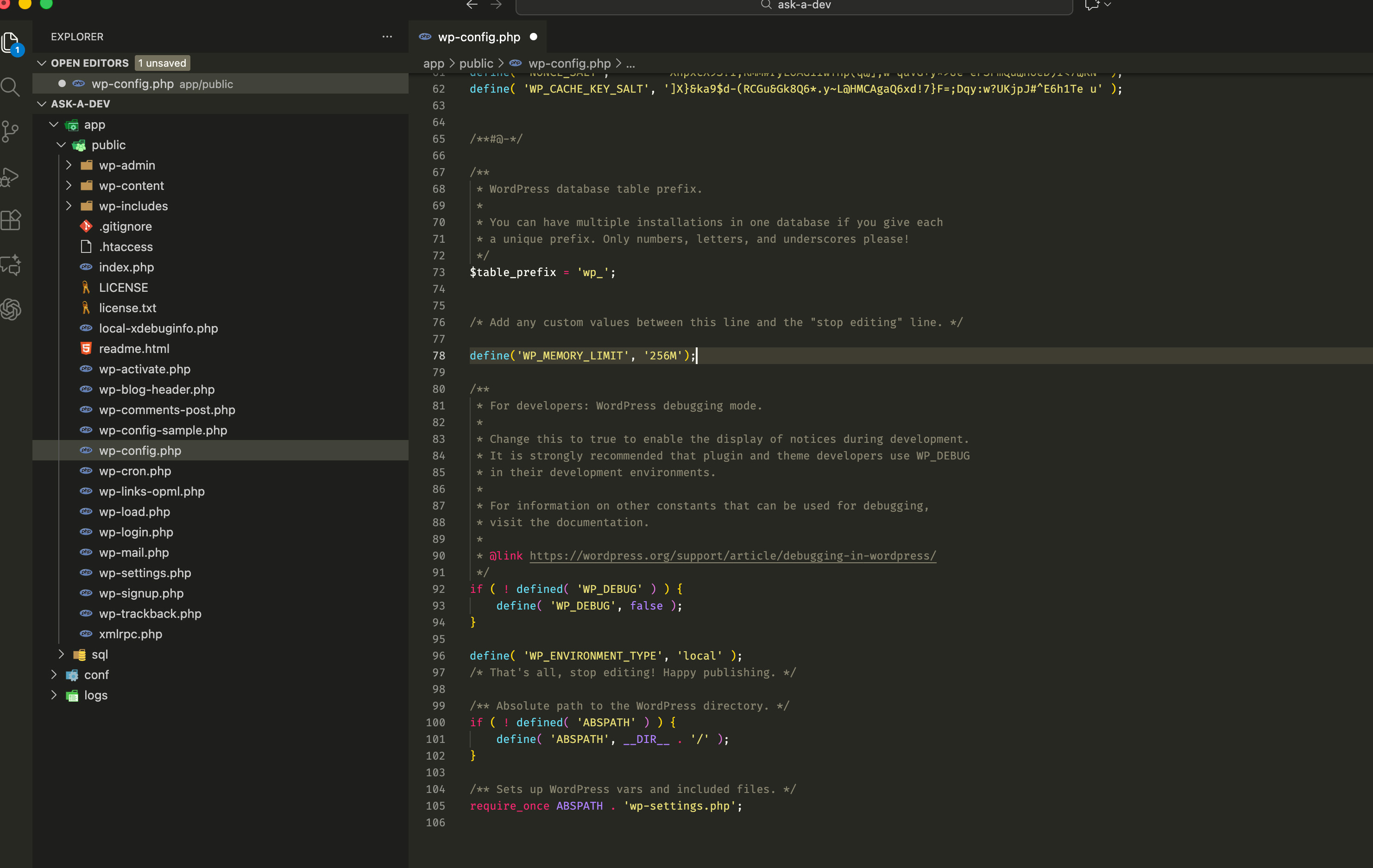
    Accessing wp-config.php File

    The wp-config.php file is your gateway to increasing memory. It’s located in your WordPress root directory. Using an FTP client or your hosting provider’s file manager, navigate to this file. Always back up your site before making changes to avoid any mishaps. Once you’re in, you’ll see lines of code—don’t worry, you won’t need to change much. The key is to find the right spot to add a simple line that will elevate your site’s performance.

    Modifying the Memory Limit Code

    In the wp-config.php file, look for the line that says “That’s all, stop editing.” Right before this, add the following: define(‘WP_MEMORY_LIMIT’, ‘256M’);. This line sets your WordPress memory to 256MB. Save the file and refresh your site to see the improvement. For some, 256MB might be enough, but if you still notice slow speeds, consider increasing it further. Always ensure your hosting plan supports the higher memory limit to avoid conflicts.

    Benefits of Enhanced Performance

    By increasing your WordPress memory limit, you’re setting your site up for success with Elementor and beyond.

    Smoother Elementor Design Experience

    With a boosted memory limit, your Elementor design sessions will feel more fluid. No more waiting for changes to apply or wrestling with lag. This improvement allows you to focus on creativity and design, rather than technical hiccups. Most people think they need a new hosting plan for better performance, but sometimes a simple memory tweak does the trick.

    Improved WordPress Performance 🚀

    Beyond Elementor, your entire WordPress site benefits from a higher memory limit. Faster load times and more efficient operations mean a better experience for your visitors. The longer you wait to address memory issues, the more visitors you might lose due to slow performance. By taking action now, you’re investing in your site’s future success. For more details on optimizing performance, check out this Crocoblock article.

    In summary, increasing your WordPress memory limit is a crucial step toward optimizing your site for speed and efficiency. It’s a straightforward process that can significantly enhance your Elementor experience and overall WordPress performance.

  • Breaking Down Agile Marketing: What It Means for Your Business

    Breaking Down Agile Marketing: What It Means for Your Business

    Breaking Down Agile Marketing: What It Means for Your Business

    Most marketing plans fall flat because they can’t keep up with change. If your business feels stuck chasing trends instead of setting them, it’s time to rethink your approach. Agile marketing offers a flexible way to boost your online presence and business growth—and Eclipse Digital knows exactly how to make that shift work for you. For more insights, check out this resource.

    Understanding Agile Marketing

    If you’re tired of stagnant marketing tactics, agile marketing could be your answer. Let’s dive into the basics and see how it can benefit your business.

    Key Principles and Benefits

    At its core, agile marketing is all about flexibility and rapid response. Unlike traditional methods, it allows your team to adapt quickly to market changes. This approach leads to faster results and a more responsive strategy. Imagine cutting your campaign launch time in half—that’s the power of agile.

    Agile marketing operates on short cycles, often called sprints. These cycles make it easier to test new ideas and see what works. For example, a company might run a two-week social media campaign to gauge interest before rolling out a larger initiative. This kind of testing allows for quick pivots if needed.

    The benefits are clear: agile marketing can increase your team’s productivity by up to 25%. Plus, it helps keep your strategy aligned with current trends. This means your marketing isn’t just reactive—it’s proactive. Curious about how this works in practice? Check out this article for more insights.

    How Agile Differs From Traditional

    Traditional marketing often feels like steering a huge ship—it takes time to change direction. Agile marketing, in contrast, is more like a speedboat. It’s nimble and quick to adjust course, keeping you ahead of the curve.

    While traditional methods rely on long-term plans, agile focuses on short-term goals. This shift allows for immediate feedback and improvement. For instance, if a digital ad isn’t performing well, you can change it on the fly instead of waiting months to see lackluster results.

    Another key difference is the focus on collaboration. Agile marketing encourages teams to work closely together, fostering creativity and innovation. This approach often leads to more engaging and effective campaigns. Most people assume big results require big plans, but agile proves that small, iterative steps can lead to significant success.

    Implementing Agile Marketing Strategies

    Now that you understand what agile marketing is, you’re probably wondering how to apply it. Let’s explore the steps to implement these strategies effectively.

    Steps to Get Started

    Ready to make the shift? Start by assembling a dedicated team. This group will focus solely on agile marketing initiatives. Next, outline your goals. What do you hope to achieve with your new strategy? Clear objectives will guide your efforts and keep your team motivated.

    1. Set up sprints: Plan short, focused work periods. This allows your team to tackle tasks efficiently.

    2. Embrace collaboration: Encourage open communication among team members. Regular meetings ensure everyone is on the same page.

    3. Use data wisely: Track performance metrics to see what’s working. This will help you make informed decisions and refine your approach.

    Finally, remember that agile is all about learning and adapting. Don’t be afraid to experiment. Maybe try a new social media platform or tweak your email marketing. The goal is to find what resonates with your audience and run with it. For more tips, visit this guide.

    Common Challenges and Solutions

    Transitioning to agile marketing isn’t without its hurdles. One common challenge is getting buy-in from your team. Some may resist change, preferring the comfort of established methods. To overcome this, highlight the tangible benefits of agile, like improved efficiency and faster results.

    Another issue is managing workloads. Agile requires careful planning to ensure tasks are completed on time. To solve this, use project management tools to keep everyone organized. These tools can help allocate resources and track progress, preventing burnout and missed deadlines.

    Lastly, measuring success can be tricky in the beginning. Agile marketing focuses on continuous improvement, which means goals may shift. Establish clear KPIs (Key Performance Indicators) to evaluate your progress. Over time, you’ll see how agile can transform your marketing efforts and drive business growth.

    Partnering with Eclipse Digital

    Implementing agile marketing can seem daunting, but you don’t have to do it alone. Eclipse Digital is here to help you make the transition smoothly.

    Why Choose Eclipse Digital

    Eclipse Digital is not just another agency; we’re your partners in marketing excellence. With expertise in both SEO and web design, we offer a comprehensive suite of services tailored to your needs. Our personalized approach ensures we understand your unique challenges and goals.

    We specialize in creating agile strategies that drive results. By focusing on flexibility and responsiveness, we help you stay ahead of the competition. Our proven track record speaks for itself, with countless satisfied clients attesting to our success.

    Choosing Eclipse Digital means gaining a team of dedicated professionals committed to your growth. You’re not just hiring a service; you’re gaining a partner invested in your success. Learn more about our philosophy here.

    Success Stories and Testimonials

    Our clients’ successes are our proudest achievements. Take, for instance, a local e-commerce business struggling with stagnant sales. After partnering with Eclipse Digital, they adopted agile marketing strategies. Within months, their sales increased by 40%. This transformation was possible due to targeted campaigns and rapid adjustments based on real-time data.

    Another client, a service-based company, saw their website traffic double after implementing our SEO strategies. Their newfound visibility in local search results led to a surge in inquiries and new clients.

    These stories are just a glimpse of how Eclipse Digital can impact your business. Our clients trust us to deliver results, and we take that responsibility seriously. If you’re ready to elevate your marketing efforts, Eclipse Digital is here to guide you every step of the way.

    🌟✨

    By embracing agile marketing, you open the door to a more responsive and effective strategy. And with Eclipse Digital by your side, you’ll have the support and expertise needed to succeed. Let’s transform your marketing approach and achieve the growth you’ve been aiming for.

  • Is It Time for a Website Makeover? Signs Your Site Needs an Upgrade

    Is It Time for a Website Makeover? Signs Your Site Needs an Upgrade

    Is It Time for a Website Makeover? Signs Your Site Needs an Upgrade

    Your website isn’t just a digital billboard—it’s where your business earns trust and drives sales. If your site feels slow, outdated, or buried in search results, those issues are costing you customers. Spotting the signs your website needs an upgrade can save you from falling behind and help you connect better with your audience. Let’s break down the key signals that tell you it’s time for a website upgrade—and how smart web design can boost your user experience and site performance. For more insights, check out this guide.

    Signs You Need a Website Upgrade

    When your website isn’t performing, it’s not just a technical issue—it’s a barrier to your business growth. Let’s explore some telltale signs that it’s time for a refresh.

    Outdated Design Elements

    First impressions matter. If your website looks like something from the early 2000s, you might be turning away potential customers. An outdated design doesn’t just affect aesthetics; it can also impact user trust. People expect modern, clean, and intuitive interfaces. If your site feels cluttered or visually unappealing, it’s time to update. A well-designed site reflects your professionalism and keeps users engaged.

    Imagine visiting a store with faded signage and cluttered aisles. You’d likely leave quickly, right? The same goes for websites. Clean lines, cohesive color schemes, and responsive layouts are key. Your site should guide visitors effortlessly to the information they need. If your design isn’t pulling its weight, consider a makeover.

    Slow Site Performance

    It’s no secret that slow websites frustrate users. If your pages take more than a few seconds to load, you’re likely losing visitors. Speed is crucial. People expect instant access to information. A sluggish site can lead to high bounce rates and lost sales. One second of delay can reduce conversions by 7%. That’s a significant loss over time.

    To check your site’s speed, use online tools like Google PageSpeed Insights. If your site lags, it might be time to streamline code, optimize images, or even switch hosting providers. A faster site isn’t just better for users; it can boost your search engine ranking too. In a fast-paced world, speed is a competitive advantage.

    Poor Mobile Responsiveness

    With more people browsing on their phones, a mobile-friendly website is essential. If your site doesn’t adapt to different screen sizes, you’re missing out on traffic. Picture this: you visit a site on your phone, and text overlaps or images don’t load properly. Frustrating, right? That’s how users feel with non-responsive sites.

    A responsive design ensures your site works smoothly across devices. Test your site on various screens. If navigation is tricky or content doesn’t fit, it’s time for a redesign. Mobile users expect easy interaction—if they don’t get it, they’ll move on to a competitor. Ensuring mobile compatibility can widen your reach and enhance user satisfaction.

    Enhancing User Experience

    A great website isn’t just about looks—it’s about how users feel when they navigate it. Improving the user journey can significantly impact engagement and conversion rates.

    Simplifying Navigation

    Imagine walking into a maze when all you want is a straightforward hallway. Complex website navigation can feel just like that. Clear, intuitive menus help users find what they’re looking for without hassle. Use descriptive labels and logical structures. A simple, well-organized navigation bar can reduce the time users spend searching for information, making their visit more pleasant.

    To simplify, start by listing your main pages and grouping related content. Use dropdowns sparingly and test your navigation with real users. If they’re getting lost, it’s time to simplify. Happy users are likely to stay longer and explore more.

    Improving Visual Appeal

    Looks aren’t everything, but they sure help. An appealing website encourages users to stay longer and explore. Bright colors, high-quality images, and a harmonious layout can make a huge difference. Use visuals to guide attention to key areas like calls to action or special offers.

    Your website is an extension of your brand. Ensure that colors, fonts, and imagery align with your brand identity. Consistency builds trust and familiarity. If your site feels visually disjointed, it might be time to refresh its look.

    Boosting Your Online Presence

    Your website is the cornerstone of your digital presence. Optimizing it can set your business apart in a crowded market.

    SEO Best Practices

    A beautiful site means little if no one visits it. Search engine optimization (SEO) helps your site rank higher in search results. This means more visibility and traffic. Use relevant keywords naturally throughout your content. Optimize meta tags and ensure your site is mobile-friendly—search engines love that.

    Quality content is key. Create informative, engaging articles or blog posts that answer user questions. Link to reputable external sources, like this article, to boost credibility. Regular updates keep your site fresh and relevant. SEO isn’t a one-time task—it’s an ongoing process that pays dividends over time.

    Engaging Content Strategy

    Content is king, but engagement is queen. Crafting a strategy that keeps users coming back can boost your site’s success. From blog posts to videos, offer diverse content that appeals to your audience’s interests. Use storytelling to connect on an emotional level, and encourage interaction through comments or shares.

    Here’s the key insight: focus on your audience’s needs and pain points. Provide solutions, showcase expertise, and build a community. Engaged users are more likely to become loyal customers. Consistent, valuable content strengthens your relationship with your audience.

    Transforming your website isn’t just about keeping up with trends—it’s about staying ahead of the curve. A well-designed, fast, and engaging site can boost your presence and drive business growth. The longer you wait, the more opportunities you might miss. So, take the leap today and see the difference a fresh website can make. 🌟📈✨

    For more on why a website upgrade is essential, check out this article.

  • Unlock Agile Marketing: Strategies to Adapt and Win in Today’s Market

    Unlock Agile Marketing: Strategies to Adapt and Win in Today’s Market

    Unlock Agile Marketing: Strategies to Adapt and Win in Today’s Market

    You’ve tried digital marketing plans that looked good on paper but failed when the market shifted. Staying ahead means more than one-size-fits-all tactics—it demands agile marketing that adapts fast and keeps your business visible. In this post, you’ll find clear strategies from Eclipse Digital to sharpen your SEO, custom web design, and flexible marketing solutions so you can respond quickly and win in today’s market. For more insights, check out this resource on agile marketing strategies.

    Understanding Agile Marketing

    Agile marketing is like a secret weapon in a marketer’s toolkit. It ensures your strategies evolve with the marketplace. But what exactly does this mean?

    What is Agile Marketing?

    Imagine a marketing approach that changes as quickly as market trends. That’s agile marketing. This method shifts focus from the traditional long-term planning to short-term adaptability. Agile marketing consists of small, iterative campaigns that respond quickly to changes in consumer behavior. It’s like having a GPS that reroutes when there’s traffic, ensuring you always reach your goal efficiently. Learn more about its foundations here.

    Key Benefits for Businesses

    Why choose agile marketing? For starters, it keeps you ahead. When you can pivot quickly, you outpace competitors stuck in outdated strategies. Another benefit is increased collaboration. Agile marketing fosters teamwork, leading to creative solutions. Lastly, it boosts efficiency. By focusing on what’s working, you save time and resources. Businesses like Eclipse Digital use these principles to deliver tailored solutions with proven results.

    Building an Agile Strategy

    Crafting an agile strategy might seem daunting, but it’s simpler than you think. Here’s how you can shape your marketing to be as nimble as possible.

    Adapting to Market Changes

    Adapting swiftly can feel like trying to hit a moving target. But with agile marketing, you’re always ready to aim. Start by conducting regular market analysis. This helps you spot trends before they become mainstream. Next, prioritize customer feedback. Their insights are gold, guiding where your strategy should head next. Finally, keep your team flexible. Encourage open communication and quick decision-making.

    Creating Flexible Marketing Solutions

    Flexibility is the backbone of agile marketing. To achieve it, build versatile campaigns that can be adjusted on the fly. Use data analytics to monitor performance and make informed changes. Testing different strategies helps you find what resonates best with your audience. Remember, it’s not about drastic overhauls but subtle tweaks. Eclipse Digital has mastered this art, delivering personalized solutions that respond to market demands.

    Enhancing Online Presence

    Now, let’s dive into boosting your online presence. With agile marketing, you can effectively engage your audience and stand out in digital spaces.

    Effective SEO Techniques

    SEO is crucial, but it’s not a one-and-done task. Think of it as gardening. Regular updates to keywords, content, and backlinks nurture growth. Keep an eye on SEO trends and algorithm updates to stay relevant. Also, explore local SEO to connect with nearby audiences. Eclipse Digital excels in this realm, offering strategies that elevate rankings and visibility. Dive deeper into SEO essentials on this blog.

    Custom Web Design Solutions 🚀

    Your website is your digital storefront. It needs to be inviting and functional. Start with a design that reflects your brand’s personality. Ensure it’s mobile-friendly and easy to navigate. Incorporate engaging content that holds attention and prompts action. Regularly update your design to match changing consumer preferences. Eclipse Digital’s custom web design services ensure a blend of creativity and functionality, helping your brand leave a lasting impression. For more insights, explore agile marketing strategies.

    With these strategies, your business is not just another player but a leader in the digital world. Embrace agile marketing to adapt and thrive, no matter how the market shifts.