Blog

  • AI-Powered Local SEO: 7 Ways Service Businesses Are Crushing Competition in 2025

    AI-Powered Local SEO: 7 Ways Service Businesses Are Crushing Competition in 2025

    The local SEO landscape has been completely transformed in 2025. Service businesses that cling to outdated optimization tactics are watching their competitors dominate search results while they fade into obscurity. The game-changer? Artificial intelligence has revolutionized how smart businesses approach local search: and the results are staggering.

    Companies leveraging AI-powered local SEO strategies are reporting 150% ROI increases and conversion rates jumping to 31%. Meanwhile, businesses stuck in the old playbook are losing ground fast. The gap between AI-adopters and traditional approaches isn't just widening: it's becoming insurmountable.

    Here are the seven AI-powered strategies that are separating winners from losers in local search competition.

    1. AI-Enhanced Keyword Research That Actually Works

    Traditional keyword research is dead. Guessing what your customers search for based on intuition or basic tools leaves money on the table. AI-powered platforms like SEMrush, SurferSEO, and MarketMuse now analyze massive datasets to reveal exactly what local customers are searching for: and more importantly, what your competitors are missing.

    image_1

    These AI tools don't just find keywords; they scan competitor content to identify performance gaps and differentiation opportunities. Instead of competing for oversaturated terms, AI reveals untapped local search phrases with high intent and low competition.

    Service businesses using AI keyword research are discovering hyper-specific local queries their competitors never considered. While your competition fights over "plumber near me," AI helps you dominate searches like "emergency pipe repair downtown Minneapolis Sunday evening."

    The technology processes search pattern data in real-time, adapting recommendations as local search behavior shifts. This means your keyword strategy evolves continuously instead of becoming stale after three months.

    2. Real-Time Strategy Adaptation That Never Sleeps

    Static SEO strategies are a relic of the past. In 2025, machine learning algorithms track ranking signals 24/7 and automatically adjust optimization tactics based on performance data. This isn't theory: it's happening right now.

    AI systems monitor your local search rankings, competitor movements, and algorithm updates simultaneously. When Google tweaks its local ranking factors (which happens constantly), AI-powered tools immediately recalibrate your strategy without human intervention.

    This real-time adaptation means service businesses never fall behind due to delayed responses to ranking changes. While competitors scramble to understand why their rankings dropped, AI-powered businesses maintain visibility through continuous optimization.

    3. Google Business Profile Automation That Dominates

    Your Google Business Profile is the foundation of local SEO success. But manually managing profile optimization, posts, and customer interactions is time-consuming and inconsistent. AI has solved this problem completely.

    Automated AI systems now handle profile updates, suggest strategic improvements, and manage customer engagement without missing a beat. These tools ensure your business information stays accurate, posts remain fresh, and profile elements align with Google's ranking preferences.
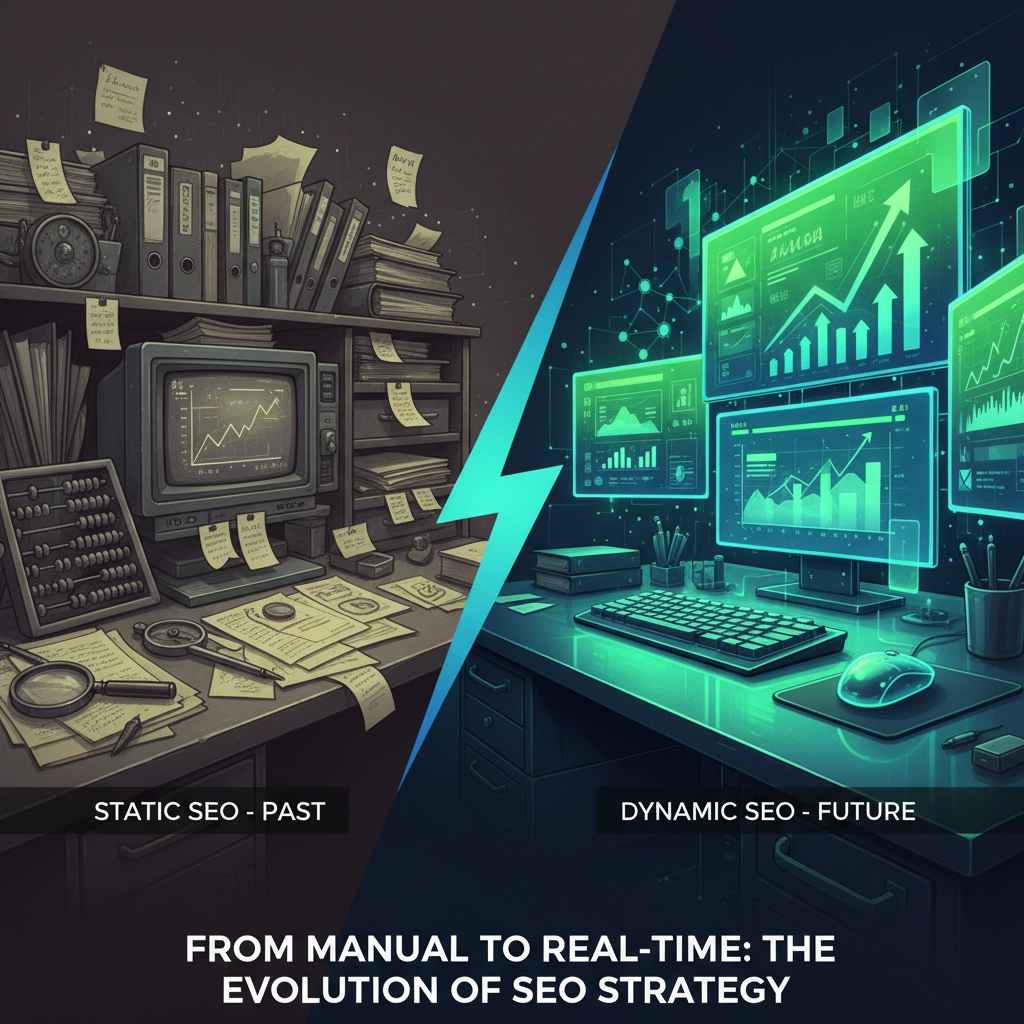
    image_2

    The results are undeniable. Service businesses using AI-powered Google Business Profile management see higher visibility in local map results and increased customer interactions. The technology maintains profile activity levels that Google rewards while freeing up your time for actual business operations.

    AI also optimizes posting schedules, selects the most engaging content formats, and responds to customer questions using natural language processing that feels genuinely human.

    4. Sentiment Analysis That Transforms Reviews into Revenue

    Here's a shocking statistic: 98% of people read online reviews for local businesses. But most service companies only track star ratings and review counts: completely missing the goldmine of customer intelligence hidden in review content.

    AI-driven sentiment analysis goes deeper than surface metrics. This technology analyzes the emotional context behind customer reviews, identifying specific pain points, satisfaction drivers, and competitive advantages buried in review text.

    Instead of just knowing you have 4.2 stars, AI reveals that customers consistently praise your response time but criticize your pricing transparency. Armed with this intelligence, you can address specific issues and amplify positive experiences strategically.

    Service businesses using review sentiment analysis are making data-driven improvements that directly impact customer satisfaction and local search rankings. Reviews become a competitive intelligence tool instead of just a vanity metric.

    5. Voice Search Optimization for the AI Era

    Voice search through Siri, Alexa, and Google Assistant has fundamentally changed how customers find local services. People don't type "pizza delivery" anymore: they ask "Where can I get the best pizza delivered in Brooklyn tonight?"

    image_3

    AI helps service businesses optimize for these conversational queries by understanding natural language patterns and search intent. The technology identifies how people actually speak when searching for your services, not how they type.

    This shift is critical because voice search results often provide only one recommendation. Being the AI's top choice for local queries means dominating an entire category of customer searches. Service businesses optimizing for voice search are capturing customers their competitors never even reach.

    AI also helps structure content in formats that voice assistants can easily interpret and present to users, positioning your business as the authoritative answer for local service queries.

    6. Generative Engine Optimization for AI Search Results

    The emergence of AI-powered search responses has created an entirely new optimization category: Generative Engine Optimization (GEO). This is beyond traditional SEO: it's optimization specifically for AI-generated search results and recommendations.

    When potential customers ask AI assistants about local services, the AI generates responses based on available data about businesses in the area. Service companies using GEO strategies ensure their information appears prominently in these AI-generated recommendations.

    This involves structuring website content, business information, and online presence in formats that AI systems can easily interpret and present. Businesses mastering GEO are appearing in AI search summaries while competitors remain invisible.

    The competitive advantage is enormous because most service businesses haven't even heard of GEO, let alone implemented strategies for it.

    7. Hyper-Local Intelligence That Crushes Competition

    AI enables micro-local targeting that would be impossible through manual analysis. The technology identifies specific neighborhoods, service areas, and local opportunities based on search pattern data and competitor gaps.

    Instead of competing citywide, AI helps service businesses dominate specific geographic micro-markets. This could mean owning all plumbing searches in a particular zip code or becoming the go-to electrical service for specific neighborhoods.

    image_4

    AI tools provide continuous competitor monitoring at the local level, revealing when competitors enter or exit markets, change pricing strategies, or modify service offerings. This intelligence enables strategic positioning that keeps you ahead of competitive threats.

    The technology also identifies seasonal patterns, local events, and community trends that create temporary service demand spikes. Service businesses using this intelligence can adjust their local SEO strategies to capture these opportunities automatically.

    The Competitive Reality Check

    Service businesses not embracing AI-powered local SEO strategies are falling behind irreversibly. The technology gap between AI-adopters and traditional approaches grows wider every month.

    Companies still manually managing keyword research, profile optimization, and competitor analysis are operating with 19th-century tools in a 21st-century marketplace. Meanwhile, AI-powered competitors are capturing more customers, generating higher revenues, and building stronger market positions.

    The choice is stark: evolve with AI-powered local SEO or watch competitors dominate your market while your business becomes increasingly invisible to local customers.

    Don't let outdated strategies cost you customers. The service businesses thriving in 2025 all have one thing in common: they've embraced AI-powered local SEO to dominate their competition. The technology exists, the strategies are proven, and the results speak for themselves.

    Your competitors are already using these tools. The question isn't whether you should adopt AI-powered local SEO: it's how quickly you can implement these strategies before you fall too far behind to recover.
  • 5 Reasons to Leave WordPress in 2025 (Shocking Truth for Website Owners)

    5 Reasons to Leave WordPress in 2025 (Shocking Truth for Website Owners)

    For nearly two decades, WordPress has been the go-to solution for building websites. It powered over 40% of the web at its peak and built its reputation on being free, open-source, and endlessly customizable. But in 2025, cracks in the foundation are showing more clearly than ever.

    Between security risks, outdated tech, and rising costs, website owners are reconsidering whether WordPress is still the right tool for the modern web. And for many, the answer is no.

    Here are six powerful reasons to consider leaving WordPress behind in 2025.


    Reason #1: Security Concerns and Frequent Vulnerabilities

    WordPress’s popularity is its greatest strength—and its biggest weakness. As the most widely used CMS, it’s the #1 target for hackers.

    In 2024, research from Wordfence showed that 90% of hacked websites were running WordPress, often due to outdated plugins or poorly maintained themes. Hackers don’t need to find new exploits in WordPress core—they simply target the weakest link: the vast plugin ecosystem.

    • Abandoned plugins leave open backdoors.
    • Theme vulnerabilities often go unpatched for months.
    • AI-powered attacks in 2025 are making brute-force and phishing attempts more sophisticated.

    The result? Running a WordPress site now feels like owning a house with 100 doors, where only a few are locked. Unless you’re willing to constantly update, scan, and invest in premium security, WordPress exposes you to unnecessary risks.


    Reason #2: Outdated Technology and Performance Issues

    WordPress was built in 2003 as a blogging tool. While it has evolved, its architecture hasn’t kept up with the times. The platform remains monolithic and bloated compared to modern, lightweight frameworks.

    Here’s what that means in practice:

    • A typical WordPress site loads dozens of scripts and stylesheets, slowing performance.
    • To achieve modern site speed standards, users must pile on optimization plugins (caching, image compression, lazy loading).
    • Google’s Core Web Vitals updates in 2024 penalized millions of WordPress sites for sluggish performance.

    Meanwhile, modern competitors like Webflow, Framer, and headless CMS platforms are built from the ground up for performance. They generate clean, minimal code and prioritize speed, which means they’re ready for SEO out of the box.

    In 2025, performance isn’t optional—it’s survival. And WordPress is falling behind.


    Reason #3: Cost of Maintenance Keeps Rising

    On the surface, WordPress is free. But maintaining a professional site is anything but. Let’s break it down:

    • Hosting: Reliable hosting now costs $25–$100 per month for security and speed.
    • Plugins: Many critical plugins (SEO, e-commerce, security) charge $50–$300 annually.
    • Themes: Premium themes often require $100+ yearly renewals.
    • Developer fees: If something breaks (and it often does), you’ll need a developer.

    By the time you add these costs, a WordPress site can easily exceed $2,000 annually.

    By contrast, SaaS solutions like Wix Studio, Shopify, or Squarespace bundle hosting, design, and updates for a predictable monthly fee. No surprise costs, no patchwork of plugins.

    In 2025, WordPress is no longer the cheapest option—and for many small businesses, it’s not the smartest.


    Reason #4: Poor User Experience for Beginners

    For non-developers, WordPress is overwhelming. To launch a site, you need to:

    1. Buy hosting and a domain.
    2. Install WordPress manually.
    3. Configure plugins and themes.
    4. Set up backups and security.

    Each step involves technical know-how and potential pitfalls. And if you miss an update? Expect broken features or downtime.

    Meanwhile, drag-and-drop builders offer a streamlined experience. Platforms like Wix Studio and Webflow provide visual editors, responsive layouts, and automatic updates—no plugins required.

    In 2025, beginners expect simplicity, not complexity. WordPress feels like an operating system from the early 2000s—powerful, yes, but cumbersome.


    Reason #5: SEO and Mobile Optimization Challenges

    Search engine optimization has always been a major reason people chose WordPress. With plugins like Yoast or Rank Math, users could fine-tune their SEO settings. But in 2025, SEO isn’t just about keywords—it’s about speed, user experience, and mobile-first design.

    Here’s where WordPress stumbles:

    • Many themes generate bloated, messy code that slows down crawlers.
    • Mobile responsiveness varies wildly between themes.
    • Relying on multiple plugins for optimization creates conflicts and extra weight.

    Google’s mobile-first indexing means slow, unoptimized WordPress sites lose rankings. Meanwhile, modern platforms are built to be SEO-friendly by default, without needing a dozen add-ons.

    The bottom line: In 2025, WordPress SEO plugins can’t compensate for outdated site architecture.


    Reason #6: A Deep Community Divide Caused by Leadership Drama

    Perhaps the most surprising reason to leave WordPress in 2025 isn’t technical—it’s cultural and political.

    Matt Mullenweg, co-founder of WordPress and CEO of Automattic, has come under fire for his handling of the open-source project. In 2024, he sparked a high-profile feud with WP Engine, one of the largest managed WordPress hosting providers. He accused them of exploiting WordPress without giving back, went so far as to call them a “cancer,” and restricted their developer access to WordPress.org resources.

    This dispute escalated into a legal battle, with courts forcing Automattic to restore WP Engine’s access and roll back discriminatory policies. Many in the community felt this drama exposed the dangers of having so much control centralized under one figure.

    The fallout? A fractured community, with contributors, developers, and businesses questioning whether WordPress can truly remain a collaborative, open-source project. When leadership becomes the story instead of the technology, trust erodes—and people look for alternatives.


    Best Alternatives to WordPress in 2025

    If you’re ready to move on, here are some top choices:

    • Webflow – For designers and businesses needing pixel-perfect control.
    • Wix Studio – For drag-and-drop simplicity with powerful integrations.
    • Framer – For startups wanting fast, modern landing pages.
    • Ghost CMS – For bloggers and publishers focused on content.
    • Strapi – For developers building scalable headless CMS solutions.
    • Statamic – For custom lean sites with lots of extensibility.

    FAQs About Leaving WordPress in 2025

    1. Is WordPress still good in 2025?

    It works, but newer platforms are faster, easier, and more secure.

    2. Will I lose SEO if I leave WordPress?

    Not if you migrate properly—modern platforms often give you a ranking boost.

    3. What’s the easiest WordPress alternative?

    Wix Studio or Framer are beginner-friendly and require no coding.

    4. Can I migrate my WordPress site to Webflow or Wix?

    Yes, migration tools and agencies can handle the process.

    5. Is WordPress too expensive now?

    For many, yes. With hosting, plugins, and maintenance, SaaS options may be cheaper.

    6. Should businesses switch from WordPress in 2025?

    If security, performance, and cost matter—absolutely.

    7. What’s happening with the WordPress community?

    Leadership disputes and lawsuits have divided contributors, raising questions about WordPress’s long-term future.


    Is It Time to Ditch WordPress for Good?

    WordPress isn’t dead, but it’s losing relevance fast. Security concerns, outdated technology, high costs, poor usability, SEO struggles, and a divided community are pushing businesses to explore modern solutions.

    If you want a website that’s fast, secure, affordable, and future-proof, 2025 might be the perfect year to finally say goodbye to WordPress.

    👉 Don’t let outdated tools hold your business back—the web is moving forward, and so should you.


    🔗 External Resource: WordPress.org Official Website

  • Why Power Users Are Leaving Arc Browser — And How to Switch Without Losing Your Mind

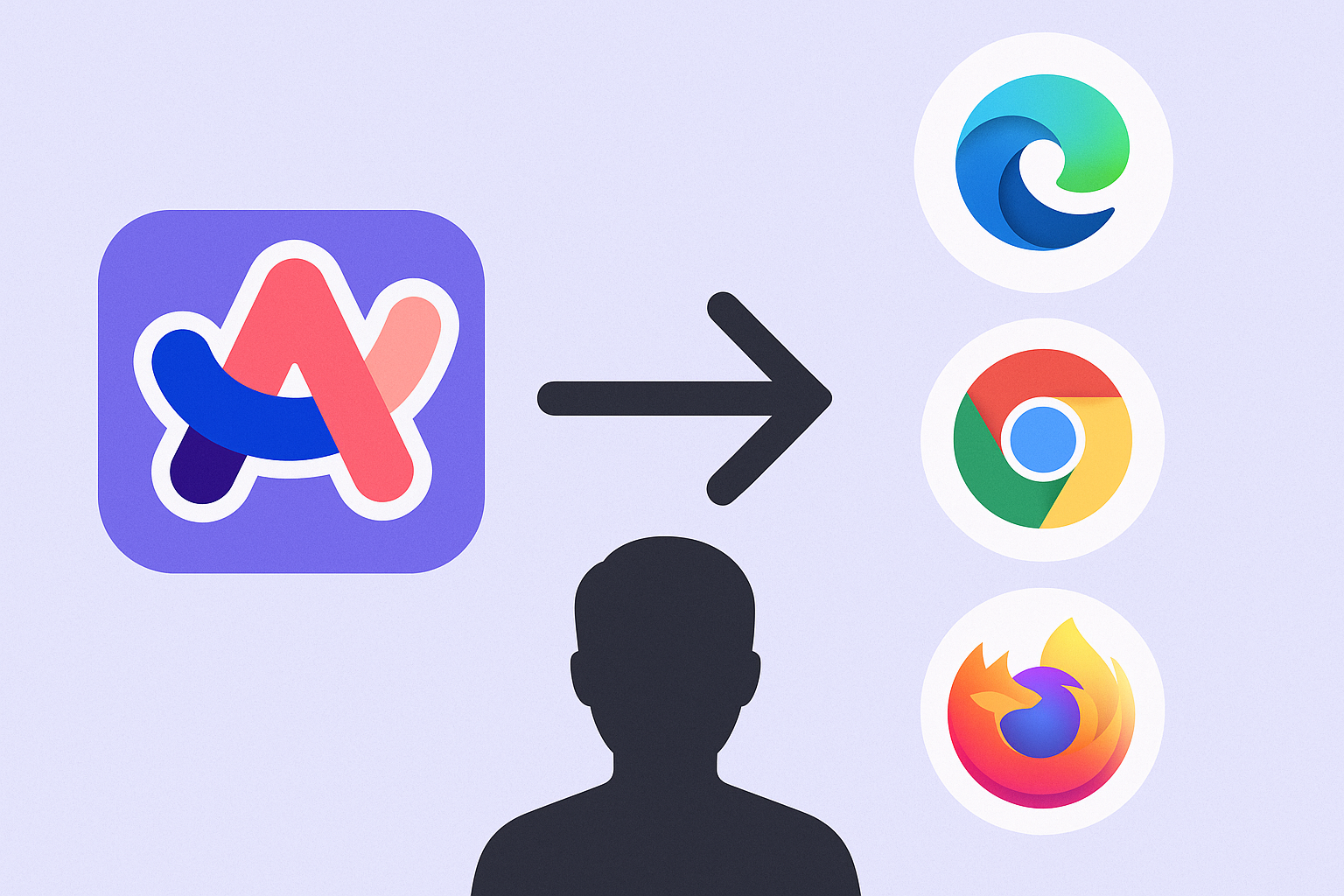
    Why Power Users Are Leaving Arc Browser — And How to Switch Without Losing Your Mind

    For a browser that once captured the hearts of creatives, developers, and digital power users, Arc Browser’s recent decision to sunset support has been nothing short of shocking. Known for its sleek design, sidebar multitasking, and productivity-first features, Arc was the darling of the tech-savvy crowd.

    But as of 2025, Arc has officially ended support for several key platforms — and that’s triggered an exodus.

    If you’re one of the many users scrambling for a new daily driver that doesn’t feel like a step backward, you’re in the right place.

    In this guide, we’ll break down:

    • Why Arc Browser is shutting down support (and what it means)
    • How to export your data from Arc safely
    • The best Arc Browser alternatives (with sidebars and tab groups)
    • How to seamlessly switch to another browser

    What Happened to Arc Browser?

    Arc Browser, developed by The Browser Company, was first introduced with a vision to reimagine web browsing — moving away from cluttered tabs and toward a more app-like interface. With its sidebar layout, split view, spaces, and tab management, Arc became a favorite for developers, designers, and anyone who lives in a browser.

    But in May 2025, the company announced a major shift in direction — ending support for Arc on Windows and pivoting focus toward AI-integrated browsing tools via mobile and MacOS only.

    This decision left a large portion of its user base — particularly Windows professionals — out in the cold.

    Why it matters:

    • Loss of cross-platform parity: Arc was one of the few browsers giving power users a consistent UX across Mac and Windows.
    • No more updates or security patches for Windows versions after Q2 2025.
    • Community uproar: Developers and power users expressed frustration over the loss of a tool they integrated deeply into daily workflows.

    Step 1: Export Your Data Before It’s Too Late

    Before switching browsers, back up your data from Arc. Here’s how to export your bookmarks, favorites, and key preferences.

    Arc Browser does not offer a built-in feature to directly export favorites to other browsers. However, you can manually save your pinned and favorite tabs by copying the links to a document and then importing them into another browser. Alternatively, you can use an external tool to extract your bookmarks. 

    Here’s how to manually save your favorites:

    1. Right-click on the Pinned Folder: In Arc, locate the “Pinned” folder in your sidebar and right-click on it.
    2. Copy All Links: Select “Copy All Links” from the context menu.
    3. Paste into a Document: Paste the copied links into a text document, or any other place where you can easily reference them.
    4. Import into Another Browser: Open the new browser and manually add the bookmarks by pasting the links into the bookmark manager. 

    Using an External Tool:

    If you prefer a more automated approach, you can use an online tool like Arc Export or a GitHub repository like arc-export to convert your Arc bookmarks to an HTML file. These tools typically require you to locate the StorableSidebar.json file within your Arc application’s directory and then process it to generate an HTML file that can be imported into other browsers. 

    Note: Arc does not currently export spaces or tab groups, so you may need to manually recreate those.


    Step 2: Best Arc Browser Alternatives for Power Users (with Sidebars & Tab Groups)

    If Arc’s UI and tab management were game-changers for you, you’ll want something that keeps your multitasking workflow intact.

    Here are the top Arc alternatives in 2025:

    1. Vivaldi

    Why power users love it:

    • Customizable sidebar & tab stacking
    • Split-screen view support
    • Built-in email client, calendar, and RSS reader
    • Keyboard shortcuts galore
    • Built for productivity-first users

    Vivaldi is arguably the most powerful customizable browser out there. It mirrors many of Arc’s innovations — and even adds a few extras.

    2. Microsoft Edge (with Sidebar and Workspaces)

    Edge has quietly become a workhorse for professionals, especially with recent updates introducing:

    • Vertical tabs
    • Sidebar with apps like Office, Outlook, and ChatGPT
    • Workspaces (like Arc’s Spaces)
    • Integration with Copilot AI

    If you’re a Windows user looking for stability with productivity features, Edge is a solid bet.

    3. Sidekick Browser

    Focused on teams and startups, Sidekick combines:

    • Sidebar with pinned apps (Slack, Notion, etc.)
    • Tab suspending and hibernation
    • Account switching
    • Ad blocker and session isolation

    Think of it as Arc with an enterprise twist — ideal for agency and business owners.

    4. Brave Browser

    While Brave doesn’t offer a native sidebar like Arc, it:

    • Has vertical tab support (via extensions)
    • Offers privacy-first features
    • Includes a crypto wallet and privacy search
    • Is ultra-lightweight and fast

    Developers appreciate Brave for its security, speed, and open-source roots.


    Visual Comparison Chart: Arc vs. Top Alternatives

    Here’s a breakdown of the closest feature matches:

    FeatureArc BrowserVivaldiMicrosoft EdgeSidekickBrave
    SidebarYesYesYesYesNo
    Tab Groups/SpacesYesYesYesYesLimited
    Split ViewYesYesNoNoNo
    Built-in AppsPartialYesYesYesNo
    Privacy/Ad BlockerPartialYesYesYesYes
    Platform Support (Windows)Ending SoonFullFullFullFull

    Step 3: How to Switch to a New Browser (Without Losing Workflow)

    Once you’ve chosen your new browser, here’s how to make the switch painless.

    Importing Bookmarks

    Most modern browsers will offer to import bookmarks when you first install. If not:

    1. Open your new browser
    2. Go to Settings > Import Bookmarks or Data
    3. Upload the HTML file you exported from Arc

    Rebuilding Workspaces or Tab Groups

    Recreating Arc’s “Spaces” in your new browser takes a little effort. Here’s a shortcut approach:

    • Vivaldi: Use “Tab Stacks” + “Workspaces” for organization.
    • Edge: Use “Workspaces” to set up project-based tabs.
    • Sidekick: Use app sidebar to recreate Arc’s quick-access apps.

    Reinstall Extensions

    Make a list of your must-have extensions from Arc. Use the Chrome Web Store (since all these browsers are Chromium-based) to quickly reinstall them.

    Set Your Defaults

    • Set your new browser as default under System Settings
    • Sync your Google or Microsoft account to restore history, passwords, and preferences
    • Pin your browser to the taskbar or dock

    Extra Tips for Power Users

    Here are a few ways to supercharge your new browser setup:

    Use Profiles for Separation

    All major browsers now support multiple profiles. Use them to separate work from personal browsing or client accounts.

    Set Up Keyboard Shortcuts

    Customize hotkeys for tab navigation, sidebar control, and developer tools to match your old Arc workflow.

    Use Extensions Like:

    • Workona – for managing tab groups
    • Tab Suspender – auto-hibernate unused tabs
    • Toby – organize tabs visually like Arc Spaces

    Final Thoughts: Arc May Be Gone, But Your Workflow Doesn’t Have to Suffer

    Arc’s departure is disappointing — especially for those of us who found its interface to be a genuine productivity booster. But in many ways, this is an opportunity.

    With browsers like Vivaldi, Edge, and Sidekick stepping up their game, you’re not forced to downgrade — you’re just transitioning.

    Choose a browser that matches your workflow needs, import your data, and spend a few minutes configuring it.

    Your future browsing setup might end up even better than Arc.

  • Transforming Wilcraft’s Digital Presence

    Transforming Wilcraft’s Digital Presence

    Transforming WILCraft’s Digital Presence

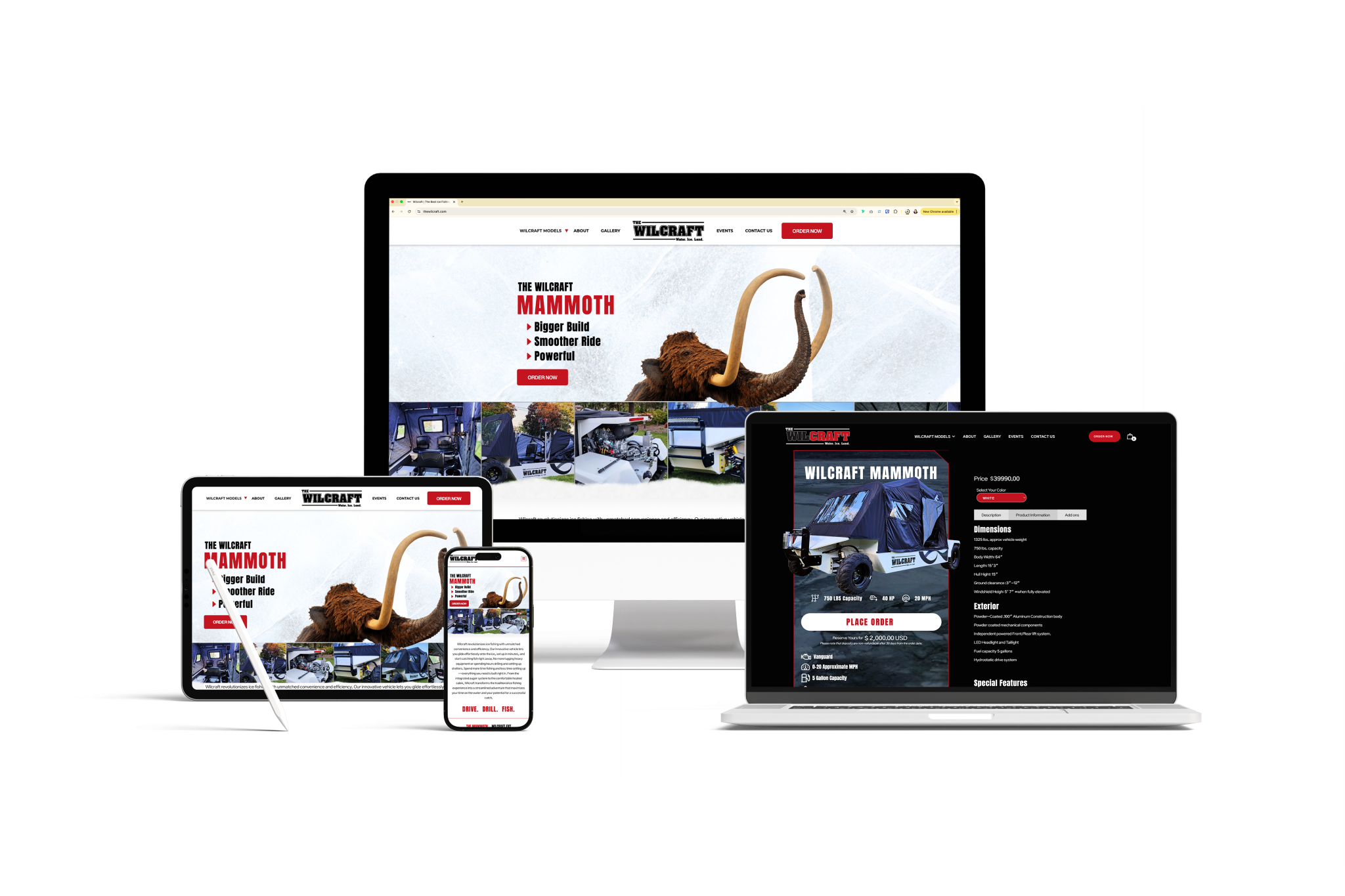
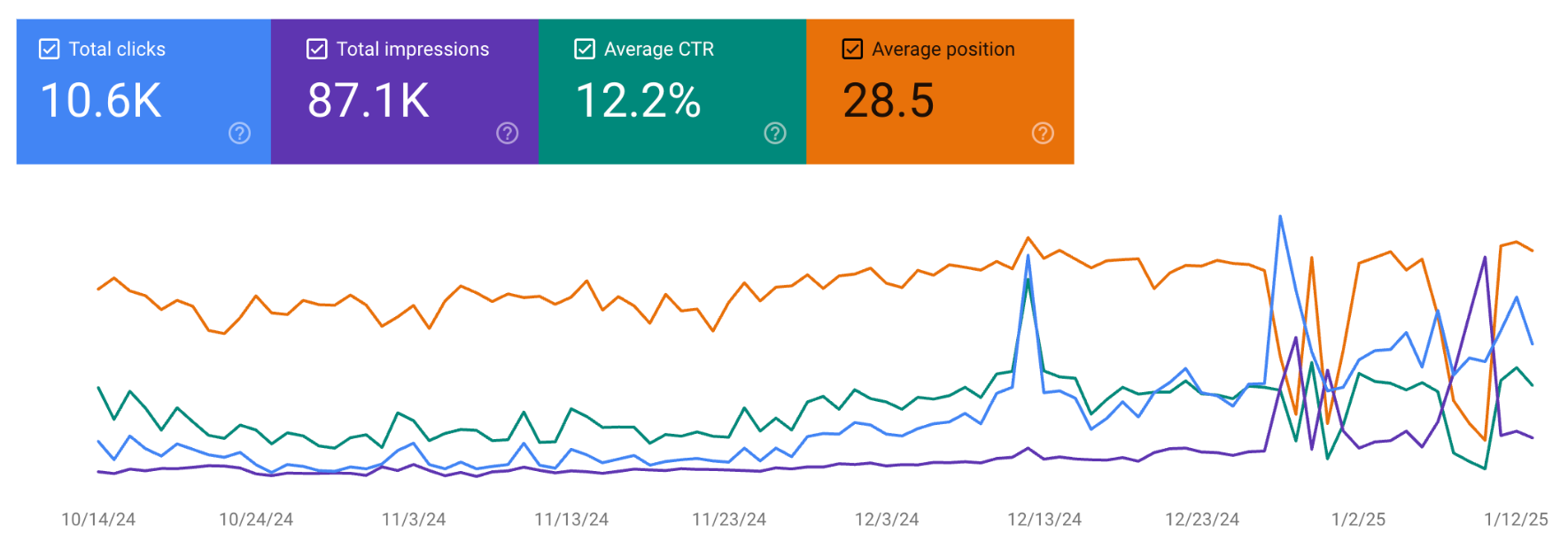
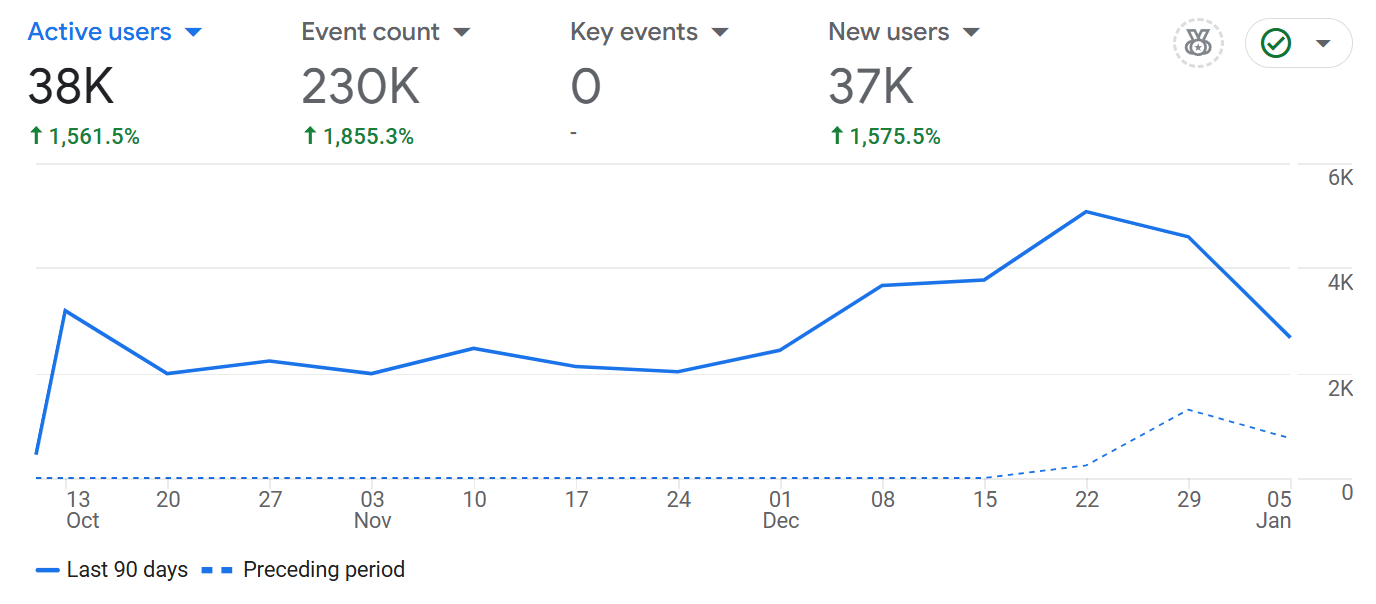
    See how traffic, engagement, and new users skyrocketed within weeks!

    Client Overview

    WILCraft is a specialized company offering innovative ice fishing houses designed for ultimate mobility and convenience. Their unique products cater to fishing enthusiasts who seek adventure in the harshest winter conditions without compromising on comfort.


    The Challenge

    Before partnering with Eclipse Digital, WilCraft faced several digital hurdles:

    • Minimal online presence and low engagement on social media platforms.
    • Website performance issues affecting user experience and conversions.
    • Inefficient Meta Ads strategy leading to suboptimal reach and conversions.
    • Low search visibility and lack of organic traffic.

    Strategy Implemented:

    ✅ Website Optimization: Enhanced site speed, fixed UI/UX issues, and improved overall user experience to boost engagement and conversions.
    ✅ SEO Enhancements: Conducted keyword research, optimized product pages, and improved on-page SEO to increase organic visibility.
    ✅ Meta Ads Campaign Revamp: Redesigned ad creatives, optimized targeting, and introduced new ad strategies to improve performance.
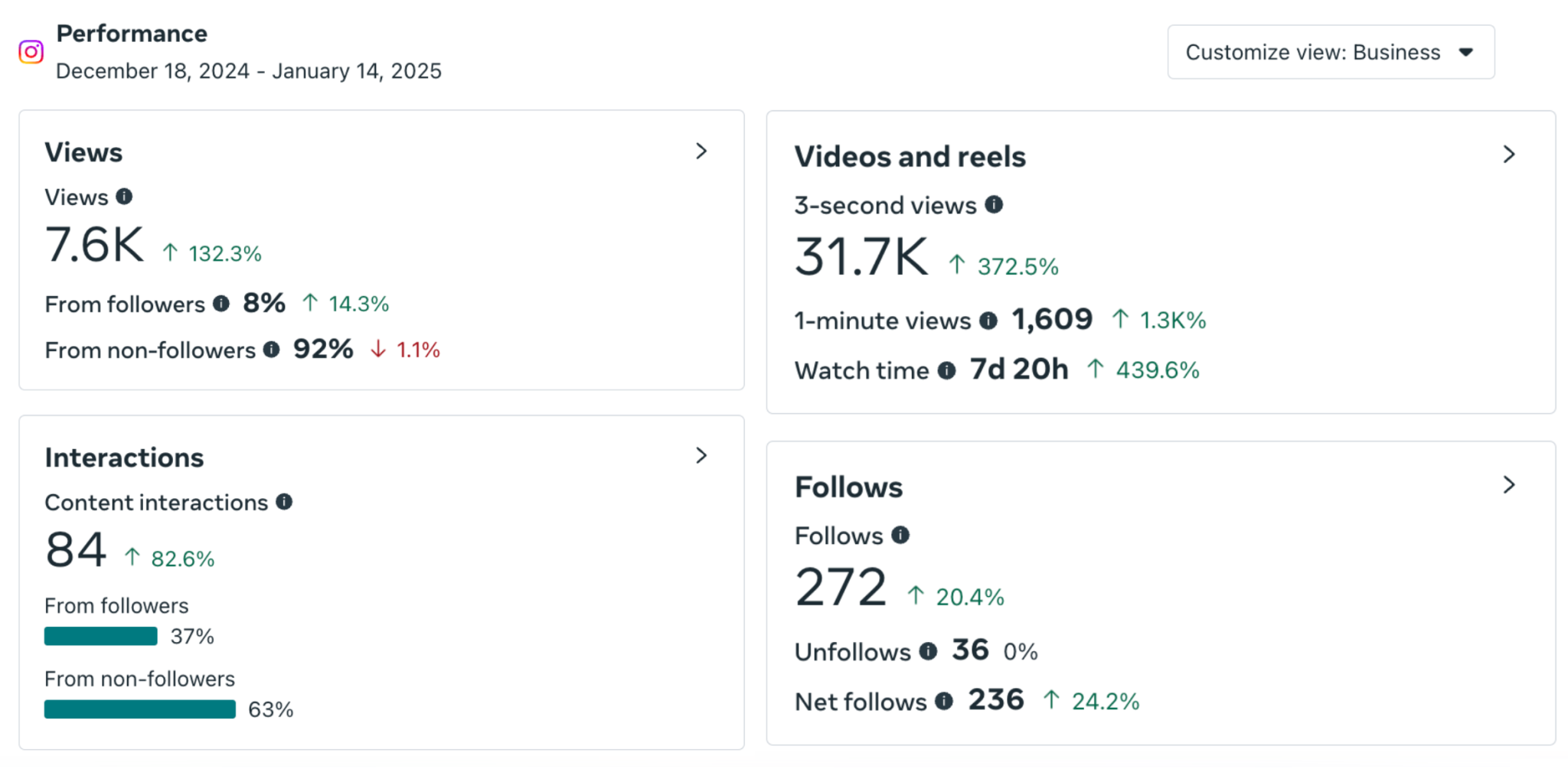
    ✅ Content & Social Media Marketing: Developed a structured content plan, increased posting frequency, and engaged with the audience to drive more traffic and leads.

    website development
    website development

    Impact on Engagement:

    📈 Higher Interaction Rates: Increased likes, shares, and comments across social media platforms.
    📈 Improved CTR (Click-Through Rate) on Ads: More users engaged with ads, leading to increased traffic and conversions.
    📈 Stronger Brand Community: More user-generated content and positive brand conversations online.
    📈 Increased Website Engagement: Lower bounce rates and higher session durations due to engaging blog content and improved site performance.


    FB Ads Minnesota

    Key Takeaways:

    🔹 A well-optimized website leads to better user experience and conversions.
    🔹 Data-driven Meta Ads optimization significantly improves ROI.
    🔹 SEO and content marketing are essential for long-term brand growth.
    🔹 Social media engagement plays a crucial role in building a loyal community and driving sales.

    What’s Next?

    This success was just the beginning. With advanced SEO, content marketing, and digital advertising, you have the potential to scale its reach even further.

    Ready to Transform Your Website?

    If your business is struggling with low traffic and poor digital presence, let’s talk! At Eclipse Digital, we help brands redesign, optimize, and grow through tailored digital marketing strategies.


    Contact us today to get started!

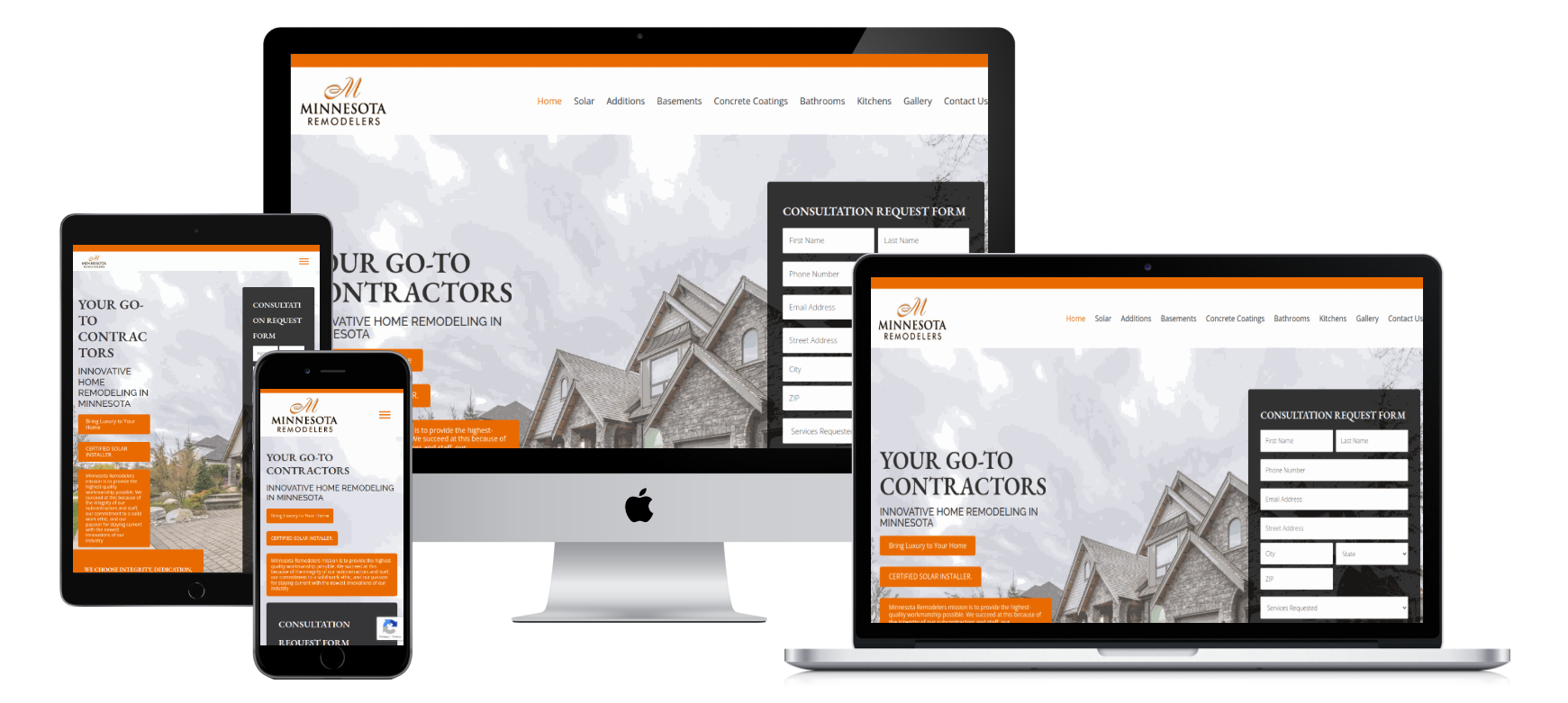
  • Minnesota Remodelers: Website Traffic Growth & Google Ads Performance Enhancement

    Minnesota Remodelers: Website Traffic Growth & Google Ads Performance Enhancement

    Minnesota Remodelers: Website Traffic Growth & Google Ads Performance Enhancement

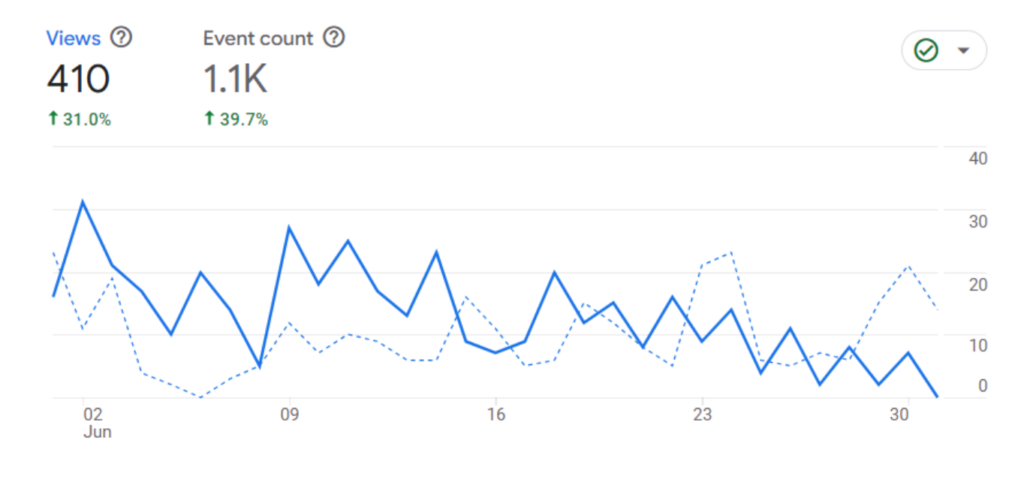
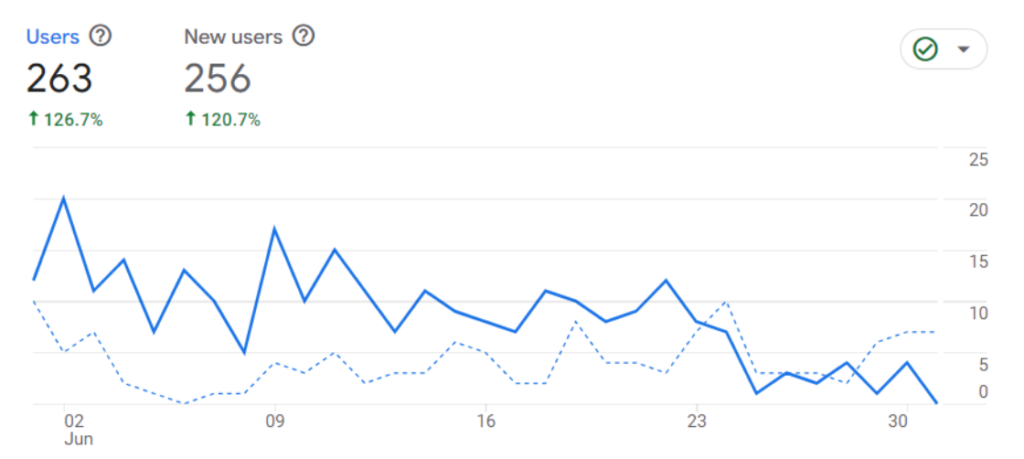
    See how traffic, engagement, and new users skyrocketed within weeks!

    Client Overview

    A business sought to enhance its online presence, improve website traffic, optimize Google Ads, and reduce advertising costs while increasing overall campaign performance. Through strategic adjustments and optimization, we delivered significant improvements.

    Digital marketing agency Minnesota

    +60% Organic Reach

    The Challenge

    Before partnering with Eclipse Digital, Minnesota Remodelers faced several digital hurdles:

    • Low Website Traffic: Minimal organic reach and poor SEO rankings resulted in inadequate visibility.

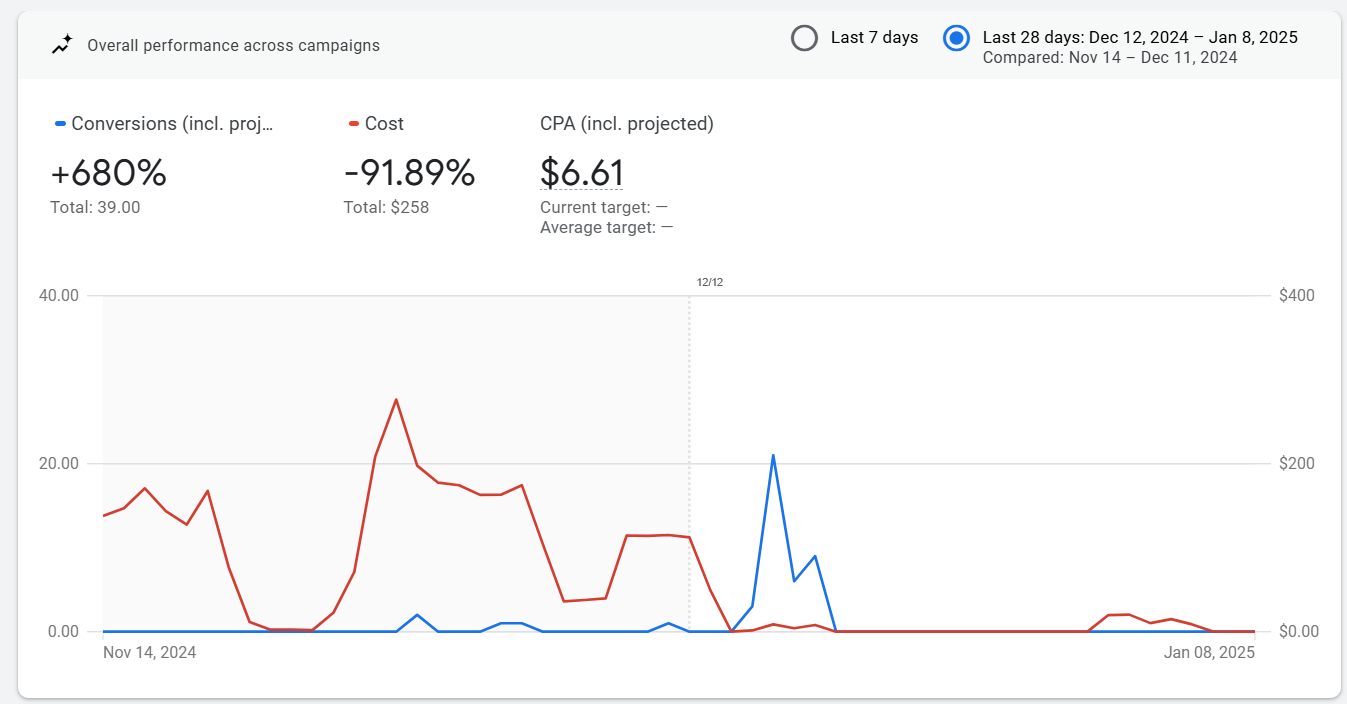
    • High Google Ads Cost: The client was experiencing high CPC (Cost Per Click) with low ROI.

    • Low Conversion Rate: Despite running ads, conversions were below industry benchmarks.

    • Poor Ad Targeting: Inefficient audience segmentation led to wasted ad spend.

    Strategy Implemented:

    1. Website Traffic Optimization

    • Conducted an in-depth SEO audit and implemented keyword strategies to improve organic reach.

    • Enhanced on-page SEO (meta titles, descriptions, header tags, image alt texts).

    • Improved internal linking structure and content optimization.

    • Created high-quality blog content focusing on industry-relevant keywords.

    • Optimized website speed and mobile responsiveness.

    2. Google Ads Optimization

    • Restructured Campaigns: Segmented ads based on audience demographics, interests, and behavior.

    • Keyword Refinement: Focused on high-intent, long-tail keywords to improve ad relevance and reduce CPC.

    • Ad Copy Enhancement: Created compelling ad creatives with strong CTAs to boost engagement.

    • Bid Strategy Optimization: Implemented automated bidding strategies for better budget allocation.

    • A/B Testing: Conducted continuous testing of ad copies, landing pages, and audience targeting to identify the best-performing variations.

    marketing agency near me
    marketing agency near me

    3. Cost Reduction & Performance Boost

    • Integrated negative keywords to avoid irrelevant clicks and reduce wasted ad spend.

    • Used retargeting campaigns to re-engage potential customers who previously interacted with the website.

    • Optimized landing pages for better conversion rates by improving user experience and simplifying forms.

    • Shifted focus to high-performing ad placements and excluded underperforming networks.


    website development


    website development

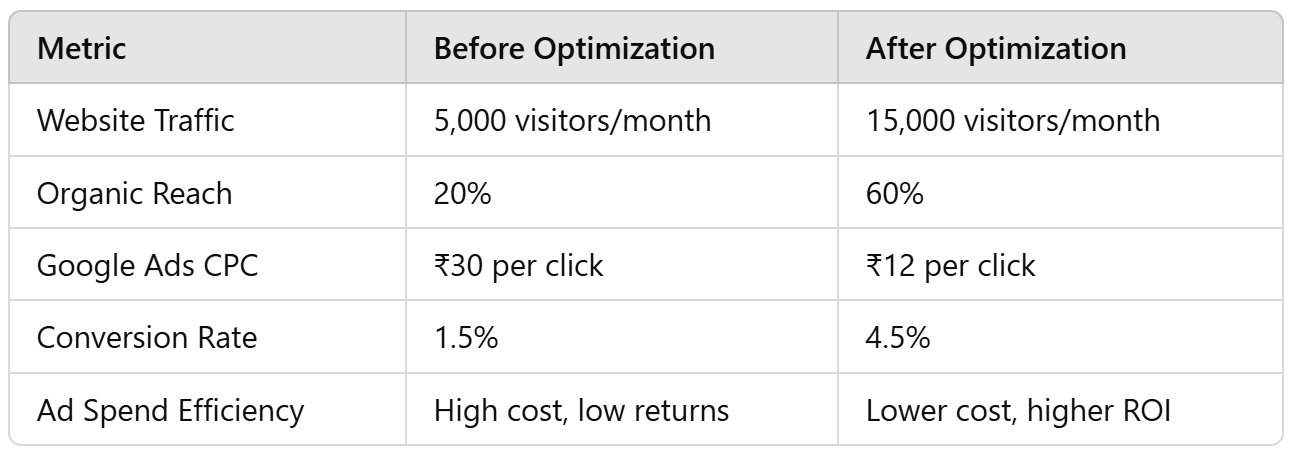
    Results Achieved:

    marketing agency near me

    Key Takeaways:

    1. SEO Optimization is Crucial: Improved on-page and technical SEO significantly boosted organic reach.

    2. Smart Google Ads Management Saves Cost: Targeted audience segmentation and bid adjustments led to lower CPC and better engagement.

    3. Conversion-Focused Landing Pages Work: Optimized landing pages improved user experience and increased conversion rates.

    4. Data-Driven Decisions Drive Success: Regular performance tracking and A/B testing helped fine-tune campaigns for maximum results.

    What’s Next?

    This success was just the beginning. With advanced SEO, content marketing, and digital advertising, you have the potential to scale its reach even further.

    Ready to Transform Your Website?

    If your business is struggling with low traffic and poor digital presence, let’s talk! At Eclipse Digital, we help brands redesign, optimize, and grow through tailored digital marketing strategies.


    Contact us today to get started!

  • Dahle Media Group’s Digital Makeover: Increased Traffic & Engagement

    Dahle Media Group’s Digital Makeover: Increased Traffic & Engagement

    Dahle Media Group’s Digital Makeover:
    Increased Traffic & Engagement

    See how traffic, engagement, and new users skyrocketed within weeks!

    Client Overview

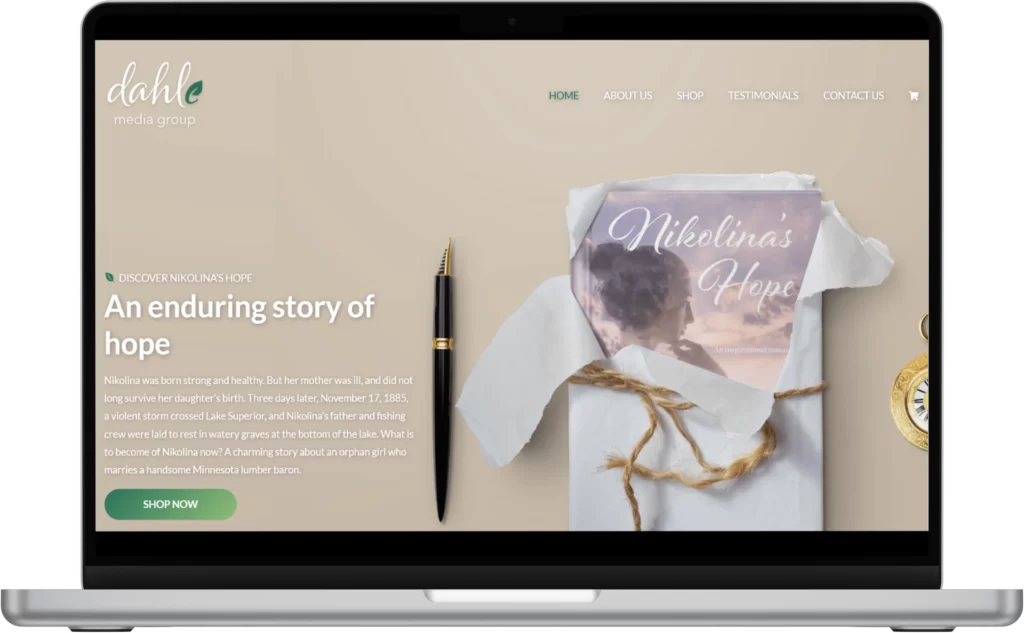
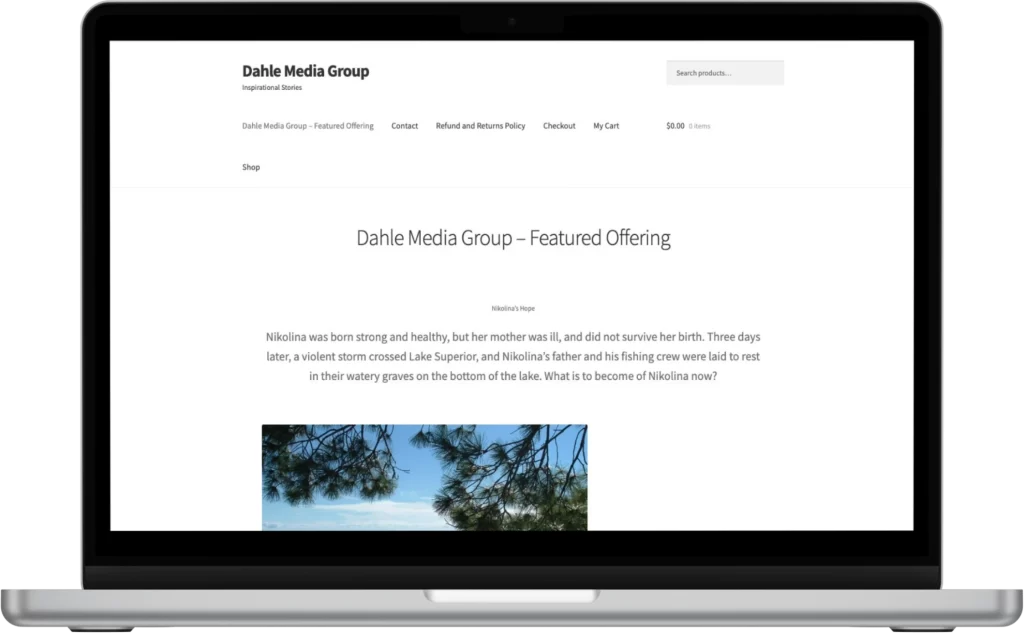
    Dahle Media Group is a media production company specializing in publishing, audiobooks, and creative content. Despite their strong expertise, their online presence was underperforming due to an outdated website and lack of search engine optimization (SEO). 

    Local SEO Minnesota

    +70% Website Engagement

    The Challenge

    Before partnering with Eclipse Digital, Dahle Media Group faced several digital hurdles:

    • Outdated Website Design – Lacked modern UI/UX, affecting engagement.
    • Low Website Traffic – Minimal organic reach due to poor SEO.
    • No Search Visibility – Struggled to rank on Google for relevant keywords.
    • Lack of Analytics & Optimization – No insights on visitor behavior.

    NOW !!

    Before

    Local SEO Minnesota
    Local SEO Minnesota

    Our Approach

    We implemented a comprehensive website redesign and basic SEO strategy to boost performance:
    ✅ Modern, Responsive Website Redesign – Improved navigation, faster load times, and a visually engaging UI.
    ✅ On-Page SEO Optimization – Optimized metadata, keyword placement, and structured content for better search rankings.
    ✅ Technical SEO Fixes – Enhanced website speed, mobile-friendliness, and site architecture.
    ✅ Google Analytics Setup – Integrated tracking to monitor performance and growth.

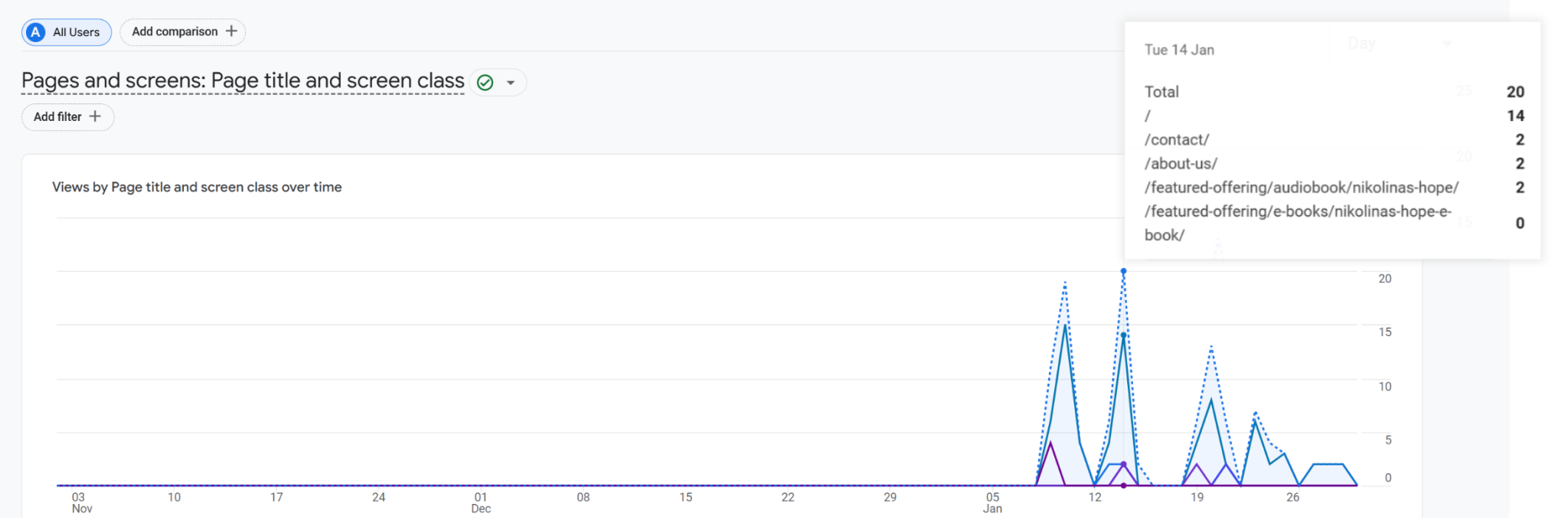
    The Results (Within Weeks of Implementation)

    seo optimization


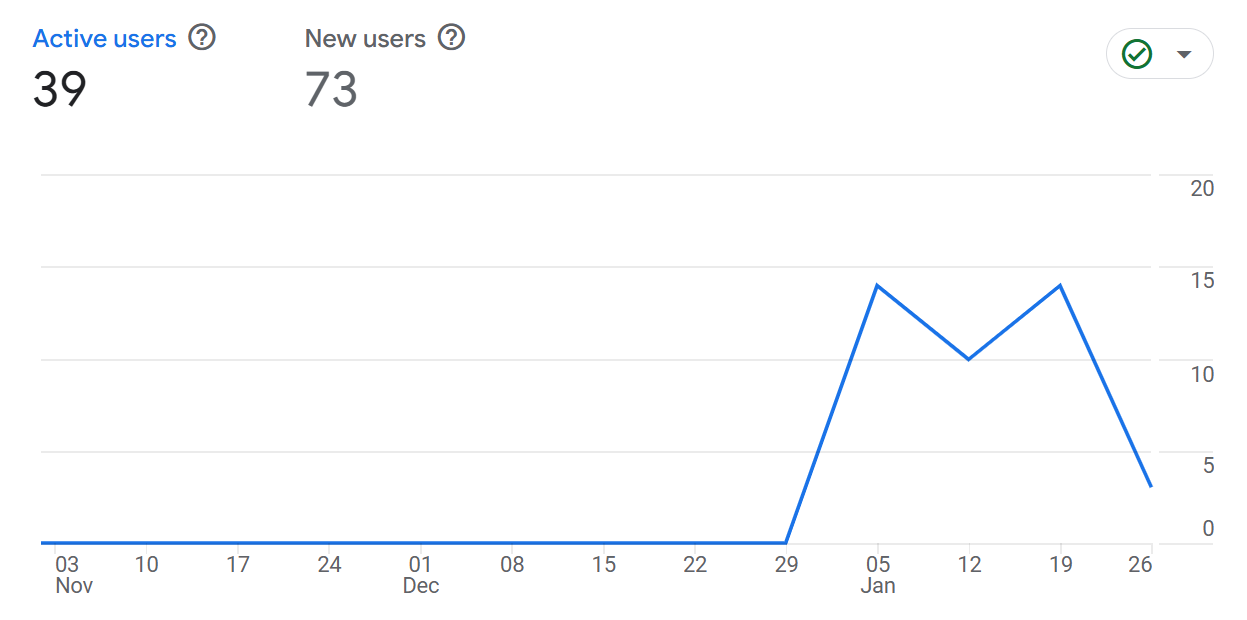
    • 📈 39 Active Users – A steady increase in engaged visitors.

    • 🚀 73 New Users – More first-time visitors discovering the website.

    • 📊 Consistent Traffic Growth – Visible spikes in website visits after SEO enhancements.

    • 🔍 Better Page Performance – Homepage and key pages saw significant viewership increase.

    What’s Next?

    This success was just the beginning. With advanced SEO, content marketing, and digital advertising, you have the potential to scale its reach even further.

    Ready to Transform Your Website?

    If your business is struggling with low traffic and poor digital presence, let’s talk! At Eclipse Digital, we help brands redesign, optimize, and grow through tailored digital marketing strategies.


    Contact us today to get started!

  • Eclipse Digital Acquires 7 Ten Web Solutions, Expanding Digital Marketing Services

    Eclipse Digital Acquires 7 Ten Web Solutions, Expanding Digital Marketing Services

    A New Era of Digital Excellence

    Eclipse Digital is proud to announce the acquisition of 7 Ten Web Solutions, a strategic merger that strengthens our position in digital marketing and web development services. This acquisition combines the expertise and resources of both companies, enabling us to deliver enhanced solutions to our clients.

    What This Means for Our Clients

    Current clients of both companies will benefit from:

    • Expanded service capabilities
    • Enhanced technical expertise
    • Continued high-quality support
    • Seamless transition process
    • Access to additional resources

    Leadership and Support

    The combined organization will continue to focus on delivering exceptional service and innovative solutions. To ensure continuity of service, Mark from 7 Ten Web Solutions will remain with the company for 12 months, supporting clients through the transition period.

    For any questions or assistance:

    Looking Forward

    This strategic acquisition positions Eclipse Digital to better serve both existing and future clients. We remain committed to delivering innovative digital solutions and exceptional service to help businesses achieve their goals.

    For more information about our services or to discuss your project needs, please contact us directly.

  • SEO for Small Business When You Have a Limited Budget

    SEO for Small Business When You Have a Limited Budget

    Power Up Your Small Business Online Presence

    In today’s digital age, having an online presence is crucial for the success of small businesses. Search engine optimization (SEO) plays a vital role in improving visibility and driving organic traffic to your website. However, for small businesses with limited budgets, investing in SEO strategies can be challenging. But fear not! In this article, we will explore effective SEO tactics that can help your small business thrive even with budgetary constraints.

    1. Start with Keyword Research

    Keyword research is the foundation of any successful SEO campaign. Begin by identifying relevant keywords and phrases that your target audience is likely to search for. Use tools like Google Keyword Planner, SEMrush, or Moz Keyword Explorer to discover high-volume, low-competition keywords. Incorporate these keywords strategically throughout your website content to increase your chances of ranking higher in search engine results.

    2. Optimize Your Website’s On-Page Elements

    On-page optimization involves optimizing various elements on your website to make it search engine friendly. Ensure that your website has a clean and user-friendly design, with fast loading times and mobile responsiveness. Optimize your title tags, meta descriptions, headers, and URLs by including relevant keywords. Create informative and engaging content that is well-structured, properly formatted, and enriched with relevant keywords.

    3. Build High-Quality Backlinks

    Backlinks are an essential component of SEO and can significantly impact your website’s rankings. While it can be challenging to acquire backlinks with a limited budget, there are still cost-effective strategies you can employ. Focus on creating high-quality, shareable content that naturally attracts links from other websites. Collaborate with industry influencers, participate in guest blogging opportunities, and leverage social media platforms to promote your content and attract backlinks.

    4. Leverage Local SEO

    If your small business operates within a specific geographical area, optimizing for local search is crucial. Claim and optimize your Google My Business listing, ensuring that your business name, address, and phone number (NAP) information is accurate and consistent across all online directories. Encourage customers to leave positive reviews, as they can improve your local search rankings. Additionally, create location-specific content and include relevant local keywords to enhance your visibility in local search results.

    5. Harness the Power of Social Media

    Social media platforms offer excellent opportunities for small businesses to increase their online visibility and engage with their target audience. Create compelling social media profiles for your business on platforms that align with your target market. Regularly share valuable content, interact with your followers, and encourage social sharing. The more your content is shared and engaged with, the more visibility it will gain, ultimately boosting your website’s SEO.

    6. Monitor and Analyze Your Progress

    SEO is an ongoing process, and it’s crucial to monitor and analyze your efforts regularly. Utilize tools like Google Analytics and Google Search Console to track your website’s performance, identify areas of improvement, and measure the impact of your SEO strategies. Pay attention to key metrics such as organic traffic, bounce rate, average time on page, and keyword rankings. Use these insights to refine your SEO tactics and optimize your website further.

    In the End

    Implementing SEO strategies for your small business, even with a limited budget, is entirely achievable. By conducting thorough keyword research, optimizing on-page elements, building quality backlinks, focusing on local SEO, leveraging social media, and monitoring your progress, you can enhance your online visibility, drive targeted traffic, and improve your search engine rankings. Remember,

  • Should Your Agency Outsource Web Development?

    Should Your Agency Outsource Web Development?

    Outsourcing Web Development: Unlocking Efficiency and Expertise for Your Business

    Outsourcing web development refers to hiring external contractors or agencies to design, develop, and maintain your website or web application. Many agencies consider outsourcing web development as a way to save costs, access specialized skills and knowledge, and improve efficiency. However, it’s crucial to choose the right outsourcing partner to ensure high-quality work, timely delivery, and effective communication.

    Benefits of outsourcing web development for agencies

    Cost-effectiveness

    Outsourcing web development can be more cost-effective than hiring an in-house team, as you don’t have to pay for employee benefits, training, and equipment. Also, outsourcing partners often have lower labor costs due to the location, which can translate into significant savings for your agency.

    Access to expertise

    Outsourcing web development allows you to tap into a pool of skilled professionals who specialize in different areas of web development, such as design, programming, and optimization. This expertise can help you create a more polished, user-friendly, and high-performing website that meets your business goals.

    Scalability

    Outsourcing web development can help you scale up or down your project as needed, without the risk of overstaffing or understaffing. You can adjust the team size and scope of work based on your budget and timeline, ensuring maximum flexibility and efficiency.

    Time-saving

    Outsourcing web development can save you time by allowing you to focus on your core business activities, such as sales, marketing, and customer service. You don’t have to worry about managing the development process, hiring, training, or supervision, as the outsourcing partner takes care of these tasks.

    Advantages of in-house web development for agencies

    Full control over the development process

    In-house web development gives you complete control over the development process, from planning and design to testing and deployment. You can ensure that your website reflects your brand identity and meets your specific requirements without relying on external parties.

    Better communication and collaboration

    With in-house web development, communication and collaboration are typically easier and more streamlined. You can directly interact with your development team, fostering a deeper understanding of your business goals and ensuring effective communication throughout the project.

    Greater flexibility and customization

    In-house development allows for greater flexibility and customization options. You have the freedom to make changes, implement new features, and respond quickly to market trends or customer demands. This agility can give your agency a competitive edge in the rapidly evolving digital landscape.

    Increased security and confidentiality

    Handling sensitive data and information internally can enhance security and confidentiality. In-house web development reduces the risk of exposing sensitive client information to external parties, providing greater control over data protection and compliance with privacy regulations.

    How to choose the right outsourcing partner for web development

    Define your requirements and goals

    Before selecting an outsourcing partner, clearly define your web development requirements and project goals. Consider factors such as the desired functionality, design elements, technology stack, timeline, and budget. Having a clear understanding of your needs will help you evaluate potential partners more effectively.

    Evaluate potential partners based on their portfolio and experience

    Review the portfolios and case studies of outsourcing companies to assess their expertise and experience. Look for projects similar to your requirements and evaluate the quality of their work, user experience, and technical capabilities. Consider their industry reputation, client testimonials, and online reviews as well.

    Check for cultural compatibility and communication skills

    Cultural compatibility and effective communication are essential for successful outsourcing partnerships. Ensure that the outsourcing partner understands your business values, target audience, and industry dynamics. Assess their communication skills, responsiveness, and ability to understand and address your specific requirements.

    Consider the pricing model and contract terms

    Evaluate the pricing models and contract terms offered by different outsourcing partners. Compare the cost structures, payment schedules, and contractual obligations to find the best fit for your agency. Ensure transparency regarding project milestones, deliverables, and potential additional costs.

    Establish clear project management and communication processes

    Effective project management and communication are vital for outsourcing success. Set clear expectations regarding project milestones, deadlines, and deliverables. Define the preferred communication channels, frequency of updates, and the point of contact for both parties. Establishing a robust project management framework ensures smooth collaboration and minimizes misunderstandings.

    The decision to outsource web development or keep it in-house depends on your agency’s specific needs, budget, and long-term goals. Outsourcing can offer cost-effectiveness, access to specialized expertise, scalability, and time-saving benefits. On the other hand, in-house development provides greater control, better communication, customization options, and enhanced security.

    Consider your agency’s unique circumstances and evaluate the advantages and disadvantages of each approach. By following the guidelines mentioned in this article, you can make an informed decision when choosing the right web development strategy for your agency’s success.

    Remember, whether you choose to outsource or keep web development in-house, maintaining a strong partnership with the development team and prioritizing effective communication are key to achieving your desired outcomes and creating exceptional digital experiences for your agency and clients.

  • Demystifying Sprints: An Inside Look at Agile Project Management

    Demystifying Sprints: An Inside Look at Agile Project Management

    Unveiling the Power of Sprints in Modern Software Development

    Sprints are a popular and effective method of Agile project management, allowing teams to rapidly develop and deliver projects in a structured yet flexible manner. In this article, we’ll provide a behind-the-scenes look at how sprints work and why they’re essential for modern software development.

    1. The Sprint Concept: What Is a Sprint?

    At its core, a sprint is a short, time-boxed iteration of project work that typically lasts between one and four weeks. The main goal of a sprint is to complete a set of predetermined tasks, called user stories, within the given time frame. These user stories are ranked according to priority, with the most critical ones being addressed first.

    1. Why Use Sprints in Project Management?

    Sprints offer a variety of benefits for project management, including:

    • Improved collaboration: By working together on a shared set of goals, team members can easily communicate and collaborate on tasks, leading to better overall performance.
    • Adaptability: Sprints allow for adjustments to be made as new information arises, ensuring that the project remains relevant and efficient.
    • Faster delivery: With a focus on shorter iterations, sprints help to deliver features or updates more quickly, enabling teams to respond to market needs and customer feedback.
    • Greater transparency: Sprints allow for clear visibility into project progress and potential obstacles, fostering a culture of accountability and continuous improvement.
    1. The Sprint Process: How Does It Work?

    The sprint process is divided into several stages:

    • Sprint Planning: The team meets to discuss and prioritize the user stories for the upcoming sprint, ensuring that everyone is aligned on the goals and expectations.
    • Daily Stand-ups: Short, daily meetings are held to discuss progress, address any issues, and keep the team on track.
    • Sprint Review: At the end of the sprint, the team reviews the completed work, discussing what went well, what could be improved, and how to apply those lessons to future sprints.
    • Sprint Retrospective: After the sprint review, the team reflects on the overall process, identifying areas for improvement and implementing changes to enhance future sprints.
    1. The Role of the Scrum Master

    The Scrum Master is a critical role in the sprint process, responsible for ensuring that the team follows Agile principles and practices. This individual helps to facilitate communication, remove roadblocks, and maintain a positive and productive work environment.

    1. Embracing Sprints for Success

    Sprints have proven to be a highly effective approach to project management, enabling teams to collaborate efficiently, adapt to change, and deliver value to customers more quickly. By understanding and embracing the sprint process, organizations can stay competitive and drive innovation in an ever-evolving digital landscape.