Category: News

  • AI Workflows for Businesses: How to Systemize Operations Without Adding More Busywork

    AI Workflows for Businesses: How to Systemize Operations Without Adding More Busywork

    Most businesses don’t have a tool problem. They have a systems problem.

    Leads come in from the website, email, social, ads, referrals, and the phone. Follow-ups live in someone’s inbox. Customer details get copied by hand from one platform to another. Reports get built manually every week. Tasks get created after someone remembers to create them.

    The business keeps moving, but too much of that movement depends on one person remembering every step.

    That’s where AI workflows help. Not because AI is magic, and not because every business needs another platform bolted on. AI workflows are useful when they turn a process you repeat every week into something reliable that doesn’t depend on memory.

    The problem isn’t a lack of AI. It’s a lack of systems.

    Most businesses already run plenty of software. A website, a CRM, email marketing, a calendar tool, project management, accounting, analytics, maybe some industry-specific platform on top of all that.

    The problem is those tools don’t talk to each other.

    A form gets submitted but never creates a CRM record. A sales call happens but no follow-up task gets assigned. A customer approves a project but someone still has to build the onboarding checklist by hand. A manager wants a weekly snapshot but the numbers live in five different places.

    That’s operational drag. People spend their time moving information around instead of using it.

    AI workflows fix that by connecting the steps that already happen inside your business, so the process repeats itself correctly without someone babysitting it.

    What an AI workflow actually is

    It’s a repeatable process that uses automation, integrations, business rules, and AI to move work from one step to the next.

    A lead fills out a form. The workflow captures it, has AI summarize what the lead needs, checks it against your criteria (service type, budget, location, urgency), creates the CRM record, assigns a task, drafts a first response, and schedules the follow-up. Your team gets an alert instead of a raw form submission sitting in an inbox.

    The human is still making the decisions. They’re just not the one manually stitching every step together anymore.

    Every workflow worth building has the same five pieces:

    • A trigger — a form submission, a signed proposal, a support request, a calendar booking
    • Business rules — what should happen, and when, based on conditions you set
    • Integrations — the tools it connects, your CRM, email, project management, spreadsheets
    • AI steps — summarizing, classifying, drafting, scoring, recommending
    • Human approval points — where judgment, trust, pricing, or a customer relationship still needs a person

    That last one matters most. Good AI workflows don’t remove judgment. They remove the busywork sitting around it.

    Where this actually pays off

    Start with the process you repeat most, not the one that sounds most impressive.

    Lead intake. Someone reads every inquiry, decides if it’s a fit, adds it to the CRM, routes it, and writes a reply. An AI workflow can summarize the inquiry, classify it, tag the service interest, check basic qualification, route it to the right person, and draft the first response for a human to approve. Faster follow-up, and it’s consistent every time instead of depending on who happened to see it first.

    Sales follow-up. This is where revenue quietly leaks out of most businesses. Interested lead, no follow-up scheduled. Proposal sent, no reminder set. Question asked, answer buried in an inbox somewhere. A workflow can build the follow-up task, draft the check-in email, and flag anything sitting too long in the pipeline. The message still goes out as a draft for a human to send, not blind.

    Customer onboarding. The first few days after someone says yes set the tone for the whole relationship, and it’s also where a lot of businesses create friction they don’t need to. Folders, intake forms, internal tasks, kickoff scheduling, missing-asset tracking, all of it can trigger automatically the moment a deal closes instead of waiting on someone to remember to start it.

    Support and reporting. Support requests can get summarized, classified, and routed on arrival, with recurring issues surfaced instead of buried. Reporting works the same way: pull from the systems you already run and turn it into one operating summary, new leads, source performance, open proposals, overdue follow-ups, instead of a dashboard nobody remembers to check.

    Where n8n, Dify, and Zapier actually fit

    The tool isn’t the strategy, the workflow is. But once you know what you’re building, the tool choice gets easy.

    Zapier is the right call for straightforward app-to-app automation where speed matters more than complexity.

    n8n is what we reach for when a workflow needs branching logic, custom API steps, or real control over how data moves. It’s our default for anything with more than two or three decision points.

    Dify earns its spot when the workflow needs an AI-powered assistant, chatbot, or agent doing more than routing, an actual structured LLM interaction.

    Most systems we build end up using more than one. A CRM owns the customer record, n8n connects the systems, AI drafts and summarizes, and a project management tool tracks the work. That’s normal. The point isn’t to pick a winner, it’s to design the workflow first and let the tools fill in around it.

    What not to automate

    Don’t automate a broken process. If the steps are unclear today, automation just makes the confusion move faster.

    Don’t let AI make high-trust decisions without a human checking it first. Pricing, contracts, sensitive customer communication, legal language, anything public-facing, that all needs a person in the loop.

    Don’t build a workflow with no owner. Someone has to be responsible for watching it, fixing it when a tool changes something, and improving it over time. Automation left unattended breaks quietly and nobody notices until a customer does.

    How we actually approach this

    We work across home services, manufacturing, and ecommerce, and the tools change client to client, n8n as the connector layer, ClickUp or HubSpot as the CRM and project layer, QuickBooks for the financial side. But the questions we start with don’t change:

    Where is the business losing time? Where are leads or customers falling through the cracks? Which repeated tasks are slowing the team down? What does leadership need to see that they’re not currently getting? Which steps genuinely need a human, and which ones are just busywork wearing a human’s name?

    From there it’s mapping the current process, defining what success actually looks like, picking the right platform for that specific workflow, and building in the approval checkpoints before anything goes live. Then testing it against real, messy inputs, not the clean example that works in a demo.

    Start with one workflow

    Don’t start by asking how many tools you can bolt on. Start with one process, the one that’s repeated, important, and currently too manual. Lead intake is usually the easiest place to start. Sales follow-up, onboarding, support triage, and reporting are close behind.

    If your business has repetitive tasks, missed follow-ups, disconnected systems, or reports nobody has time to build, that’s exactly the kind of problem Eclipse Digital solves. We’ll help you find the right workflow to start with and build a system around it that actually holds up.

  • I Was the Bottleneck in My Own Business. Goldman Sachs 10,000 Small Businesses Fixed That.

    I Was the Bottleneck in My Own Business. Goldman Sachs 10,000 Small Businesses Fixed That.

    I found the Goldman Sachs 10,000 Small Businesses program the way I find most things lately: scrolling LinkedIn. I’d never heard of it. It was free, I couldn’t spot a catch, and I figured I had nothing to lose. So I opened the books, went through the interview process, and applied.

    A few weeks later I got into the Minnesota #2 cohort. And the program taught me its first lesson before a single class started.

    The bottleneck was me

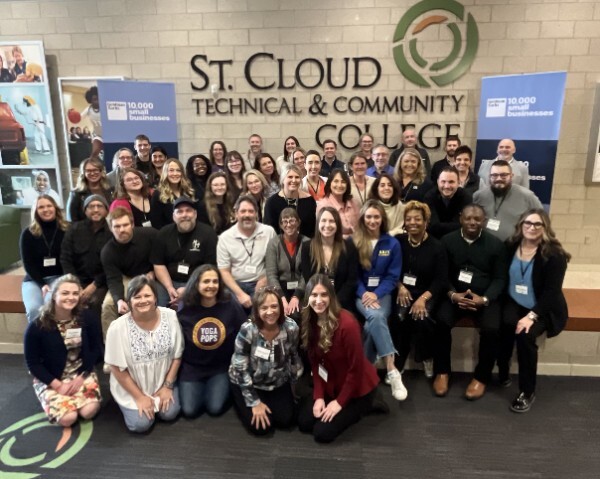
    When I got in, they told me to plan for 15 to 20 hours a week. We’d meet in person to open and close the program at St. Cloud Technical College, with twelve weeks of work in between: financial audits, marketing, hiring, negotiations. The management fundamentals most of us never sit down and formally learn.

    There was a problem with committing 15 to 20 hours a week. At the time, I was Eclipse Digital. I managed the clients. I ran sales. I scoped the projects, then did the development too. I’d just hired Andrea as our Client Relations Specialist and started building out SOPs so I could pull back from the day-to-day, but we hadn’t actually figured out our processes yet, never mind written them down. I was trying to run all of it. Somewhere along the way I’d quietly become the thing slowing my own company down.

    So before the program could teach me anything in a classroom, it forced the decision I’d been dodging. I had to hand off the work. I started giving client tasks to my team. I tried being out of the office for three and four days at a stretch.

    The business didn’t fall apart. My team handled it. Andrea was new to Eclipse and new to digital marketing, and she stepped up to manage clients and the team while I was in class. Being new turned out to be an asset. She could see the gaps in how we onboard and train people because she was living them. I learned I didn’t need a finger on the pulse every minute of every day. I should have done it years earlier, and the program basically did it for me.

    That alone would have been worth applying.

    A room full of people solving different problems

    There were about 40 of us in the cohort, and the range of businesses was something. Ben runs a residential electrical business. Zach roasts coffee up in Duluth. Michelle owns a social media marketing company. Nicole runs an ice cream shop in Minneapolis. And then there was Roberta, who started a Dungeon Master and game-facilitation business out of almost nothing and grew it into physical locations and serious revenue. I could have listened to her talk about it all day.

    We were all at different stages, in different industries, and that was the design. I came in hoping to systematize our operations. I didn’t expect how much I’d get out of the people. Comparing notes with the other digital marketers was useful, sure. But sitting across from an electrician, a coffee roaster, and an ice cream shop owner made me look at corners of my own business I’d been ignoring. Everyone was wrestling with a different problem, and somehow that sharpened mine.

    It also plugged me into a network of business owners all over Minnesota. Possible mentors, collaborators, clients. That network has quietly become the piece that keeps paying off long after the fact.

    Building the five-year plan (and the night before the presentation)

    You can’t graduate without two things: a finished five-year business plan, and a presentation of that plan to your cohort.

    Building the plan makes you actually look at your finances. You open the books, sit with the real numbers, and then forecast what your revenue could be if you made the changes you’re planning. Having a hunch about where your business is headed is easy. Putting it on a slide with numbers attached is a different feeling entirely.

    The presentation taught me something I wasn’t looking for. Going into the final week I wasn’t worried at all. In my head I was ready. Then we got to the last meetup, I started hearing everyone else walk through their plans, and all of a sudden mine felt thin by comparison. That night I was nervous. I ended up rewriting my slides and writing a longer speech.

    What actually got me wasn’t the speech. It was the Q&A afterward, which nobody warned me about. I handled it fine. But it was a good lesson in founder psychology. Confidence on its own is fragile, comparison will always find you, and the work you do in response to that nervous energy usually turns out to be worth it.

    What’s actually changed since

    The most durable thing I walked away with is the network. I still talk to plenty of people from our cohort, and I’ve since connected with folks from the first Minnesota cohort and the national one. Those relationships have led to real leads and genuine introductions into industries I’d never have reached on my own. The classes end. The network doesn’t.

    Inside Eclipse, the shift that started in week one held. I stopped being the single point of failure for every client and every project. Andrea now runs Client Relations and carries a chunk of the day-to-day I used to hold onto myself, which freed me up to focus on the work only I can do: sales and business development. We kept building out the SOPs I started during the program instead of letting them die on a shared drive somewhere, and that groundwork is still paying off.

    That shift hasn’t stopped. We’re in the middle of moving Eclipse from one-off project work toward a retainer model, and that only works if the team can run client relationships without me in the room. We’re also building out AI-driven workflows to take on more of the repeatable marketing work that used to eat a person’s whole week. None of that was on my radar before the program. It came out of learning, the hard way, that I wasn’t the asset I thought I was. I was the ceiling.

    The honest part: who this program is not for

    I’d recommend it to almost any business owner. But I’d be doing you a disservice if I made it sound easy.

    This program is not for someone who is the core pillar of their business and can’t take time away from it. The 15 to 20 hours a week is real. A few people in my cohort came close to quitting over the demand. The group meetings, the webinars, the plan itself, all of it piled on top of running a company. They stuck it out, every one of them, and they were glad they did. But if you genuinely can’t delegate, can’t step back, and can’t give the program real attention, you’ll spend twelve weeks frustrated instead of growing.

    Which, of course, is my own lesson coming back around. The hardest part of the program is having to step away from your business. That’s also the part your business probably needs most.

    Should you apply?

    For a free, twelve-week program, you come away with real skills, hands-on experience, and friendships that outlast the cohort. Everyone’s experience is different. Mine pushed me to stop being the bottleneck, to trust my team, to actually read my own numbers, and to build relationships across Minnesota that are still paying off.

    If you’re a small business owner who’s been running flat-out and you quietly suspect you’ve turned into the ceiling your company keeps hitting, go look it up. I did, on a whim, on LinkedIn. It’s one of the better whims I’ve followed.


    Erik Schultz is the owner of Eclipse Digital and a graduate of the Goldman Sachs 10,000 Small Businesses program, Minnesota Cohort #2.

  • How We Built a Custom Website for Elite Aircraft Services

    How We Built a Custom Website for Elite Aircraft Services

    Some businesses get built entirely on reputation. No ads, no social media, no website just decades of great work, word-of-mouth referrals, and a client base that knows exactly who to call. Elite Aircraft Services is that business.

    For a long time, that was enough.

    But the reality is, not having a website is starting to cost businesses like this real money. When someone searches for aircraft maintenance services and you don’t show up, they find someone else. That’s the problem Elite Aircraft Services came to us to fix.

    Who Is Elite Aircraft Services?

    Elite Aircraft Services is a full-service aircraft maintenance and repair shop. Their team, most with over 20 years at the company, handles everything from governor overhauls and avionics inspections to dynamic balancing, airworthiness directive compliance, and precision component assembly.

    Everything is done in-house. No subcontractors. No shortcuts.

    They also offer fly-in service, so aircraft owners don’t have to jump through hoops to get their plane worked on. Their whole approach comes down to one thing: get you back in the air as quickly and safely as possible.

    That kind of shop deserves to be found online.

    The Challenge: Great Reputation, Zero Digital Presence

    When Elite Aircraft Services reached out to us, they had no website and no digital footprint at all. For a business in a high-trust, safety-critical industry, that was becoming a real problem.

    Pilots searching for maintenance services couldn’t find them. New customers moving into the area had no way to discover them. Job seekers had nowhere to look. And there was nothing to hand someone at the end of a conversation no URL, no place to point people for more information.

    They’d built an incredible reputation over decades. The problem was it only lived in the heads of the people who already knew them.

    Our job was simple: build an online presence that actually matched the quality of work happening inside that hangar.

    Our Solution: A Custom WordPress Website

    We built Elite Aircraft Services a custom WordPress website from scratch.

    The site is clean, focused, and built around what matters most to their customers: confidence. From the headline “Fly with Confidence” to the service pages, everything is designed to answer the questions a prospective customer would have before picking up the phone.

    Here’s what we built into it:

    Service pages that explain each specialty clearly avionics, dynamic balancing, airworthiness directive compliance, and more in language that respects a knowledgeable aviation audience.

    An About Us section that leads with the team’s depth of experience and makes the in-house, no-subcontractor model front and center.

    A Careers page so the site does double duty attracting talent, not just customers.

    Fly-in service visibility so a key differentiator isn’t buried somewhere on page three.

    A simple contact form and clear contact info so it’s easy to reach out the second someone is ready to talk.

    The site now works for them around the clock while the team stays focused on what they do best.

    Check it out at eliteaircraftsvc.com.

    The Result: An Online Presence Worth Having

    Elite Aircraft Services now has a website that reflects the quality of the work they’ve been doing for decades. People can find them. Referrals have somewhere to land. Career opportunities are visible. And they have a real digital foundation to build on going forward.

    That’s what a good website launch should do. It doesn’t reinvent your business it makes sure people can actually find it.

    Sound Familiar?

    If you’ve built your business the hard way — through years of good work and loyal customers but your online presence doesn’t show it, we’d love to help.

    Eclipse Digital builds custom websites and digital marketing strategies for businesses that are ready to grow. We take the time to understand what makes you different and build something that actually communicates it.

    Let’s talk.

  • Taking the Mat Online: How We Rebuilt STMA Youth Wrestling’s Digital Home

    Taking the Mat Online: How We Rebuilt STMA Youth Wrestling’s Digital Home

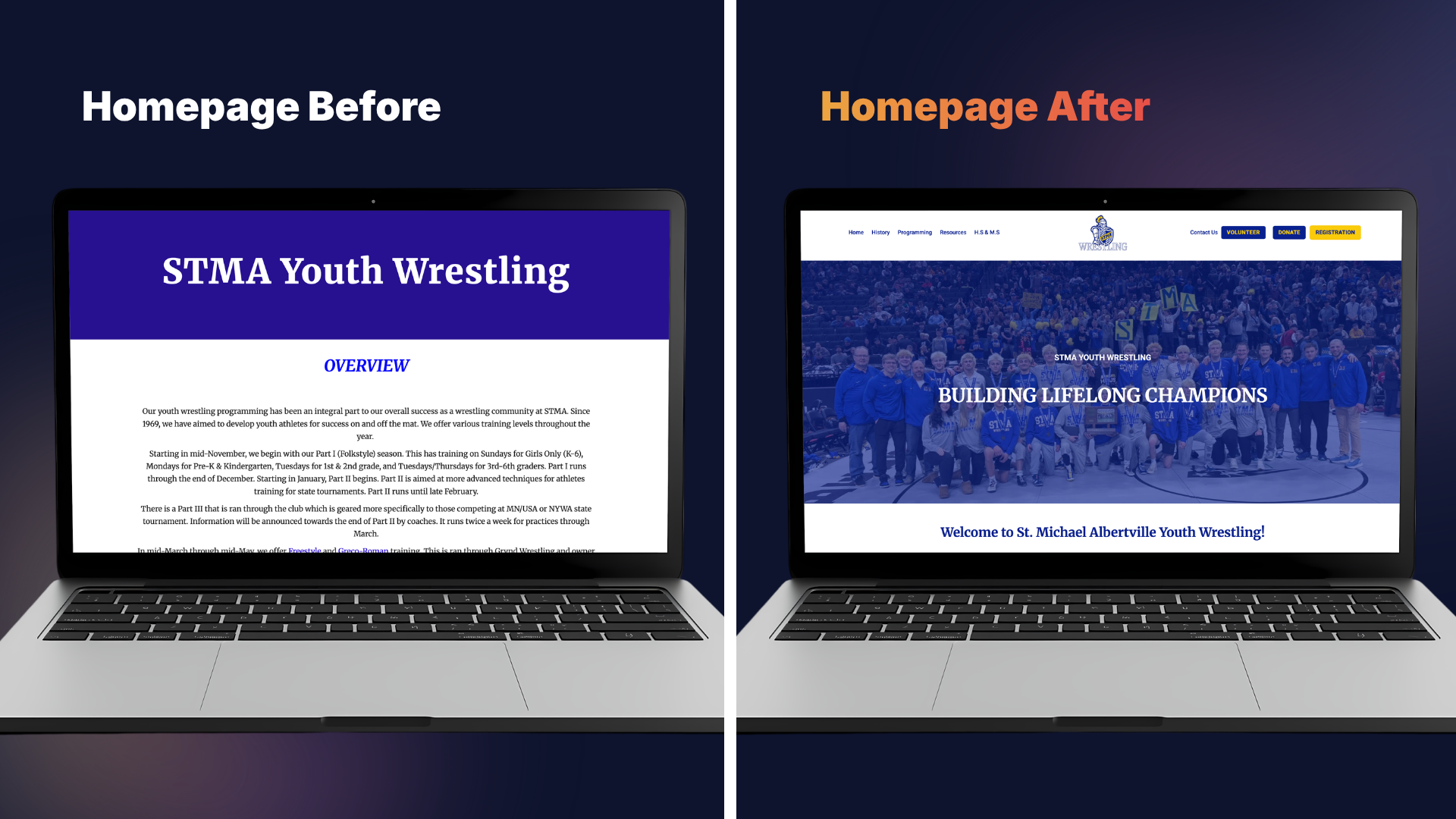
    When STMA Youth Wrestling came to us, they had a website that didn’t quite match the grit, pride, and history behind their program. Built on Google Sites, the existing platform was functional but just barely. It couldn’t keep up with the growing needs of a thriving youth athletic organization, and it certainly wasn’t doing justice to a team with a championship legacy worth celebrating.

    So, we got to work.

    The Challenge: A Site That Couldn’t Keep Up

    Google Sites is a great starting point for organizations that need to get online fast. However, as programs grow, so do their needs and STMA Youth Wrestling had officially outgrown theirs. The existing site lacked the visual polish to represent the program well, the flexibility to handle complex functionality, and the tools to streamline communication with families, volunteers, and supporters.

    The team came to us with a clear vision: they wanted a site that felt as strong as their athletes. They needed a platform that told their story, honored their history, and made it easy for the community to get involved whether that meant signing up a wrestler, making a donation, or volunteering their time.

    The Solution: A WordPress Rebuild, Built for a Champion

    We chose WordPress as the new platform, and for good reason. WordPress gave us the flexibility to build a fully custom experience while keeping the backend manageable for the STMA team to maintain. With a robust ecosystem of plugins and a proven content management system, it was the perfect engine for a project of this scope.

    Looking for Long-Term Digital Support?

    While WordPress is highly user-friendly, many organizations prefer to leave the technical heavy lifting to the experts. To help growing teams focus on what they do best, we offer monthly maintenance and security packages, alongside blocked hours for ongoing development and content creation.

    A Design That Represents the Program

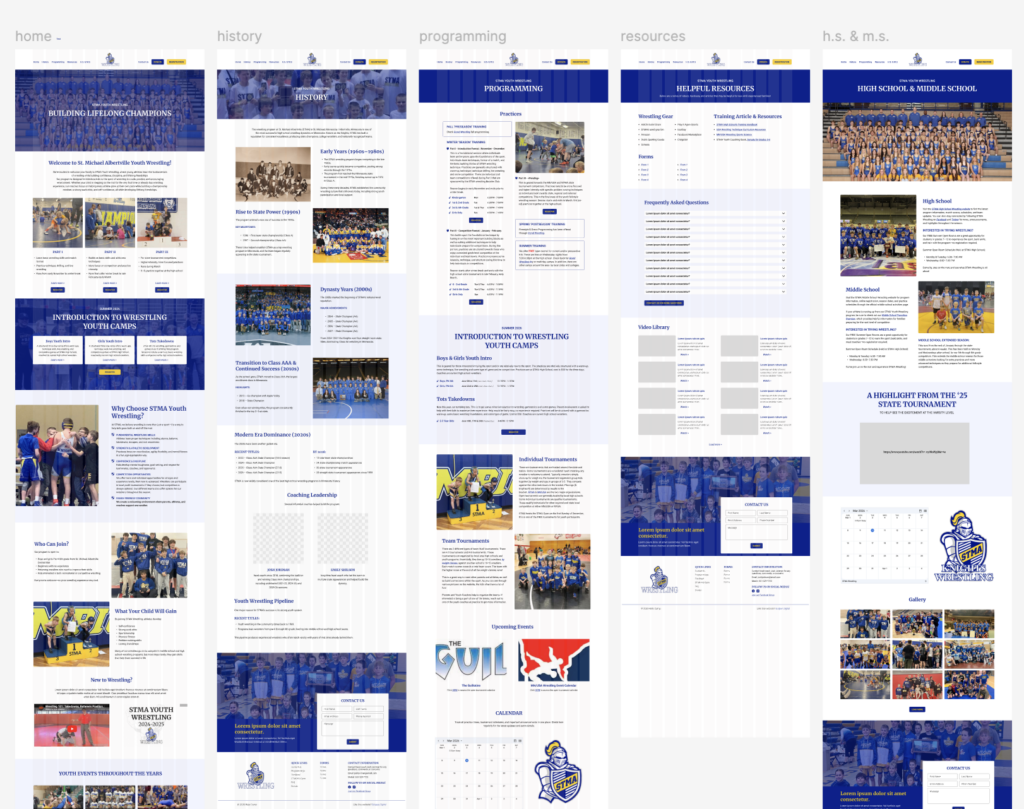
    The first priority was creating something STMA Youth Wrestling could be proud of. We designed the site with the organization’s identity front and center: hard work, family, and building lifelong champions  . The goal was for any visitor whether a first-time parent or a longtime supporter to land on the page and immediately understand what this program is about: building confidence, discipline, and lifelong friendships.

    We also built out dedicated sections to showcase their history of championships, because that legacy deserves the spotlight. Titles, milestones, and the athletes who earned them are now featured prominently, giving the program the recognition it has worked so hard to achieve.

    Built for Mobile-First Families

    Youth sports parents are rarely sitting at a desktop computer when checking tournament schedules or volunteer slots; they are on their phones at the gym, in the car, or on the sidelines.

    A massive part of this rebuild was ensuring a flawless mobile-first design. The new layout automatically scales to any device, ensuring text is perfectly readable and buttons are easy to tap with a thumb. Furthermore, by moving away from Google Sites, we were able to implement clean, localized SEO structures. This ensures that when local families search for youth sports and wrestling programs in the area, STMA stands out exactly where they should.

    Four Custom Forms, Built for Real Workflows

    One of the biggest functional upgrades was the implementation of four purpose-built forms, each designed to handle a specific community need:

    • 1. Registration Form: Getting wrestlers signed up is the lifeblood of the program. We built a streamlined registration form that is easy for parents to complete, captures all essential roster information, and drastically reduces manual back-and-forth administration.
    • 2. Donation Form: Youth sports programs run on community support. The new donation form removes friction from the giving process, making it simple and straightforward for families, alumni, and supporters to turn goodwill into real funding.
    • 3. Volunteer Form: It takes a village to run a wrestling program from coaches and coordinators to tournament-day helpers. The new volunteer form lets community members easily indicate their availability and areas of interest, streamlining coordinator workflows.
    • 4. Survey Form: To help the organization keep improving, the survey form gives STMA Youth Wrestling a direct line of feedback from the families they serve after a season, an event, or a major program change.

    Under the Hood: The Tech Powering the Site

    To transform the site from a passive bulletin board into an active operational tool, we integrated a few key pieces of backend functionality:

    • Advanced Custom Fields (ACF): This allowed us to build a structured, easy-to-update dashboard for the STMA staff. They can easily update championship records or roster numbers without risking breaking the site’s layout.
    • Optimized Database & Caching: High-traffic moments like registration opening day can crash weak websites. We built this site on a lightweight framework with premium caching to ensure it handles sudden spikes in traffic effortlessly.
    • Enhanced Security Protocols: Because the site acts as a gateway for community interaction, we implemented robust security firewalls and automated backup systems to protect the organization’s digital assets.

    The Digital Evolution at a Glance

    FeatureThe Old Google SiteThe New Custom WordPress Site
    Visual BrandGeneric, template-basedCustom, bold, and team-aligned
    Mobile ExperienceClunky and restrictive100% mobile-responsive
    Data CollectionFragmented third-party links4 seamlessly integrated custom forms
    ScalabilityLimited to basic page additionsUnlimited growth and custom blogging
    Admin ControlRigid layout optionsEasy-to-use backend tailored to volunteers

    Key Takeaway: When Should an Organization Dump Their “Starter” Website?

    Many nonprofits and youth clubs start out on free tools like Google Sites, and that is exactly what they should do to get off the ground. But how do you know when it’s time to upgrade?

    1. When administration becomes a chore: If your board is spending hours chasing paper forms or manual emails, your site isn’t working for you.
    2. When your brand outgrows the template: If your team is winning championships but your website looks outdated, your digital presence is holding you back.
    3. When you need data privacy and control: Custom forms allow you to safely route, manage, and protect community data exactly how you need to.

    The Result: A Site as Strong as the Program

    The new STMA Youth Wrestling website isn’t just a digital brochure; it’s a powerful operational tool. It represents the team’s identity, runs efficiently, and gives the community clear, easy ways to connect and participate.

    Going from a basic Google Site to a fully custom WordPress build is a significant leap, and STMA Youth Wrestling made it with purpose. The new platform is built to evolve right alongside them as their roster grows, their championship history extends, and their community deepens.

    Is your organization outgrowing its current website?

    We specialize in building custom digital solutions that match the energy and ambition of your team. Plus, we don’t just build and run—we offer ongoing maintenance, security, and dedicated content hours to keep your site running flawlessly long after launch.

    Contact us today to discuss your project!

  • Shopify B2B Setup: The Complete Guide for Wholesale Businesses

    Shopify B2B Setup: The Complete Guide for Wholesale Businesses

    Wholesale buyers want what retail customers already have: transparent pricing, easy reordering, and the ability to manage their own accounts. The days of faxing purchase orders or waiting for sales reps to return calls? Pretty much over.

    For years, Shopify meant direct-to-consumer brands. That’s changed. Today, Shopify handles B2B just as well as retail—and you can run both from one platform. This guide covers everything you need to know about Shopify B2B setup, from the native features to pricing structures to how it stacks up against Magento and WooCommerce.

    Whether you’re a manufacturer modernizing your wholesale operations, a distributor managing complex pricing tiers, or a DTC brand adding wholesale, this guide will help you decide if Shopify B2B fits your business—and how to actually implement it.

    Understanding Shopify B2B: Native Features vs. Third-Party Apps

    Your first choice: use Shopify’s built-in B2B features or add third-party apps? It depends on your Shopify plan, order volume, and how complex your operations are.

    Native Shopify Plus B2B Features

    Shopify Plus (the enterprise plan) includes the most powerful B2B functionality, all fully integrated. Here’s what you get:

    • Company Profiles: Group multiple users under one company account. Set permissions, payment terms, and track everything in one place.
    • Custom Price Lists: Create different pricing for different customers without duplicating products or building separate stores. Set percentage discounts, volume tiers, or fixed wholesale prices for specific companies.
    • Net Payment Terms: Offer Net 30, Net 60, or Net 90 terms directly in Shopify. The platform handles invoicing, payment tracking, and automated reminders.
    • Optimized B2B Checkout: A specialized checkout for wholesale buyers with PO number fields, tax exemption handling, and bulk ordering.
    • Self-Service Customer Portals: B2B buyers log in to see order history, track shipments, download invoices, and reorder with one click.

    These features are built into Shopify’s core, so you don’t worry about app conflicts, security holes, or features breaking when Shopify updates.

    Third-Party B2B Apps for Standard Shopify Plans

    Not everyone needs Shopify Plus. If you’re on Basic, Shopify, or Advanced, you can add wholesale features with third-party apps:

    • SparkLayer: Full B2B features including custom pricing, quick order forms, and customer catalogs. Starts around $99/month.
    • Wholesale Club: Budget option for basic wholesale—tiered pricing and wholesale-only access. Around $49/month.
    • B2B Handsfree: Focuses on automation with custom pricing, minimum order quantities, and approval workflows.

    Apps work, but there are tradeoffs:

    Upsides:

    • Lower cost than Shopify Plus
    • Pay only for features you need
    • Faster setup for simple wholesale

    Downsides:

    • Can slow down your site
    • App conflicts happen, especially after Shopify updates
    • Less integrated with core Shopify
    • Managing multiple app subscriptions
    • Higher transaction fees than Plus

    The Decision: Plus vs. Apps

    Three factors matter:

    1. Order Volume: Processing over $1 million annually in B2B? The lower transaction fees on Plus (0.15% vs. 0.5-2.0%) can offset half the monthly cost.
    2. Complexity: Need sophisticated pricing rules, approval workflows, or deep ERP connections? Native Plus features scale better than stacking apps.
    3. Growth Plans: Planning rapid expansion or managing DTC and B2B together? Plus saves you a costly migration later.

    Rule of thumb: Under $500K annually in B2B? Start with standard Shopify plus apps. Over $1M? Seriously look at Plus.

    Key Setup Steps and Configuration

    Once you’ve picked your approach, here’s how to configure it.

    Step 1: Setting Up Companies and Locations

    Company profiles are the foundation. Instead of treating each wholesale buyer as an individual customer, you create Company accounts with multiple users at different permission levels.

    How to set up Companies:

    1. Go to Customers > Companies in Shopify admin
    2. Click Add company and enter business name, contact, billing info
    3. Add multiple locations if your buyer has warehouses or stores in different cities
    4. Assign users with specific roles (Admins place orders and manage users; Standard users browse and add to cart)
    5. Set company-specific payment terms, credit limits, shipping preferences

    This mirrors real B2B relationships. A regional distributor might have purchasing managers in three states, all ordering under one account with shared credit terms but different shipping addresses.

    Pro tip: Start with your top 20% of wholesale customers first. High-value accounts give you immediate feedback, and getting them online drives the most ROI.

    Step 2: Configuring Price Lists and Catalogs

    Shopify B2B lets you keep one product catalog while showing different prices to different buyers—no duplicate products or separate stores needed.

    Creating Price Lists:

    1. Go to Products > Price lists
    2. Create a new list with a clear name (“Gold Tier Wholesale” or “Regional Distributor Pricing”)
    3. Choose your pricing method:
      • Percentage discount: Blanket discount (40% off retail) on everything
      • Fixed pricing: Specific wholesale prices per product
      • Volume pricing: Tiered pricing by quantity (10-49 units = $10 each, 50+ = $8 each)
    4. Assign the list to specific companies or segments
    5. Set date ranges for seasonal promotions or temporary agreements

    Example: A coffee roaster sells retail bags at $16 online. Their cafe partners see $11 per bag when logged in. Regional distributors see $9 and can access bulk packaging that retail customers never see.

    No manual quoting, fewer errors, and wholesale buyers can order 24/7 without waiting for sales approval.

    Step 3: Setting Payment Terms and Checkout

    Traditional B2B runs on credit—buyers get goods now, pay invoices in 30-90 days. Shopify B2B handles this natively on Plus, or through apps on standard plans.

    Configuring Net Payment Terms (Shopify Plus):

    1. Go to Settings > Payments > B2B payment terms
    2. Enable terms and set defaults (Net 30, Net 60, Net 90, or custom)
    3. Assign specific terms to companies based on creditworthiness
    4. Set credit limits to cap outstanding balances
    5. Enable automated invoices and payment reminders

    B2B Checkout Optimization:

    B2B checkout should match business buying:

    • PO Number Fields: Let buyers reference internal purchase orders for accounting
    • Tax Exemption Handling: Auto-apply exemptions for buyers with valid certificates
    • Bulk Order Entry: Quick order forms where buyers enter multiple SKUs at once instead of clicking through product pages
    • Saved Carts: Save draft orders for later approval

    Example: A restaurant supply company gives Net 30 to established customers. New customers pay by card. After three on-time payments, they automatically qualify for Net 30—all managed through Shopify workflows.

    Step 4: Customer Portals and Reordering

    B2B buyers order repeatedly. A good customer portal cuts reorder friction and reduces your sales team’s workload.

    Essential Portal Features:

    • Order History: Full past purchase visibility with filtering
    • Invoice Downloads: One-click PDF invoices for accounting
    • Shipment Tracking: Real-time tracking in the dashboard
    • Quick Reorder: One-click to add previous orders to cart—perfect for regular replenishments
    • Saved Lists: Custom product lists for seasonal orders or specific projects

    Shopify Plus has these built in. Standard Shopify needs apps like SparkLayer or Wholesale Club.

    Real impact: A food distributor cut inbound order calls by 60% after adding quick reorder. Customers who called every Monday for the same weekly order now handle it themselves in two minutes.

    Pricing Considerations for Shopify B2B

    The true cost goes beyond monthly fees to transaction costs, apps, and your team’s time.

    Shopify Plus Pricing Path

    Shopify Plus starts at $2,500/month (or 0.25% of monthly sales, whichever is higher). Includes:

    • All native B2B features
    • Reduced transaction fees (typically 0.15% with Shopify Payments)
    • Dedicated account management and priority support
    • Advanced automation (Shopify Flow)
    • Unlimited staff accounts

    When Plus makes sense financially:

    At $100K/month in B2B sales with 1.5% transaction fees on a standard plan, you’re paying $1,500/month in fees. On Plus, that drops to $150—a $1,350 monthly saving that covers half the Plus subscription. Add time savings from automation and the ROI gets clearer.

    Standard Shopify + App Pricing Path

    For smaller wholesale:

    • Shopify Advanced: $399/month (recommended for lower transaction fees and better reports)
    • B2B App (SparkLayer): $99-$299/month depending on features
    • Transaction Fees: 0.5-0.85% per transaction with Shopify Payments

    Total monthly: $500-$700 plus transaction fees

    This works well under $500K annually in B2B, especially if wholesale is secondary to DTC.

    ROI Analysis: The Breakeven Point

    The decision point typically falls at $750K to $1M in annual B2B revenue:

    • Below $750K: Standard plan + apps offer better value
    • $750K – $1M: Either path could work
    • Above $1M: Plus usually delivers better ROI

    Don’t forget hidden costs: staff time processing orders manually, pricing errors, missed opportunities when buyers abandon complex quote requests, and the competitive edge of modern self-service B2B.

    Common Use Cases and Industries

    Shopify B2B serves different industries with unique needs.

    Unified Commerce: DTC + B2B from One Platform

    Many brands operate hybrid models—selling to consumers online while supplying retail partners or distributors. Shopify B2B excels here by keeping one inventory pool while separating pricing and access.

    Example: An organic skincare brand sells $50 face creams on their consumer site. Spa and salon partners see the same products at $30 (40% wholesale) when logged into B2B accounts. Inventory syncs real-time across both channels, preventing overselling and simplifying fulfillment.

    Manufacturing & Distribution

    Manufacturers and distributors handle complex pricing, minimum order quantities (MOQs), and varied shipping.

    Shopify B2B solutions:

    • Set product-level or order-level MOQs (industrial chemicals only in 25kg increments)
    • Configure negotiated pricing per distributor
    • Support drop-shipping where orders route directly to manufacturers
    • Handle bulk packaging variants (retail 6-packs vs. wholesale cases of 48)

    Example: An industrial supply company manages 200+ wholesale accounts with custom pricing. Sales reps used to create quotes in Excel manually. Now buyers log in, see their prices automatically, and order 24/7. Sales focuses on relationships instead of order entry.

    Food & Beverage and Apparel

    These industries face seasonal swings, pre-order cycles, and compliance requirements.

    Key features:

    • Pre-order management for seasonal items (holiday collections, harvest pre-buys)
    • Date-specific pricing (early bird for pre-orders)
    • Compliance document storage (ServSafe certificates, business licenses)
    • Minimum order values for shipment profitability

    Example: A craft brewery uses Shopify B2B for wholesale restaurant and bar accounts. Buyers pre-order limited seasonal releases at a discount, schedule recurring deliveries of year-round beers, and access real-time inventory for last-minute event orders.

    Shopify B2B vs. Alternatives: Magento & WooCommerce

    If you’re evaluating Shopify B2B, you’ve probably looked at Magento (Adobe Commerce) and WooCommerce. Here’s the honest comparison.

    Shopify B2B: Best for Ease of Use and Unified Commerce

    Strengths:

    • Turnkey SaaS with minimal IT overhead
    • DTC and B2B work together smoothly
    • Strong app ecosystem
    • Predictable monthly costs, no surprise hosting bills
    • Excellent performance and 99.99% uptime
    • Regular updates and security patches handled by Shopify

    Limitations:

    • Less flexibility for extremely complex custom workflows
    • Transaction fees (minimized on Plus)
    • Platform lock-in (harder to migrate than open-source)

    Best for: Small to mid-sized businesses ($500K – $50M revenue) wanting reliable, scalable B2B without a dedicated IT team. Ideal for unified DTC/B2B.

    Magento (Adobe Commerce): The Enterprise Heavyweight

    Strengths:

    • Unmatched flexibility for complex B2B logic and customization
    • Deep native B2B features for large enterprises
    • Strong ERP and PIM integrations
    • No transaction fees
    • Complete control over infrastructure and data

    Limitations:

    • High total cost of ownership (development, hosting, maintenance)
    • Needs dedicated technical team or expensive agency partnership
    • Slower time-to-market for new features
    • Performance challenges at scale without proper infrastructure investment
    • Security and updates require active management

    Typical costs: $50K – $500K+ for initial implementation, plus $5K – $50K/month ongoing for hosting, maintenance, and support.

    Best for: Large enterprises ($50M+) with complex multi-brand catalogs, sophisticated pricing rules, and existing IT infrastructure. Companies needing deep custom integrations with legacy ERP systems.

    WooCommerce B2B: Budget Option with Hidden Costs

    Strengths:

    • Low upfront cost (free core)
    • Familiar WordPress environment
    • Large plugin ecosystem

    Limitations:

    • Poor scalability for serious B2B
    • Plugin conflicts cause frequent breakage
    • Security vulnerabilities need constant vigilance
    • Performance degrades fast with large catalogs
    • DIY hosting means uptime and speed are on you
    • “Free” gets expensive once you add premium plugins, hosting, development, and maintenance

    Best for: Very small wholesale (under $100K annually) with simple needs and technical resources to manage WordPress. Not recommended for growing B2B.

    The Bottom Line

    For most small-to-mid-sized businesses, Shopify B2B offers the best balance of functionality, reliability, and total cost. Magento is still the choice for enterprise-scale complexity, but only when you have both the revenue and technical resources. WooCommerce is increasingly hard to justify for serious B2B due to maintenance overhead and scaling limits.

    Best Practices and Pitfalls to Avoid

    Learning from common mistakes saves months of frustration and lost revenue.

    Best Practices

    1. Maintain a Single Source of Truth for Inventory

    Don’t create separate “wholesale-only” stores or duplicate product catalogs. Use Shopify’s company-based access and pricing to show different products or prices to different buyers while keeping one inventory pool. This prevents overselling, reduces data entry errors, and simplifies operations.

    2. Train Your Sales Team on Shopify Backend

    Your sales team should know how to create draft orders, apply custom discounts, and manage company accounts in Shopify. This lets them handle exceptions (rush orders, special pricing) without IT while keeping accurate data in your system.

    3. Start Simple with Pricing Tiers

    Don’t try replicating 15 years of complex legacy pricing on day one. Start with 2-3 clear tiers (Standard Wholesale, Volume Buyer, Distributor) and add complexity only as needed. Simpler structures are easier to explain to buyers, easier to manage, and reduce errors.

    4. Automate Onboarding Communications

    Use Shopify Flow (on Plus) or apps like Klaviyo to trigger welcome emails when new B2B accounts are created. Include login instructions, catalog highlights, ordering tutorials, and sales rep contact info. Well-onboarded customers place larger first orders and stick around longer.

    5. Monitor Key B2B Metrics

    Track metrics specific to B2B success:

    • Average order value (B2B should be 5-10x higher than DTC)
    • Reorder rate and frequency
    • Days between orders
    • Self-service vs. sales-assisted order ratio
    • Payment terms adherence

    Pitfalls to Avoid

    1. Choosing Poorly-Coded Apps on Standard Shopify

    Not all B2B apps are equal. Cheap apps load excessive JavaScript, slow your site, and create poor experiences. Before committing, test app performance with Google PageSpeed Insights, read recent reviews for compatibility issues, and choose established apps with responsive support.

    2. Neglecting Mobile Experience

    B2B buyers increasingly order on mobile—during sales calls, walking warehouse floors, traveling between job sites. Test your B2B checkout and customer portal on phones and tablets. If the experience is clunky, you’ll lose orders.

    3. Over-Restricting Catalog Access

    Some businesses hide their B2B catalog entirely, requiring login credentials before buyers see anything. This creates unnecessary friction. Consider showing your wholesale catalog publicly with “Login to see pricing” messages. Prospective buyers can evaluate your offerings before creating an account.

    4. Ignoring Integration Opportunities

    Shopify B2B works better connected to your broader tech stack:

    • Sync with accounting software (QuickBooks, NetSuite) to eliminate double-entry
    • Connect to your CRM (HubSpot, Salesforce) to track customer journey
    • Integrate with EDI networks if selling to large retailers
    • Link to inventory management for real-time stock visibility

    5. Underestimating Change Management

    Technology is half the battle. Your team needs training, your buyers need onboarding, and your processes need updating. Allocate time for internal training, create buyer education materials, and plan a phased rollout instead of switching overnight.

    Conclusion

    The wholesale landscape has changed. Buyers expect modern, self-service experiences with transparent pricing, easy reordering, and 24/7 access. Businesses still using manual processes, email-based ordering, and scattered systems will lose ground to more efficient competitors.

    Shopify B2B is a solid solution for small-to-mid-sized businesses ready to modernize wholesale. Whether you choose native Shopify Plus features for high-volume operations or use third-party apps on standard plans for lighter wholesale, the platform grows with your business.

    The strategic advantages: unified inventory across DTC and B2B, reduced overhead through automation, better buyer experiences that drive larger and more frequent orders, and a scalable foundation that supports growth without costly platform migrations.

    Ready to transform your B2B operations?

    If you’re considering Shopify B2B, partnering with an experienced Shopify agency can speed up implementation and help you avoid costly mistakes. A qualified partner will assess your specific requirements, design pricing structures that match your existing relationships, handle technical configuration, and train your team for long-term success.

    Whether you’re migrating from a legacy B2B platform like Magento, adding wholesale to an existing DTC Shopify store, or launching B2B for the first time, now’s a good time to modernize. Your buyers are ready. Is your business?


    Looking for expert guidance on your Shopify B2B implementation? Contact a Shopify Plus Partner agency to discuss your specific requirements and get a tailored implementation roadmap.

  • Digital decay: why feeding the social media beast is starving your brand

    Digital decay: why feeding the social media beast is starving your brand

    Every Monday morning, Sarah opens her content calendar and feels her chest tighten. Twenty-eight posts scheduled across four platforms. Stories, reels, static posts, carousel updates. She’s posting three times a day on Instagram, twice on Facebook, and somehow still feels like she’s falling behind.

    Her engagement numbers tell a different story than her effort. Despite doubling her output over the past year, reach is down 35%. Comments have become sparse. And last week, she noticed something that made her stomach drop: her follower count had decreased for the third month in a row.

    Sarah isn’t failing at social media. She’s doing exactly what the internet told her to do. And that’s the problem.

    The myth that’s burning out your team

    Somewhere along the way, “consistency” became confused with “constant presence.” The advice to “stay top of mind” morphed into an exhausting mandate to post every single day—multiple times a day—regardless of whether you actually have something valuable to say.

    This hustle-culture approach to social media isn’t just ineffective. It’s actively damaging your brand.

    The phenomenon has a name: digital decay. It’s what happens when the pressure to feed the content beast transforms your social media presence from a strategic communication channel into white noise. And it’s happening to businesses of every size, across every industry.

    The hidden costs of overposting

    The algorithm strikes back

    Social media platforms have evolved far beyond simple chronological feeds. Today’s algorithms are sophisticated relationship-strength calculators, designed to surface content that users genuinely want to see—not content from accounts that simply post the most.

    When you post too frequently with underwhelming content, you’re not training the algorithm to favor you. You’re training it to suppress you.

    Facebook and Instagram both actively penalize accounts that flood feeds with low-engagement content. Each time you post something that your audience scrolls past without engaging, you’re sending a signal to the platform: “This account’s content isn’t connecting.”

    Meta and TikTok take it further, hitting repetitive or low-performing content with higher cost-per-thousand-impressions (CPMs) if you try to boost it. You’re paying a premium to overcome the penalty you created by overposting in the first place.

    The data is stark: On Facebook, consistently posting more than twice per day demonstrably reduces per-post engagement. That reduced engagement doesn’t just affect those individual posts—it damages your account’s overall algorithmic standing, making it harder for even your best content to reach your audience.

    Audience fatigue: the invisible exodus

    While you’re watching your engagement metrics decline, something more insidious is happening in the minds of your followers.

    81% of consumers unsubscribe from brands that inundate them with excessive marketing messages.

    Let that sink in. More than four out of five people will actively remove your brand from their life when you show up too often with too little value.

    This isn’t about users being fickle or ungrateful. It’s about basic human psychology. We’re living through an era of unprecedented information overload. The average person is exposed to thousands of marketing messages daily. Social media was supposed to be the platform where users had control—where they chose which brands to engage with and when.

    When you violate that implicit agreement by turning your account into a content firehose, you trigger a defense mechanism. Users don’t just stop engaging—they actively retreat. They mute your account. They unfollow. And increasingly, they’re abandoning social platforms altogether.

    Gartner projects that 50% of consumers may either abandon or significantly limit social media usage in the coming years, citing platform fatigue and declining content quality as primary drivers. If half your audience is contemplating a social media detox, the last thing you want is for your brand to be the reason they finally pull the trigger.

    Brand dilution: when everything means nothing

    There’s a particular brand of content that’s everywhere now across business social media accounts. You know the type:

    “Happy Monday! Who’s ready to crush this week? 💪”

    “It’s Throwback Thursday! Here’s a photo from our office in 2015!”

    “Friday vibes! What are your weekend plans?”

    These posts exist for one reason: to fill a content calendar slot. They’re not rooted in strategy, audience insight, or genuine value. They’re digital busy work, masquerading as brand presence.

    Every time you post filler content, you dilute your brand’s actual message. Your core value proposition—the thing that makes your business worth paying attention to—gets buried beneath an avalanche of mediocrity.

    Consider what message you’re actually sending when you post just to stay active:

    You look desperate for attention. “Please notice us, even though we have nothing interesting to say.”

    Your feed becomes a relentless sales pitch, lacking the educational or entertaining content that builds trust.

    Followers begin to see your brand as superficial, prioritizing visibility over value.

    The brands that command attention aren’t the ones that post most often. They’re the ones that post with purpose.

    The unfollow spike: a cautionary tale

    The abstract costs of overposting—algorithm penalties, audience fatigue, brand dilution—can feel theoretical until you see the actual numbers.

    A research study tracked a retail brand that embraced an aggressive high-frequency posting strategy. The business posted multiple times per day across Instagram and Facebook, convinced that increased visibility would drive sales.

    Here’s what actually happened:

    A single well-timed post did generate a temporary 5% sales increase.

    But that same posting frequency caused a 300% increase in the likelihood that users would unfollow the account.

    Over the course of one year, the overposting strategy led to a 20% decrease in total followers.

    Net result: A 5% overall decrease in sales, despite posting more than ever.

    The business was working harder, spending more time and resources on content creation, and losing money in the process.

    This isn’t an isolated case. It’s a pattern playing out across thousands of business accounts right now. The difference is that most brands don’t have the research infrastructure to trace the connection between their posting frequency and their follower attrition.

    They just know something isn’t working.

    The exceptions: when high-frequency posting actually works

    Before you slash your content calendar to one post per month, it’s important to acknowledge: high-frequency posting isn’t universally harmful. Context matters.

    Platform-specific norms

    Some platforms are built for volume. X (formerly Twitter) moves at lightning speed, with content lifespans measured in minutes rather than hours. Pinterest is a visual search engine where more pins can mean more discovery opportunities. On these platforms, higher posting frequency is expected and often necessary.

    TikTok represents an interesting middle ground. The platform can tolerate—and sometimes reward—creators who post multiple times per day, provided the content remains highly native, entertaining, and genuinely valuable. The key difference? TikTok’s algorithm is less about relationship strength and more about individual content performance. One viral video can reach millions regardless of how often you post.

    But note the qualifier: the content must be good. High volume on TikTok still requires high quality. You can’t game the system with filler.

    Live events and real-time updates

    If your company is hosting a conference, launching a major product, or managing a time-sensitive situation, frequent updates are not only acceptable—they’re expected.

    Live-tweeting a keynote speech, posting multiple Instagram Stories from a trade show floor, or providing real-time customer support updates during a service outage all fall into the “high-frequency done right” category.

    The difference? These bursts of activity are time-bound (clear beginning and end), context-appropriate (your audience wants the frequent updates), and value-driven (each post has a genuine informational purpose).

    Segmented content strategy

    Global brands often manage multiple accounts: a main brand presence, regional accounts for different markets, dedicated customer service handles, or sub-brands with distinct identities.

    If you’re posting twice daily across five different accounts, the aggregate volume is high, but each individual audience only sees content tailored to them at a sustainable frequency.

    The key is true segmentation. If your followers are seeing all five accounts in their feed because you’re duplicating content across them, you’ve just multiplied your overposting problem.

    Finding your sweet spot: the quality over quantity framework

    So if “post every day” is bad advice, what’s the right answer?

    The frustrating truth: it depends. But here’s how to figure it out for your specific brand and audience.

    1. Audit your current performance

    Stop creating new content for a moment and look at what you’ve already published. Pull reports for the last 90 days and analyze:

    Engagement rate by post frequency — On days when you posted once versus multiple times, how did engagement compare?

    Top performing content — What were your best posts? How often were you posting during those periods?

    Follower growth patterns — Chart your follower count against your posting frequency. Do you see correlation?

    Time-to-create versus impact — Which posts took 15 minutes versus 3 hours? Was there a quality difference in performance?

    Most social media managers discover an uncomfortable truth in this data: their best-performing content wasn’t produced during their highest-volume periods. It came during windows when they had time to think strategically.

    2. Define “valuable” for your audience

    Every piece of content should pass the value test before publication. Ask yourself:

    Does this educate? Are you teaching something your audience doesn’t already know?

    Does this entertain? Will this genuinely make someone smile, laugh, or feel something?

    Does this inspire action? Are you moving someone toward a meaningful decision or behavior?

    Does this strengthen relationship? Does this post demonstrate that you understand and care about your audience?

    If the answer to all four questions is no, don’t post it. It doesn’t matter that you have a gap in your content calendar. An empty slot is better than a value-free post that trains the algorithm—and your audience—to ignore you.

    3. Build a sustainable content calendar

    Transition from a calendar based on frequency to one based on quality thresholds.

    Instead of saying “We post to Instagram daily, Facebook three times per week, and LinkedIn twice per week,” try “We publish when we have content that meets our value criteria, typically resulting in 8-12 posts per month across platforms.”

    This shift does several things. It reduces burnout—your team isn’t scrambling to manufacture content to meet arbitrary quotas. It improves quality—time and creative energy go into making each post genuinely good. And it resets expectations—your audience learns that when you show up, it’s worth paying attention.

    Start by cutting your current posting frequency by 30-50%. Monitor engagement rates closely. In most cases, you’ll see per-post engagement increase, even as total output decreases. That’s the signal you’re on the right track.

    4. Batch-create and build a content reserve

    One reason businesses fall into the overposting trap is reactive scheduling. You’re constantly scrambling for tomorrow’s content, which leads to posting mediocre material just to maintain consistency.

    Instead, dedicate time to batch-create high-quality content. Spend one day per month developing 10-15 excellent posts. Bank them. Then schedule strategically, leaving room to be responsive to real-time opportunities.

    This approach gives you several advantages. Higher quality baseline—you’re creating from a strategic mindset, not a desperate one. Flexibility—when something timely happens, you can swap a scheduled post without creating a gap. And reduced stress—you’re not starting each week at zero.

    5. Embrace strategic silence

    Here’s a radical idea: it’s okay to have gaps in your posting schedule.

    Your audience does not wake up each day wondering whether you posted. They don’t check your profile daily to confirm your existence. What they do notice is when you show up with something genuinely worth their time.

    Strategic silence creates anticipation. It trains your audience that when you post, it matters. It gives the algorithm clear signals about which of your content clicks with people, rather than flooding it with mixed data.

    The most successful brands on social media aren’t the loudest. They’re the most intentional.

    The permission you’ve been waiting for

    If you’re reading this and feeling a sense of relief, trust that instinct.

    You don’t need to post every day. You don’t need to maintain a presence on every platform. You don’t need to manufacture content just to “stay active.”

    What you need is a content strategy rooted in genuine value, executed at a pace your team can sustain while maintaining quality.

    The social media world has changed. Algorithms are smarter. Audiences are more selective. The old playbook—post constantly, hope something sticks—doesn’t just fail to deliver results. It actively undermines your brand.

    Digital decay isn’t inevitable. It’s a choice. And you can choose differently.

    Stop posting to check a box. Start posting to make an impact.

    Your audience will notice the difference. So will your engagement metrics. And your social media manager might actually sleep better on Sunday nights.


    Key takeaways

    • Overposting triggers algorithm penalties, reducing your reach even when you do publish great content
    • 81% of consumers unsubscribe from brands that bombard them with excessive messages
    • High-frequency posting can increase follower loss by 300%, undermining long-term growth
    • Quality beats quantity: Strategic, valuable content outperforms daily filler posts
    • Audit your metrics to find your brand’s optimal posting frequency
    • Embrace strategic silence: Gaps in your calendar are better than value-free posts

    Need help developing a sustainable, high-impact social media strategy for your brand? Eclipse Digital specializes in helping businesses move from content overwhelm to strategic clarity. Contact us to learn more.

  • Building Your Digital Staff: A Practical Guide to AI Agents for Business

    Building Your Digital Staff: A Practical Guide to AI Agents for Business

    What if you could hire a receptionist, follow-up coordinator, and proposal writer tomorrow—no interviews, no onboarding, just instant capability?

    That’s not a pitch. It’s what 65% of businesses are already doing. They’re building digital staffs with AI agents that handle routine operations while humans focus on growth.

    This isn’t about replacing your team. It’s about giving them backup.

    The shift from automation to delegation

    We’ve been automating for decades. Spreadsheets automated calculations. Email automated memos. CRM software automated Rolodexes.

    But AI agents are different. They don’t just automate—they delegate. You can hand them a job and walk away.

    Think receptionist, not robot. Someone (or something) you trust to handle calls while you’re in a meeting. Someone who follows up with leads when you forget. Someone who drafts proposals so you can focus on closing deals.

    That’s the shift happening right now. And it’s more accessible than you think.

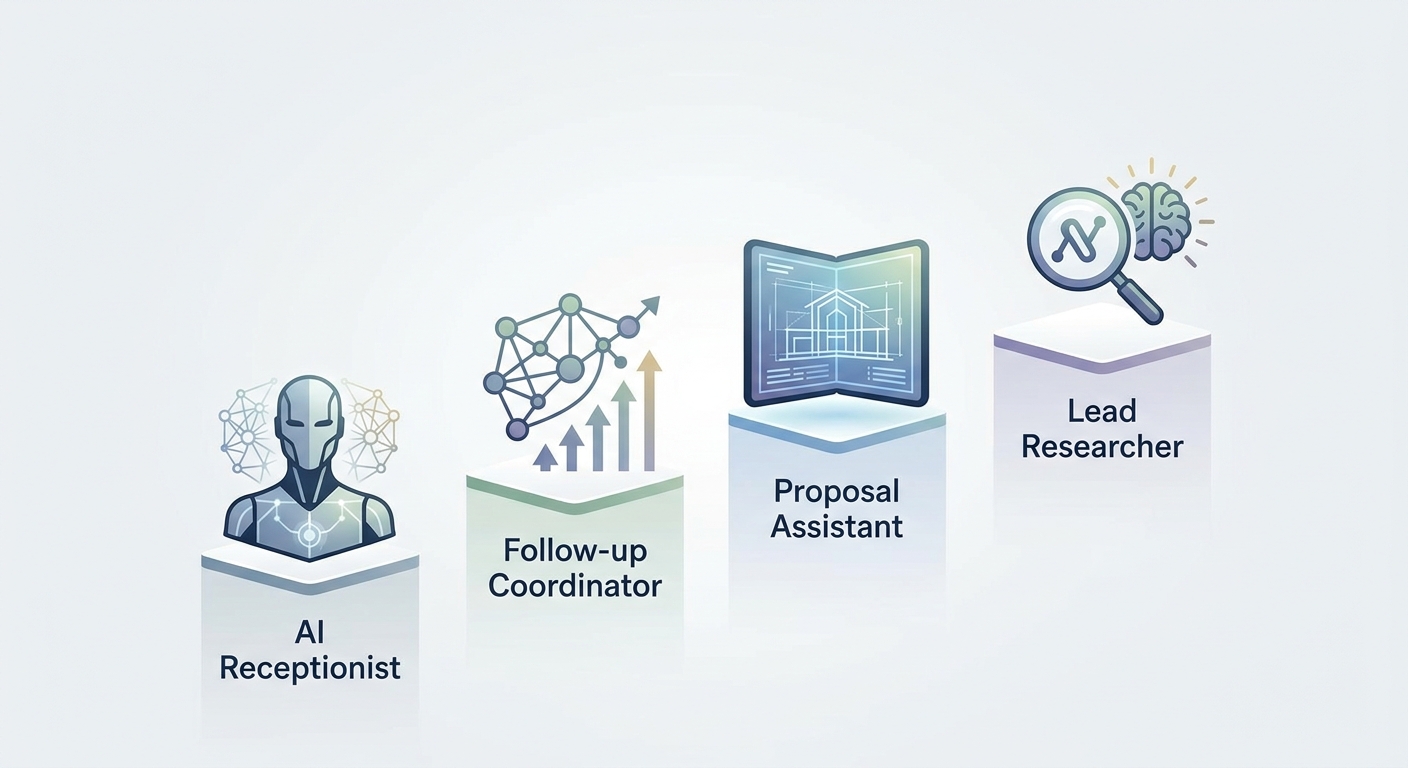
    The four pillars of your digital staff

    The Four Pillars of Your Digital Staff

    Most businesses need the same four roles covered. Let’s break them down.

    1. AI receptionist: your 24/7 front desk

    What it does:
    Answers calls. Books appointments. Routes urgent matters to the right person.

    Why it matters:
    You can’t answer every call. Neither can your team. But every missed call is a missed opportunity.

    AI receptionists fill the gap. They pick up on the first ring, handle common questions, schedule appointments directly into your calendar, and escalate complex issues to humans.

    Setup takes 5-15 minutes for basic configurations. Most platforms charge around $199/month—less than a day of a human receptionist’s salary.

    Who needs this:
    Professional service firms, medical offices, agencies—anyone who can’t afford to miss inbound calls but can’t justify a full-time front desk.

    Real-world impact:
    A medical practice in our network was having nurses answer phones mid-appointment. They switched to an AI receptionist for scheduling. Result? Nurses focus on patient care. Patients get immediate scheduling. No more “I’ll call you back.”

    2. Follow-up coordinator: the persistence engine

    What it does:
    Sends follow-up emails. Nurtures leads based on behavior. Tracks engagement. Adapts messaging based on what’s working.

    Why it matters:
    Most leads don’t convert on first contact. They need 5, 7, sometimes 10 touches. You know this. But actually doing it? That’s where businesses fail.

    AI follow-up coordinators don’t forget. They track who opened what, who clicked where, and adjust their approach accordingly. Not static drip campaigns—adaptive, behavior-driven conversations.

    64% of businesses using AI for lead generation report higher-quality leads than manual outreach. The reason? Consistency. AI doesn’t get busy. It doesn’t lose track. Every lead gets the attention it deserves.

    Who needs this:
    B2B companies with long sales cycles. Service businesses where leads take time to convert. Anyone frustrated by prospects going cold.

    Real-world impact:
    A B2B SaaS company added a follow-up coordinator to their pipeline. 30% increase in qualified meetings. Sales team stopped chasing lukewarm leads and focused on closing ready buyers.

    3. Proposal assistant: win more, write less

    What it does:
    Analyzes RFPs. Drafts responses from your content library. Checks compliance. Flags missing requirements.

    Why it matters:
    Proposals take forever. You’re pulling from old docs, rewriting sections, making sure you didn’t miss a compliance checkbox. Meanwhile, your competition already submitted.

    AI proposal assistants can automate up to 80% of the process. They pull relevant content, adapt it to the RFP requirements, and hand you a near-complete draft for final review.

    Microsoft reported a 50% reduction in content library maintenance after implementing AI-powered proposal tools. Faster turnaround. Higher win rates. Less busywork.

    Who needs this:
    Agencies, consultancies, B2B service providers—anyone responding to RFPs or writing custom proposals regularly.

    Real-world impact:
    A marketing agency was spending 10-15 hours per RFP response. After implementing a proposal assistant, they cut that to 3-4 hours of review and customization. Same quality. Triple the capacity.

    4. Lead researcher: intelligence on autopilot

    What it does:
    Researches prospects. Enriches CRM data. Scores leads in real time. Flags buying signals.

    Why it matters:
    Your sales team spends hours researching prospects before making calls. Company size, recent news, decision-makers, budget signals—it’s necessary, but it’s slow.

    AI lead researchers handle the grunt work. They pull data, score fit, identify intent signals, and surface the leads most likely to convert. Your team shows up to every call prepared.

    The best part? It updates continuously. A prospect visits your pricing page? Score goes up. They engage with a competitor? You know instantly.

    Who needs this:
    Sales teams, business development, account-based marketing—anyone doing outbound or managing a large pipeline.

    Real-world impact:
    One team cut research time from 30 minutes per lead to under 5. Same quality intel. More calls. Better close rates.

    How to build your digital staff (without breaking anything)

    Don’t try to do this all at once. Here’s the smart approach.

    Step 1: Identify your biggest bottleneck

    Ask yourself:

    • Where do leads die?
    • What eats the most time?
    • What would benefit from 24/7 coverage?

    For most businesses, it’s either reception (missed calls) or follow-up (leads going cold).

    Step 2: Start with one agent

    Pick the highest-impact role. Implement it. Get it working. Then add the next.

    Trying to deploy four agents at once is how projects stall. One at a time. Nail it, then scale it.

    Step 3: Integration is everything

    Your AI agents need to talk to your systems. CRM, calendar, email—data has to flow.

    Most platforms integrate with HubSpot, Salesforce, Google Workspace, and other common tools. Make sure that’s in place before you launch.

    A receptionist that can’t update your CRM is just an expensive answering machine.

    Step 4: Train and refine

    AI gets better over time. Monitor what’s working. Adjust scoring models. Update response templates. Tweak qualification criteria.

    Think of it like onboarding a new hire. They improve with feedback.

    What this means for your business

    Human-AI Partnership

    The math

    Traditional receptionist: $35,000–$50,000/year + benefits
    AI receptionist: ~$2,400/year

    Follow-up coordinator (fractional hire): $30,000–$40,000/year
    AI follow-up: ~$1,200–$3,000/year (depending on volume)

    For most SMBs, payback happens in 2-4 months. After that, it’s pure margin improvement.

    The reality check

    AI doesn’t replace humans. It amplifies them.

    The best results come from pairing AI with people. AI handles the repetitive stuff. Humans handle the complex, relationship-driven work.

    So the question isn’t “Should I replace my team?” It’s “What should my team focus on?”

    If your sales team spends half their day researching leads, you’re wasting talent. Let AI research. Let humans sell.

    The competitive edge

    Early adopters are scaling faster. They’re responding to leads within minutes, not hours. They’re winning proposals because they’re first to respond. They’re closing deals because nothing falls through the cracks.

    You don’t have to be an early adopter. But you do need to keep pace.

    Getting started

    Here’s your action plan:

    1. Assess where you need help most
    Reception? Follow-up? Proposals? Research? Pick one.

    2. Set a 30–90 day timeline
    Most implementations take a month or two, including setup and refinement.

    3. Avoid these mistakes:

    • Trying to automate everything at once
    • Skipping integration (your agents need to talk to your systems)
    • Setting it and forgetting it (AI improves with monitoring)

    4. Track success metrics:

    • Response time (calls, leads, proposals)
    • Conversion rates (leads to meetings, proposals to wins)
    • Time saved (hours per week your team gets back)

    Your team just got bigger

    Building a digital staff isn’t about cutting costs. It’s about expanding capacity.

    You get a receptionist who never sleeps. A follow-up coordinator who never forgets. A proposal writer who never misses a deadline. A researcher who works in the background while you focus on closing.

    The shift is from “doing everything” to “orchestrating everything.” You become the conductor. Your digital staff handles the notes.


    Ready to build yours?

    Eclipse Digital helps businesses implement AI agents without the guesswork. We’ll assess your bottlenecks, recommend the right tools, handle integration, and train your team.

    If you’re tired of missed opportunities and maxed-out capacity, let’s talk.

    Contact Eclipse Digital to schedule a Digital Staff Assessment.


    Published by Eclipse Digital • March 2026

  • What’s Your OpenClaw Strategy? Moving from Random AI Tools to Real Business Automation

    What’s Your OpenClaw Strategy? Moving from Random AI Tools to Real Business Automation

    You’re using AI. Your team is using AI. Everyone’s using AI.

    But here’s the uncomfortable question: Do you have an AI strategy?

    If you’re like most businesses right now, the honest answer is no. You’ve got ChatGPT subscriptions scattered across departments. A few Zapier workflows cobbled together by that tech-savvy marketing manager. Maybe your CRM added an AI feature you’re sort of using. Perhaps someone in operations discovered Claude and swears by it for writing reports.

    This is what Thryv and the U.S. Chamber of Commerce are calling “Shadow AI” or “AI Sprawl” in their recent surveys. It’s the business equivalent of having a dozen disconnected apps all trying to solve the same problem in different ways. And while it feels like progress, it’s actually creating a dangerous illusion of improvement.

    The truth is, there’s a massive difference between using AI tools and having an AI strategy. One is reactive, fragmented, and expensive. The other is systematic, integrated, and genuinely competitive.

    The question isn’t whether you should adopt AI. You’re already doing that. The real question is: when will you stop accumulating tools and start building infrastructure?

    The hidden cost of “winging it”

    Recent surveys from Thryv and the U.S. Chamber of Commerce reveal that 55-68% of small and mid-sized businesses are now using AI in some capacity. That’s remarkable growth in just two years. But dig deeper into those numbers, and you’ll find something troubling: most of these businesses are just experimenting, not executing.

    They’re paying for multiple subscriptions. ChatGPT Plus, Jasper, Copy.ai, Zapier, maybe a few API credits here and there. Each tool promises to save time. Each integration claims to boost productivity. Yet somehow, teams feel busier than ever, drowning in a sea of disconnected platforms that don’t talk to each other.

    Here’s what that “winging it” approach actually creates:

    Data silos everywhere. Your marketing AI doesn’t know what your sales CRM knows. Your customer support tool can’t access your product database. Every system operates in isolation, forcing humans to be the connective tissue, copying, pasting, translating, and manually syncing information between platforms.

    Security blind spots. When employees adopt tools independently, IT has no visibility into what data is flowing where. Sensitive customer information gets pasted into third-party platforms with unknown data policies. Compliance becomes a nightmare. You can’t protect what you can’t see.

    Subscription bloat. Five team members each paying for their own ChatGPT Plus account. Three different automation platforms because different departments started with different tools. Duplicate functionality across systems because nobody realized another team already solved that problem.

    Cognitive overhead. Your team spends mental energy not just on their actual work, but on remembering which tool to use for what, how to format data for each platform, and which workarounds make incompatible systems cooperate.

    This isn’t progress. It’s chaos with a modern interface.

    The problem isn’t the individual tools (many are excellent at what they do). The problem is treating AI adoption as a procurement decision rather than an architectural one. You wouldn’t build a house by buying random building materials and hoping they fit together. Why would you build your business’s AI infrastructure that way?

    Tactical vs. strategic: a real-world comparison

    Let’s make this concrete. Consider two approaches to the same business problem: handling customer email inquiries.

    The tactical approach:
    Your customer service rep gets an email. They copy the message into ChatGPT and ask it to draft a professional response. They review the output, make some edits, then paste it into their email client and send it. Maybe they log the interaction in a spreadsheet. If they’re sophisticated, they’ve got a Zapier workflow that moves certain emails to a specific folder.

    This saves a few minutes per email. It feels productive. It is, marginally, better than nothing.

    The strategic approach:
    An OpenClaw agent monitors the inbox continuously. When an email arrives, it automatically categorizes the intent (support request, sales inquiry, partnership proposal). It pulls relevant context from your CRM: previous interactions, account status, outstanding issues. It cross-references your knowledge base for product-specific details. It drafts a contextually appropriate response that maintains your brand voice and includes accurate information. For routine inquiries, it sends the response autonomously. For complex situations, it flags the message for human review with a summary of the situation and a recommended approach.

    No copying. No pasting. No context switching. No manual logging. The entire workflow is invisible until human judgment is actually needed.

    See the difference? One is a productivity hack. The other is infrastructure.

    The tactical approach makes individual tasks slightly easier. The strategic approach eliminates entire categories of work while simultaneously improving quality, consistency, and response time.

    This distinction (tactical versus strategic) is the divide in AI adoption right now. Most businesses are stuck in the tactical mindset, asking “What can AI do for me?” when they should be asking “How should AI reshape how we work?”

    What OpenClaw actually is (and isn’t)

    Let’s clear up a common misconception: OpenClaw isn’t another chatbot. It’s not a tool you open when you need to write something or analyze data. It’s not competing with ChatGPT or Claude or Gemini.

    OpenClaw is an orchestration layer. A central nervous system for business automation that connects and coordinates everything else.

    Think of it this way: Individual AI tools are like having talented specialists who work in separate offices and never communicate. OpenClaw is the organizational structure that lets those specialists collaborate, share context, and work toward common goals.

    At its core, OpenClaw provides three critical capabilities that scattered tools simply cannot:

    Workflow automation that actually works. True automation means eliminating human intervention from routine processes, not just making those processes slightly faster. OpenClaw can monitor triggers across multiple systems, make contextual decisions about what to do next, execute complex multi-step workflows, and handle exceptions intelligently, all without someone clicking “Run” each time.

    Data integration across your entire business. OpenClaw breaks down the silos. It connects your CRM with your email with your calendar with your project management system with your analytics platform. When an AI agent needs information, it has access to your complete organizational context, not just whatever data lives in one isolated tool. This isn’t just convenient. It’s the difference between AI that can actually make informed decisions versus AI that generates plausible-sounding nonsense.

    Custom agents working together. This is where it gets interesting. Rather than having one general-purpose AI trying to do everything adequately, OpenClaw lets you deploy specialized sub-agents, each with specific expertise, access rights, and responsibilities. A content creation agent that understands your brand voice. A code review agent that knows your tech stack. A customer support agent with full access to your support history and product documentation.

    These agents don’t just exist in parallel. They coordinate. The support agent can hand off to the sales agent when it detects an upsell opportunity. The content agent can collaborate with the research agent to produce articles grounded in your actual data. The workflow is orchestrated, not improvised.

    This is what infrastructure looks like. Not a collection of point solutions, but an integrated system designed to evolve with your business.

    What a real OpenClaw strategy includes

    Building an actual AI strategy (not just accumulating tools) requires thinking through several layers that most businesses haven’t considered.

    Process auditing before implementation. You can’t automate chaos. Before deploying OpenClaw, you need a clear picture of your actual workflows, not how you think they work or how they’re documented, but how work actually flows through your organization. Where are the handoffs? Where does information get stuck? Which repetitive tasks consume disproportionate time? What decisions require human judgment versus rules-based processing?

    This isn’t a technology question. It’s a business architecture question. The most successful OpenClaw deployments start with brutal honesty about which processes deserve automation and which need redesign first.

    Integration architecture. Once you understand your workflows, you need to map the integration needs. What systems need to talk to each other? What data needs to flow where? What access permissions and security boundaries matter? How do you handle exceptions and edge cases?

    This is where many DIY automation projects fail. They solve the happy path but fall apart when reality introduces complexity. A proper OpenClaw strategy includes solid error handling, graceful degradation, and human escalation paths for situations that genuinely require judgment.

    Custom agent development. Generic AI is useful for generic tasks. But your business isn’t generic. Your competitive advantage comes from doing specific things in specific ways that reflect your unique expertise and relationships.

    Custom OpenClaw agents embody that uniqueness. They’re trained on your data, configured to your processes, and designed to amplify your specific capabilities. A content agent for a law firm operates very differently than one for a marketing agency, not because the underlying AI is different, but because the strategy and context are different.

    Ongoing optimization and governance. Here’s what nobody tells you about AI systems: they’re not set-it-and-forget-it. As your business evolves, your automation needs to evolve too. New products launch. Processes change. Regulations update. Customer expectations shift.

    A real OpenClaw strategy includes governance: who can deploy new agents, what data they can access, how performance is measured, when human oversight is required. It includes monitoring, not just “is it running,” but “is it producing the outcomes we actually care about?” And it includes iteration, continuously refining and expanding capabilities based on what you learn.

    Why this requires a partner (not just software)

    If OpenClaw is so powerful, why can’t you just download it and start automating?

    Technically, you could. OpenClaw is open-source. But here’s the reality: implementing strategic automation is different from installing software.

    The technology is the easy part. The hard part is the translation layer between what OpenClaw can do and what your business needs it to do. That’s not a technical problem. It’s a strategy problem.

    Think about what’s actually required:

    – Understanding your business deeply enough to identify automation opportunities you might not see yourself
    – Auditing existing workflows to find inefficiencies, redundancies, and bottlenecks
    – Designing an integration architecture that balances power with security and maintainability
    – Building and configuring custom agents that genuinely understand your specific context
    – Training your team not just to use the system, but to think differently about how work gets done
    – Providing ongoing support as your needs evolve and edge cases emerge

    This is where Eclipse Digital operates. We’re not selling software (OpenClaw is free). We’re selling the strategic thinking and technical implementation that turns powerful technology into actual business outcomes.

    We’ve done this before. We understand the patterns. We know which approaches work and which sound good in theory but fail in practice. We can help you avoid the expensive mistakes that come from treating automation as a technology project rather than a business change.

    More importantly, we become the ongoing partner who helps you evolve your OpenClaw strategy as your business grows. We don’t install a system and disappear. We build capabilities, transfer knowledge, and position you to continuously expand your automation maturity.

    The ROI of this approach is dramatic. Businesses that move from fragmented AI adoption to unified OpenClaw orchestration consistently report:

    – Time savings measured in hours per employee per week, not minutes
    – Error reduction in data-heavy processes, often 90%+ fewer mistakes
    – Subscription consolidation, replacing 5-10 separate tools with integrated capabilities
    – Competitive advantage from being able to operate at speed and scale that manual processes can’t match

    But perhaps most valuable is the strategic clarity that comes from actually knowing how your AI systems work, what they’re doing, and how they contribute to business goals. No more shadow IT. No more wondering which subscriptions are actually being used. No more data scattered across incompatible platforms.

    Just infrastructure that works.

    The question you need to answer

    Here’s where we are: AI adoption is accelerating whether you’re ready or not. Your competitors are experimenting. Your employees are finding tools. Your customers are experiencing AI-powered service from other companies and developing new expectations.

    The window for deliberate strategy is closing. The longer you operate with fragmented tools and shadow AI, the more technical debt you accumulate. The harder it becomes to untangle the mess and build something coherent.

    So the question isn’t whether you should have an AI strategy. It’s whether you’ll develop one intentionally, with proper architecture, integration, and governance, or whether you’ll let it emerge accidentally from the chaos of everyone doing their own thing.

    One path leads to competitive advantage. The other leads to expensive complexity that makes you less agile, not more.

    You don’t need more AI tools. You probably have enough already. What you need is a strategy that turns those tools (and the new capabilities OpenClaw provides) into genuine business infrastructure.

    You need to move from tactical hacks to strategic architecture.

    You need to move from Shadow AI to deliberate orchestration.

    You need to stop buying tools and start building systems.

    Ready to build your OpenClaw strategy?

    Eclipse Digital specializes in helping businesses make exactly this transition, from AI tool chaos to strategic automation infrastructure.

    We start with an OpenClaw strategy session: a deep-dive audit of your current state, your business priorities, and your automation opportunities. We help you see the patterns you’re too close to notice and design an implementation roadmap that delivers value quickly while building toward long-term change.

    This isn’t about technology for technology’s sake. It’s about giving you the infrastructure to compete, scale, and win in an AI-native business environment.

    Stop accumulating tools. Start building strategy.

    Contact Eclipse Digital to schedule your OpenClaw strategy session and discover what coordinated automation can do for your business.

    —

    The future belongs to businesses that treat AI as infrastructure, not as a collection of apps. Which side of that divide will you be on?

  • 5 Website Red Flags That Make You Look Like a Spam Site

    5 Website Red Flags That Make You Look Like a Spam Site

    5 website red flags that make you look like a spam site

    You’ve invested in marketing. You’re driving traffic to your website. But here’s the problem: visitors arrive, glance at your homepage for three seconds, and vanish. Your bounce rate is through the roof.

    Here’s the uncomfortable truth: your website might be accidentally triggering the same alarm bells in people’s brains that scam sites do on purpose.

    Users make snap judgments about website credibility in about 50 milliseconds (faster than you can blink). After years of dodging phishing attempts, malware pop-ups, and too-good-to-be-true offers, people have developed a sixth sense for spotting sketchy websites. If your legitimate business accidentally uses the same tactics that spammers rely on, you’ll lose potential customers before they even read your first headline.

    The good news? Most of these red flags are fixable. Let’s walk through the five most common mistakes that make visitors think “scam” and show you exactly how to fix them.

    Red flag #1: The dreaded “not secure” warning

    When someone visits your website and sees “Not Secure” displayed right next to your URL in their browser, it’s game over before you’ve even started.

    Modern browsers (especially Google Chrome) actively flag HTTP sites as unsafe. That little warning isn’t subtle. It’s right there in the address bar, screaming “DANGER” to anyone who clicks on your link.

    Why it screams “spam”: That warning tells users their data isn’t encrypted. Phishing sites, scam operations, and malware distributors rarely bother with SSL certificates because they’re disposable operations. If you don’t have HTTPS, you’re lumped into the same category in visitors’ minds.

    This is especially devastating if you’re trying to collect information: email addresses, phone numbers, payment details. Would you enter your credit card number on a site labeled “Not Secure”? Neither will your customers.

    Real-world impact: A local roofing company once saw a 40% drop in lead form submissions overnight. They couldn’t figure out what changed until they realized their SSL certificate had expired. The moment that browser warning appeared, potential customers stopped trusting them with their contact information. Once they renewed the certificate, conversions returned to normal within 48 hours.

    The quick fix

    1. Check if you have SSL. Type your website URL with “https://” at the beginning. If it redirects to “http://” or shows a warning, you have a problem.

    2. Get an SSL certificate. Most hosting providers offer free Let’s Encrypt SSL certificates. If you’re with a major host like Bluehost, SiteGround, or GoDaddy, you can usually enable HTTPS with a single click in your control panel.

    3. Force HTTPS. Once your certificate is installed, make sure your website automatically redirects visitors to the secure version. This usually requires adding a simple redirect rule to your site’s configuration.

    If this sounds technical and you’re not sure where to start, contact your web hosting provider. This is a standard request they handle daily, and most can enable HTTPS for you within minutes.

    Red flag #2: The pop-up ambush

    You land on a website and immediately get bombarded. A newsletter signup pop-up covers the screen. A live chat widget pings in the corner. A cookie consent banner slides up from the bottom. A notification request appears at the top. All within the first three seconds.

    It’s overwhelming, aggressive, and the exact opposite of a good first impression.

    Why it screams “spam”: This behavior mimics malware sites and clickbait farms that are trying to trap you. Legitimate businesses don’t need to trap visitors—they earn their attention. When you throw five interruptions at someone before they’ve even read a single word of your content, you signal desperation.

    Mobile users get hit especially hard. On a small screen, an aggressive pop-up doesn’t just interrupt—it completely blocks the entire experience.

    Real-world impact: Studies consistently show that intrusive interstitials (the fancy term for these pop-ups) increase bounce rates significantly. Google even penalizes sites that use aggressive mobile pop-ups in search rankings. You’re literally paying to drive traffic to your site, then immediately annoying those visitors away.

    The quick fix

    1. Delay your pop-ups. If you use newsletter sign-up forms or special offers, set them to appear only after a visitor has scrolled 50% down the page or spent at least 30 seconds on your site. This shows you respect their time and want them to see your content first.

    2. Make the exit obvious. When a pop-up does appear, make sure the “X” button to close it is large, clearly visible, and actually works. Nothing frustrates users more than a close button that doesn’t close anything.

    3. Limit the interruptions. You don’t need five different tools fighting for attention. Pick one (whether it’s a newsletter form, a chat widget, or a special offer) and present it thoughtfully.

    4. Test on mobile. Pull out your phone right now and visit your own website. Can you read the content? Or are you spending your time closing pop-ups and dismissing notifications? If you find it annoying, your customers do too.

    Bottom line: Let visitors experience your content before you ask them for anything. Build value first, request action second.

    Red flag #3: The ghost town contact page

    Your Contact page has a blank form with fields for name, email, and message. That’s it. No phone number. No email address. No physical location. Just a digital suggestion box that goes… somewhere.

    Why it screams “spam”: Fly-by-night operations hide their identities because they don’t plan to be around long. Scam sites use generic contact forms because they don’t want to be tracked down. Legitimate businesses, on the other hand, make themselves easy to reach.

    When a potential customer can’t find a way to actually contact you (like, pick up the phone and talk to a human), they start wondering if you’re real. And if they’re wondering that, they’re definitely not buying from you.

    Real-world impact: This plummets trust, especially for higher-value purchases or services. If I’m considering hiring someone to remodel my kitchen or manage my company’s IT infrastructure, I want to know exactly who I’m dealing with. A mysterious contact form doesn’t cut it.

    Think about your own behavior: When you’re researching a company and can’t find any real contact information, don’t you get a little suspicious? Your customers feel the same way about you.

    The quick fix

    1. Add a real business address. You don’t need to broadcast your home address if you work from home, but at minimum, list your city and state. If you have a physical office or storefront, put the full address in your footer and on your Contact page.

    2. Provide a direct email address. List an actual email address, not just a form. Something like info@yourcompany.com or hello@yourcompany.com works great. It shows you’re accessible and not hiding behind automation.

    3. Include a phone number. Even if most of your communication happens via email, having a phone number visible signals legitimacy. List it in your header or footer so it appears on every page.

    4. Add business hours. Let people know when they can expect to reach you. “Monday-Friday, 9 AM-5 PM CST” tells visitors you’re a real operation with real hours, not a bot waiting to phish their information.

    5. Consider adding staff photos. If appropriate for your industry, showing the faces behind your business builds immediate trust. People buy from people, not from anonymous entities.

    Bottom line: Make yourself easy to contact through multiple channels. Accessibility breeds trust.

    Red flag #4: Robot copy and keyword stuffing

    You click on a service page and encounter a wall of text that reads like this:

    “We are the best plumber in Chicago for all your Chicago plumbing needs. Our Chicago plumbing company provides Chicago area plumbing services to Chicago residents and Chicago businesses. When you need a Chicago plumber, call our Chicago plumbing team.”

    It’s exhausting to read, sounds completely unnatural, and screams “I’m trying to trick Google.”

    Why it screams “spam”: This is the hallmark of cheap SEO from 2008, back when you could game search engines by repeating keywords over and over. Today, this approach doesn’t fool Google, and it definitely doesn’t fool humans.

    When your copy reads like it was written for a search bot rather than a person, it destroys your brand authority. It tells visitors you don’t care about their experience, you just want to rank. And if you don’t care about your messaging, why would anyone believe you care about your service?

    Even worse, with the rise of AI writing tools, many businesses now have content that’s technically grammatically correct but completely soulless. It hits all the keyword targets and follows the content brief, but it has no personality, no real insight, and no human touch.

    Real-world impact: Visitors skim your content, feel nothing, and leave. Google’s algorithms have gotten sophisticated enough to recognize and penalize keyword-stuffed content. You’re not gaining an SEO advantage—you’re actively hurting your rankings while simultaneously driving away the humans who do manage to find you.

    The quick fix

    1. Write for humans first, search engines second. Start by answering the real questions your customers have. What do they need to know before they hire you? What concerns do they have? Address those directly in clear, conversational language.

    2. Break up walls of text. Use clear subheadings to organize your content. Add bullet points for easy scanning. Keep paragraphs short (3-4 sentences max) so readers can skim easily.

    3. Focus on benefits, not just features. Instead of saying “We offer 24/7 emergency plumbing services in Chicago,” try “When your water heater fails at 2 AM, you can call us. We answer the phone, and we show up, even on weekends.”

    4. Read your copy out loud. If it sounds awkward or robotic when you say it, it needs to be rewritten. Real people should be able to speak your website copy naturally.

    5. Use keywords naturally. Yes, SEO matters. But work your keywords into sentences that would exist anyway. “We’re a family-owned plumbing company serving Chicago and the surrounding suburbs” feels natural. Repeating “Chicago plumbing” fifteen times in one paragraph doesn’t.

    6. Get a second opinion. If you’re using AI to draft content (which is fine), make sure a real human edits it before it goes live. Add your personality, your specific insights, your actual experience. That’s what makes you different from your competitors.

    Bottom line: If your content wouldn’t pass the “read it out loud to a friend” test, rewrite it. People can smell artificial copy from a mile away.

    Red flag #5: Broken elements and that “MySpace” look

    Images show up as broken icon placeholders. Links lead to 404 error pages. Text overlaps images on mobile devices. The design aesthetic looks like it was fresh in 2012 (which means it’s ancient now). Buttons don’t work. Forms fail silently. The site feels… neglected.

    Why it screams “spam”: Scam sites are thrown together quickly and poorly. They’re not built to last because they’re not meant to last. When your website shows signs of neglect (broken links, outdated design, mobile responsiveness failures), visitors unconsciously categorize you as unprofessional at best, and potentially fraudulent at worst.

    The logic in their minds is simple: If you can’t maintain your website, how can you be trusted to maintain your business operations? If you don’t care enough to fix broken elements on your digital storefront, why would you care about keeping promises to customers?

    Real-world impact: A broken or outdated website directly damages your credibility. According to Stanford Web Credibility Research, 75% of users judge a company’s credibility based on their website design. An outdated design doesn’t just look bad—it makes people question whether you’re still in business.

    Mobile is especially critical here. More than 60% of web traffic comes from mobile devices. If your site breaks on smartphones (text that’s too small, buttons that are too close together, images that don’t scale), you’re alienating the majority of your potential customers.

    The quick fix

    1. Run a broken link check. Use a free tool like Dead Link Checker or Broken Link Checker to scan your entire site. These tools will find all the 404 errors, broken images, and dead links in minutes. Then fix them.

    2. Test on actual mobile devices. Don’t just resize your browser window. Actually pull out your phone and visit your website. Tap on buttons. Fill out forms. Read the text. If you struggle, your customers are struggling too.

    3. Update your design elements. You don’t need a complete redesign to look modern. Start with fonts: switch from outdated serif fonts or decorative scripts to clean, readable sans-serif fonts like Open Sans, Lato, or Roboto. Make sure your font sizes are large enough to read easily (16px minimum for body text).

    4. Fix overlapping elements. If text appears on top of images, make sure there’s enough contrast for readability. Use text shadows, overlay layers, or choose different image areas that don’t conflict with your copy.

    5. Update old imagery. Stock photos from 2010 have a distinct look that dates your site immediately. Invest in fresh, high-quality images, or better yet, use real photos from your actual business.

    6. Check your forms. Submit a test inquiry through your own contact form. Does it work? Do you receive the email? Does the user get a confirmation message? You’d be surprised how many businesses have broken contact forms and don’t realize they’re losing leads.

    7. Look at your footer. If your copyright notice says “© 2018” and it’s 2026, that’s a red flag. It suggests the site hasn’t been touched in years. Keep it updated.

    Bottom line: Your website should feel current, functional, and well-maintained. Regular maintenance isn’t optional, it’s essential for credibility.

    The bottom line: trust is the currency of conversions

    Here’s what it all comes down to: You can drive all the traffic in the world to your website, but if visitors don’t trust you within the first few seconds, they’ll leave. And they won’t come back.

    The five red flags we’ve covered (missing security, aggressive pop-ups, ghost town contact pages, robot copy, and broken elements) are all trust killers. Individually, any one of them can cost you customers. Combined, they’re devastating.

    The good news is that these are all fixable. You don’t need a complete website overhaul or a massive budget. You need to look at your site through your customers’ eyes and remove the friction points that make them question your legitimacy.

    Trust gets built through small signals: A secure connection. A clean, uncluttered experience. Real contact information. Human-sounding copy. A website that actually works. These aren’t fancy features, they’re baseline expectations.

    When you meet those expectations, something remarkable happens: Visitors stop looking for reasons to leave and start looking for reasons to stay. They read your content. They explore your services. They reach out. They become customers.

    Ready to fix your website red flags?

    Not sure if your website is accidentally turning away customers? You don’t have to figure it out alone.

    Eclipse Digital specializes in website audits that identify exactly what’s hurting your conversions and how to fix it. We’ll review your site for trust issues, user experience problems, mobile responsiveness, and all the subtle red flags that make visitors bounce.

    Then we’ll help you build a website your customers can actually trust. One that doesn’t just look professional, it converts traffic into leads and leads into customers.

    Let’s build a site that works for your business, not against it.

    Contact Eclipse Digital today for a website audit and see exactly what’s standing between you and more conversions.


  • Stunning WordPress Redesign for Ship Shape Car Wash

    Stunning WordPress Redesign for Ship Shape Car Wash

    The Ship Shape Car Wash Website Redesign: How Eclipse Digital Boosted Engagement and Business

    We recently relaunched Ship Shape Car Wash’s website, a project that improves how customers discover services and join memberships online. This case study walks through Eclipse Digital’s strategy, the custom WordPress work we delivered, the problems we solved, and the measurable impact after launch. You’ll read about the old site’s limitations, the features we added—like the Unlimited Wash Club integration—and the results those changes drove for the business.

    As more car wash services move online, a polished website becomes essential for stronger customer engagement and smoother operations.

    What is Ship Shape Car Wash and Why Redesign Its Website?

    Ship Shape Car Wash delivers high-quality car care with a focus on consistent results and friendly service. The website redesign was driven by the need to modernize the online experience, reduce friction for customers, and better support business goals like membership growth and local discovery.

    Who is Ship Shape Car Wash and what services do they offer?

    Ship Shape provides a full suite of car care services: quick exterior washes, deep interior detailing, and specialty treatments such as waxing and ceramic coatings. The brand emphasizes premium products and attentive service so vehicles leave looking their best every time.

    What challenges did the old Ship Shape Car Wash website face?

    The previous site struggled with a cluttered layout, slow load times, and poor mobile performance. Those issues drove up bounce rates and made it harder for visitors to find membership and location information—clear signs it needed a focused redesign to improve usability and conversions.

    How Did Eclipse Digital Approach the Ship Shape Car Wash Website Redesign?

    Eclipse Digital led the redesign with a user-first approach to UX and UI. Our aim was to build a site that looks modern, loads fast, and guides customers toward the actions that matter—signing up for memberships, finding locations, and learning about services.

    What strategic planning and UX/UI design principles guided the redesign?

    Ship Shape Car Wash Tunnel

    We started with research into user behavior, then mapped customer journeys and prioritized the most common tasks. Wireframes and prototypes let us test flows quickly and revise based on feedback—so the final design reflects real user needs rather than assumptions.

    A user-centered design process reduces friction and helps businesses scale digital interactions more reliably, according to recent studies.

    How was custom WordPress development implemented for Ship Shape Car Wash?

    We used a custom WordPress build to combine visual polish with practical content management. WordPress allowed us to integrate tailored plugins and custom code for membership handling, performance optimizations, and a manageable admin experience—so the team can update content without developer support.

    This aligns with established best practices for custom WordPress projects that balance flexibility with reliability.

    What Key Features and Enhancements Were Delivered in the New Website?

    The redesigned site delivers clearer navigation, faster performance, mobile-first layouts, and membership tools—each chosen to make it easier for customers to find, choose, and return to Ship Shape services.

    How does the Unlimited Wash Club integration improve customer experience?

    Unlimited Car Was and Vaccums

    The Unlimited Wash Club lets customers sign up online for unlimited washes at a fixed monthly price. We simplified the signup flow so members can join in minutes—boosting perceived value and making recurring revenue easier for the business to manage.

    What mobile responsiveness and location finder improvements were made?

    The new site is fully responsive and designed for quick task completion on phones and tablets. We also added a location finder that helps visitors locate the nearest Ship Shape site and get directions—reducing friction for on-the-go customers.

    What Are the Measurable Results and Business Impact of the Website Launch?

    Early analytics show the redesign delivered meaningful gains across engagement, memberships, and local discovery—validating the strategic choices made during the project.

    How has user engagement and membership sign-ups improved post-launch?

    After launch we saw longer session durations, lower bounce rates, and a noticeable rise in Unlimited Wash Club signups. Those indicators point to a smoother customer journey and stronger conversion paths across the site.

    What SEO performance gains and local search visibility were achieved?

    The site’s technical improvements and content restructuring led to better keyword rankings and increased organic traffic. Local search visibility improved as well, making it easier for nearby customers to discover Ship Shape and convert into visitors.

    How Does the Ship Shape Car Wash Redesign Exemplify Effective Car Wash WordPress Development?

    This project demonstrates how a focused WordPress build—paired with user-centered design—can meet the practical needs of a service business while supporting growth and repeat customers.

    Why is WordPress a preferred platform for car wash website redesigns?

    WordPress combines a friendly admin experience with deep customization options. For car wash businesses that need memberships, location tools, and frequent updates, it offers a straightforward way to manage content and extend functionality over time.

    What custom development solutions did Eclipse Digital provide?

    Eclipse Digital delivered custom plugins and integrations for membership management, booking flows, and performance tuning. These elements reduce manual work, improve the customer experience, and differentiate Ship Shape from competitors.

    What Are the Next Steps and How Can Other Businesses Benefit from Similar Web Design Services?

    Ship Shape will continue to refine the site with monitoring, A/B testing, and feature rollouts. Other businesses can replicate this approach—start with user research, choose a flexible platform, and focus on the key actions your customers take.

    What ongoing support and future enhancements are planned for Ship Shape Car Wash?

    Ongoing work will include performance maintenance, regular content updates, and new features driven by customer feedback—like expanded booking options and service-specific promotions.

    How can businesses engage Eclipse Digital for custom WordPress redesign projects?

    If you’re considering a custom WordPress redesign, reach out to Eclipse Digital through their website. We tailor each project to the client’s goals and operational needs to ensure a measurable digital improvement.

    FeatureDescriptionBenefit
    Unlimited Wash ClubMonthly membership for unlimited washesBoosts loyalty and predictable revenue
    Mobile ResponsivenessFully responsive site designBetter experience on phones and tablets
    Location FinderTool to locate nearby sitesMakes visits and conversions easier

    Together, these features show how a purposeful redesign can increase customer engagement and streamline operations for a service-driven business.